Chapter 5 Replacing Field-Replaceable Units 5-11
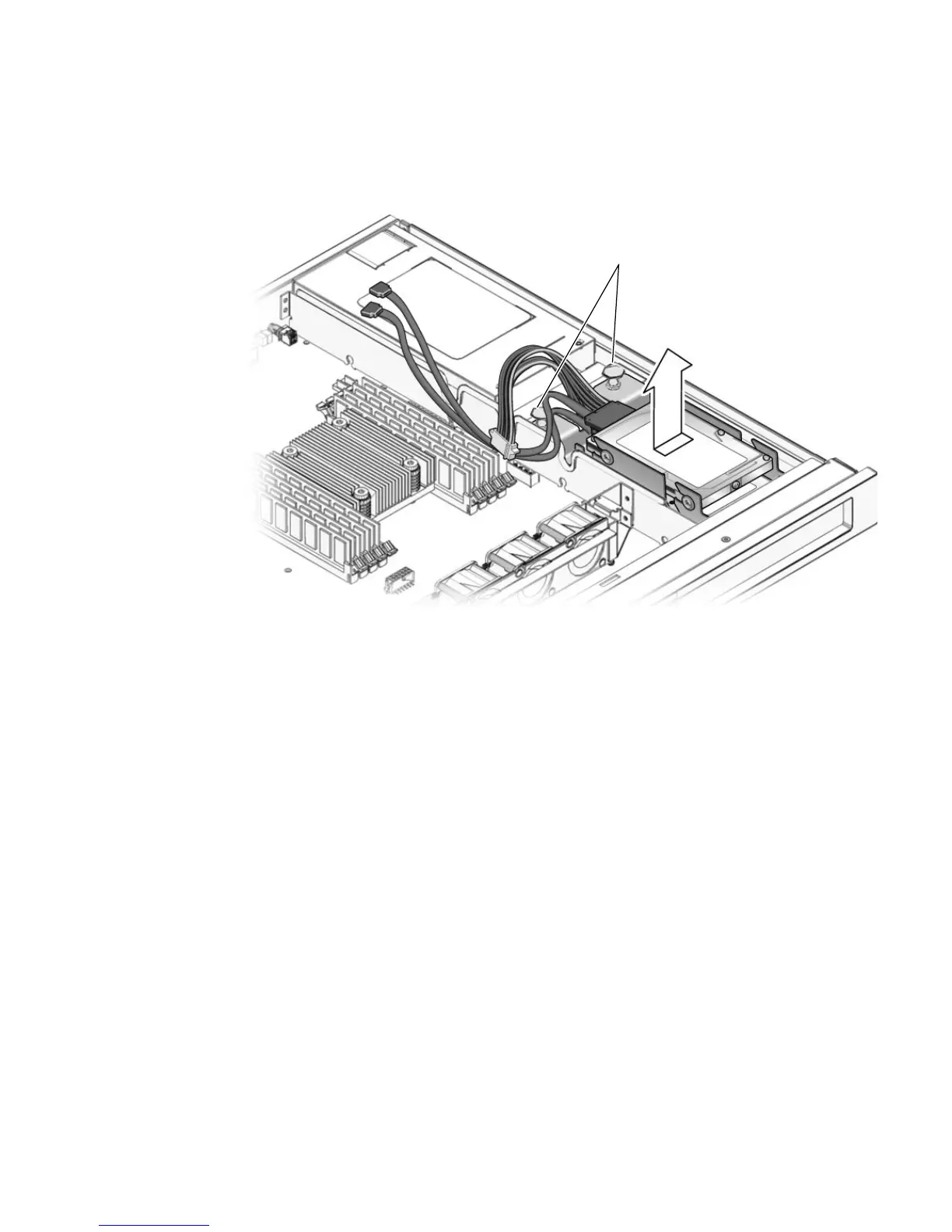
3. Pull the fasteners up on the rear of the dual-drive assembly and remove the dual-
drive assembly from the chassis (
FIGURE 5-9).
FIGURE 5-9 Removing the Dual-Drive Assembly
4. Determine which of the two hard drives you want to remove.
■ The upper drive (drive 1) is typically the data drive or mirror drive.
■ The lower drive (drive 0) is typically the boot drive.
5. Remove the drive from the drive bracket.
If you are removing the lower drive, you must first remove the upper drive before
you can remove the lower drive.
■ To remove the upper drive (drive 1):
a. Disconnect the drive cable from the data/power connector on the upper drive.
b. Push the drive toward the back of the drive bracket and lift the drive away
from the bracket.
■ To remove the lower drive (drive 0):
a. Disconnect the drive cable from the data/power connector on the lower drive.
b. Push the drive toward the back of the drive bracket and lift the drive away
from the bracket.
Fasteners













 To Next Page