Chapter 5 Replacing Field-Replaceable Units 5-15
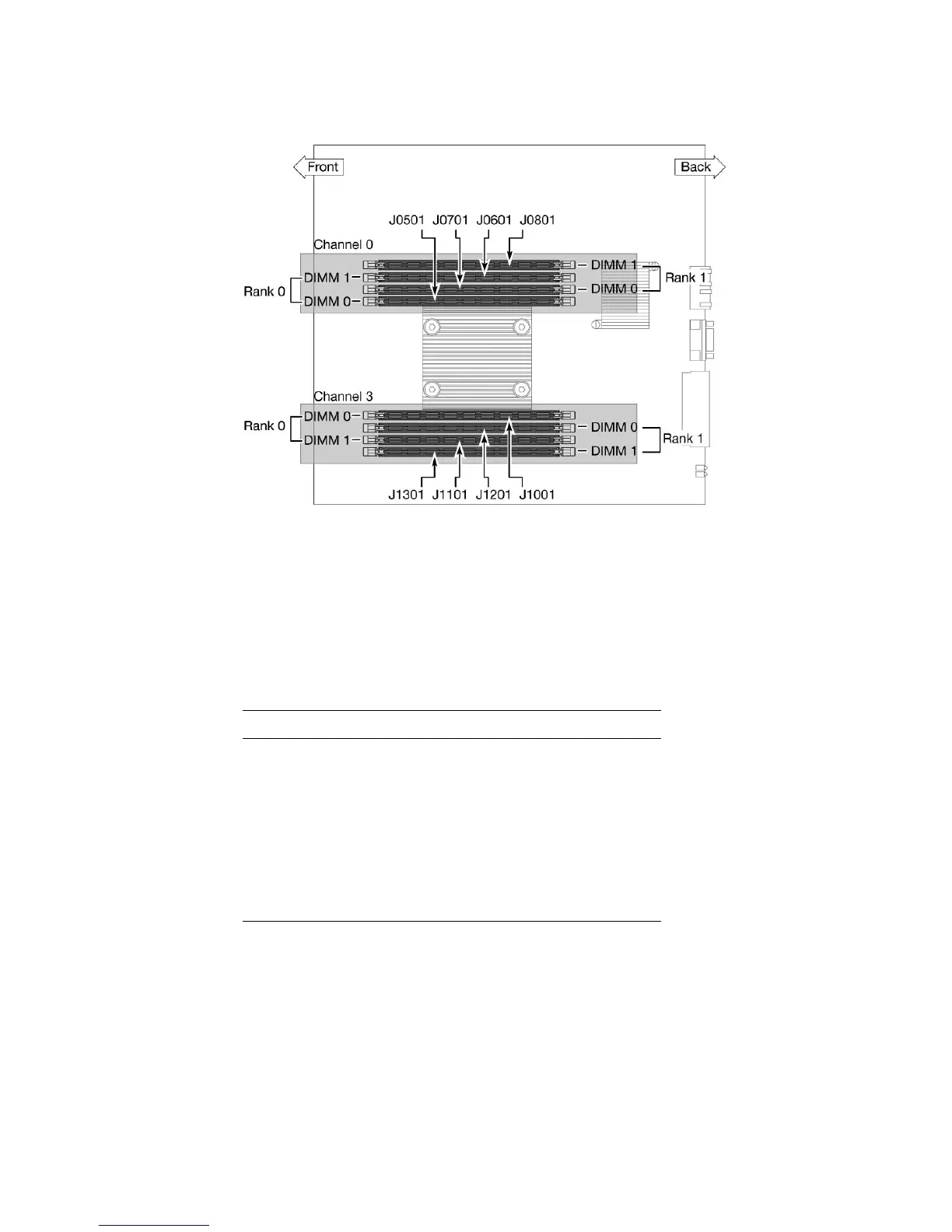
FIGURE 5-11 DIMM Locations
TABLE 5-1 maps the DIMM names that are displayed in faults to the socket numbers
that identify the location of the DIMM on the motherboard. The
Channel/Rank/DIMM locations (for example, CH0/R0/D0) are silkscreened on the
board and on a label near the board.
* DIMM names in messages are displayed with the full name, such as MB/CMP0/CH0/R1/D1, but this table
lists the DIMM name with the preceding MB/CMP0 omitted for clarity.
3. Note the DIMM location so that you can install the replacement DIMM in the
same socket.
4. Push down on the ejector levers on each side of the DIMM until the DIMM is
released.
TABLE 5-1 DIMM Names and Socket Numbers
Socket Number DIMM Name Used in Messages*
J0501
J0601
J0701
J0801
J1001
J1101
J1201
J1301
CH0/R0/D0
CH0/R0/D1
CH0/R1/D0
CH0/R1/D1
CH3/R0/D0
CH3/R0/D1
CH3/R1/D0
CH3/R1/D1












 To Next Page