Questions? Call or Text +1-801-658-0015 • 27
e Micro Welder Experts
ALARMS
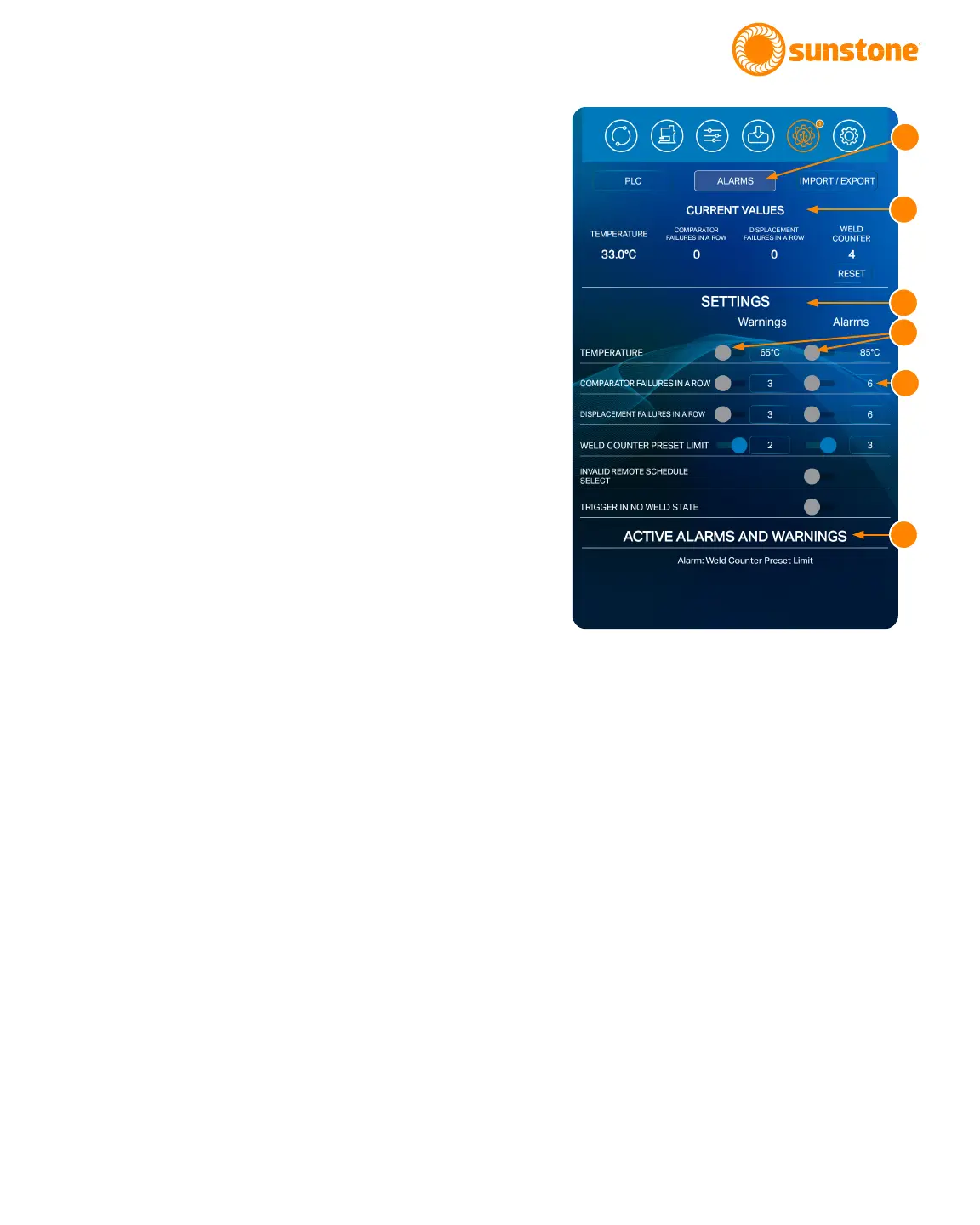
To access the Pico alarms control panel, press the
Alarms Button (A) in the Communications Screen, as
shown in Figure 27.1. The Alarms control panel will
display certain power supply statuses, active warnings,
active alarms, and other alarm-related settings.
The top portion of the screen displays Current Val-
ues (B) for temperature, comparator failures in a row,
displacement failures in a row and weld count. The weld
count can be reset by pressing the Reset Button below
the displayed weld count number.
The Settings portion of the screen (C) can be used to
enable or disable the listed alarms and set limits for
certain alarms/warnings.
The switch (D) next to each parameter toggles to blue
to enable, gray to disable.
The following alarms are enabled by default:
• Part Check Failed
• Trigger in No Weld State
• Wrong Trigger Detected.
The bottom portion of the screen will show a list of
active alarms and warnings (F). If there are more active
alarms and warning than can be displayed at one time,
you’ll be able to scroll up and down to see all the dier-
ent warnings and alarms.
To set and activate a warning or alarm:
• Find the setting for which you wish to set a
warning or alarm.
• Press the round switch (D) or warning or alarm
next to the setting. The switch will be gray if
the warning or alarm is already o; blue if the
warning or alarm is already on.
• Enter a warning or alarm value. Touch the box
(E) in the Warnings or Alarms column on the
same row for the setting you wish to activate. A
pop-up box will appear: Enter the desired value.
Whenever that value is reached during opera-
tion, a warning or alarm message will appear.
Figure 27.1. The Pico alarms control panel will display
certain power supply statuses, active warnings, active
alarms, and other alarm-related settings.
A
B
C
D
E
F















 To Next Page