rev. 08.15.2006.
3-18
3. Operating Instructions
3.1. Controls and Indicators
The ST-LAB Torque Tester Control Unit has operator controls and indicators necessary for torque testing functions.
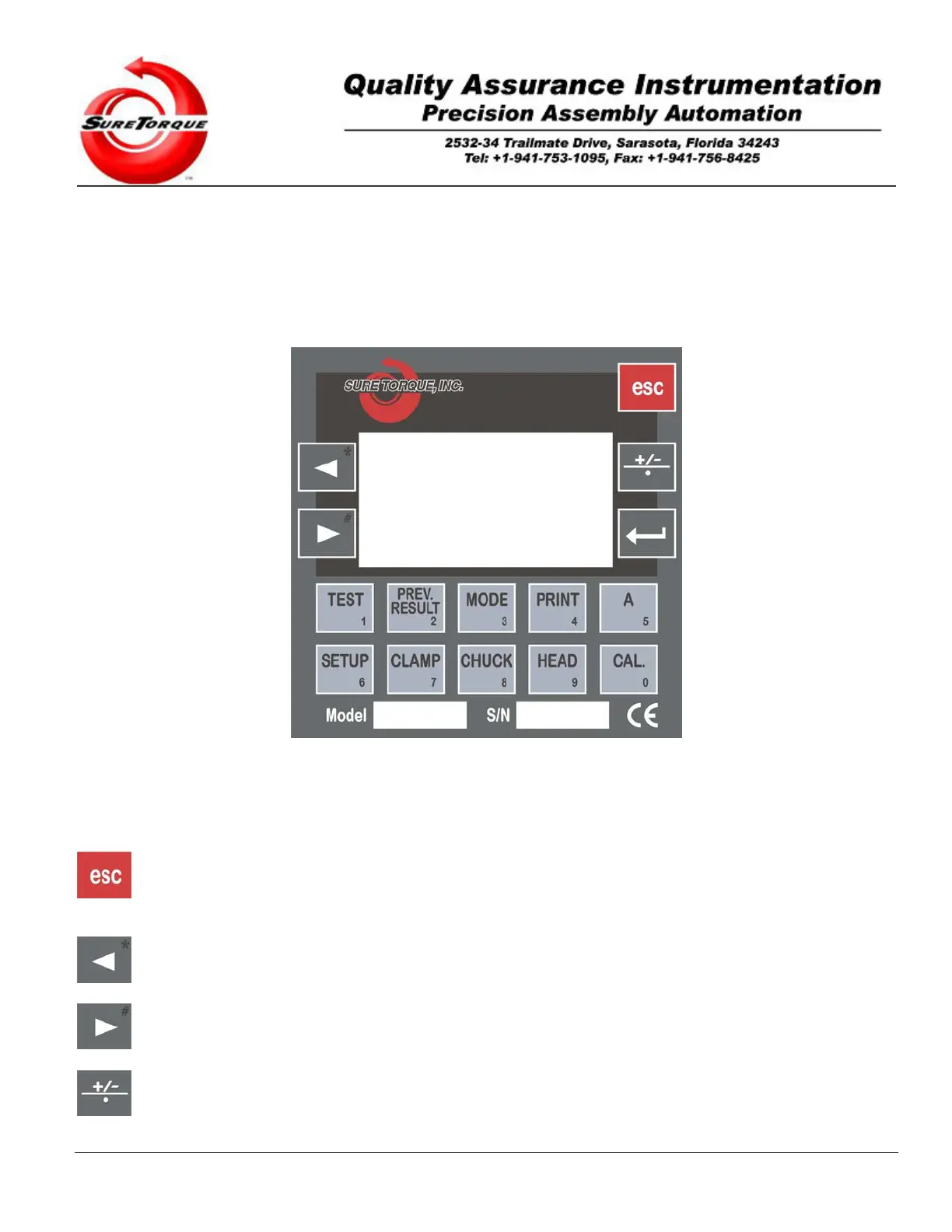
Refer to Figure 3-1, ST-LAB Controls and Indicators, for a drawing of all operator’s controls and indicators, listing their
types and functions.
Figure 3-1, ST-LAB Controls and Indicators.
There are 15 push-button switches available to the user to operate the ST-LAB Sure Torque Control Unit. They are
used as “Soft Keys”; that is to say, their functions depend on the operational test mode in use.
- This button is used to go back to the previous screen (on screens without edit fields), go forward to the next
screen (on screens with edit fields), or stop the machine and go back to the mode screen in which the operator
actuated the last test (while measurement is in progress).
- This button is used to navigate within edit fields/menu points and mode screens. In Manual Mode it is used to
decrease the torque, and on the historical screens it may be used to navigate between the records.
- This button is used to navigate within edit fields/menu points and mode screens. In Manual Mode it is used to
increase the torque, and on the historical screens it may be used to navigate between the records.
- Toggles the topload application switch in Manual Mode, when the tester is equipped with the topload option.


 To Next Page