rev. 08.15.2006.
3-33
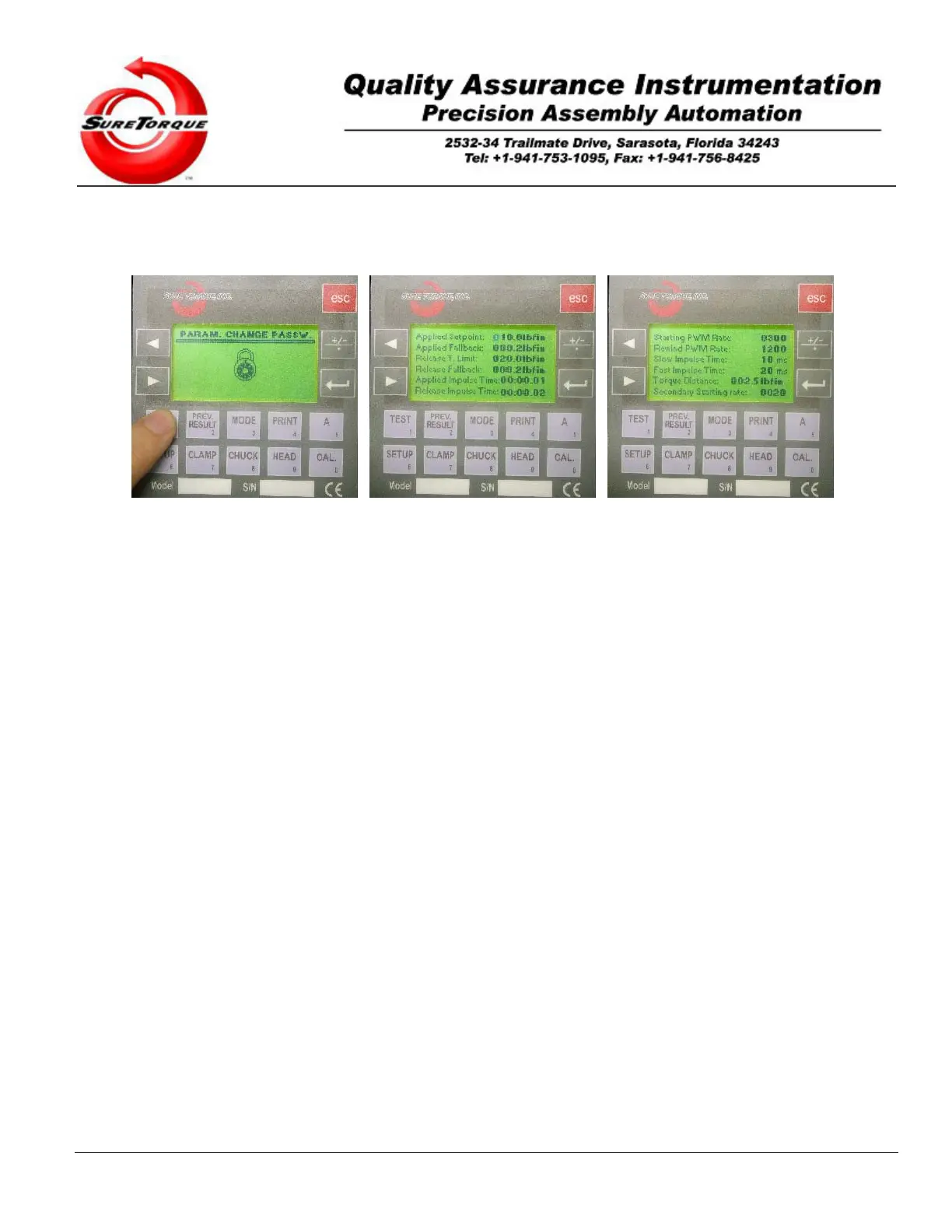
2. Type in the Password if the password protection feature is enabled (default password is 1112), then modify
the required values using the numeric keypad
3. Hit “ENTER” after you changed a variable.
4. Hit “ESC” if all the changes are made on the current screen, this will redirect to the next screen.
Change any values you wish and check the effect of that parameter change by running a test. There are some values
on these screens which was not discussed previously:
Applied Setpoint: This is the pre-define torque limit in application/on-torque modes. When the transducer senses the
Setpoint value in an application torque test, it will automatically turn off the torque, and then the completed screen
appears showing the torque actually applied on the container/closure.
Applied fallback: The applied fallback value is used to determine the end of the measurement cycle after reaching a
peak torque. If the torque decreases by the fallback value from the peak torque, the torque tester will finish the actual
test and show the torque value where the fallback was sensed on the completed screen. The fallback directly affects
the sensitivity of the measurement. The applied fallback value is only used in strip mode to determine the strip torque.
Release Torque Limit: This is the pre-define torque limit in release/off-torque modes. When the transducer senses
the Torque limit value in a release torque test, it will automatically turn off the torque application, showing a message
that the release torque was not sensed in the pre-define torque limit. It is the best to set this number 2 times of the
expected release torque, or to 999.9 when the expected release torque is not known. Lowering this value may be
used for undestructive release torque testing. This method is used to test if there is a release torque up to the release
torque limit. This mode may be used for closure quality testing. For example, when a capper is known to undershoot
the torque Setpoint, this method may be used for fast quality control, to see whether or not a closure was satisfying
only the low limit requirement.
Release fallback: The release fallback value is used to determine the end of the measurement cycle after reaching a
peak torque. If the torque decreases by the fallback value from the peak torque, the torque tester will finish the actual
test and show the torque value where the fallback was sensed on the completed screen. The fallback directly affects
the sensitivity of the measurement. The release fallback value is used in all the off torque modes to determine the
initial, the highest or the local release torque values.
Note: On any mode screens or completed screens the same test may be initiated by pushing the START button(s).
The Prev. Result button may be used to get in to the historical screens, when this feature is unlocked. The ESC
button may be used to go to the main navigation screen, or while a test is running it will reset the torque tester.
3.3.3.2. Applied Mode
This is the test method used to tighten a closure precisely on a container. The mode screen displays the torque
that the torque tester will apply, this torque value called the applied setpoint. The applied impulse time, the decay time
(effective only when the decay feature is enabled) and other variables affecting the test are shown on this screen.
Set the desired applied torque value by entering it in the “Parameter change” menu (Press “ENTER” (type in the
password- if this feature is enabled) and then use the numeric keypad to configure the desired values). Each time you
change a value you have to hit the “ENTER” button to accept the changes. If all the values are configured on the


 To Next Page