rev. 08.15.2006.
3-29
in the middle of the pulley. Pull the pin on the pulley then. Wrap the wire around pulley at least 180
degrees and hang it over the appropriate roller; now put the pin back in. If you hang the wire over the right
hand side roller, you test the machine for release; if over the left hand side roller, you test for applied.
9. Hang the desired weight on the end of the wire. Be sure not to drop the weight and shock the testing head.
10. If the reading on the display is within the ±1% range of the torque (the radius of the pulley multiplied by the
weight), the torque tester meets the calibration requirements.
Pressing the “Esc” button will terminate the calibration mode and return to the previous sub-menu.
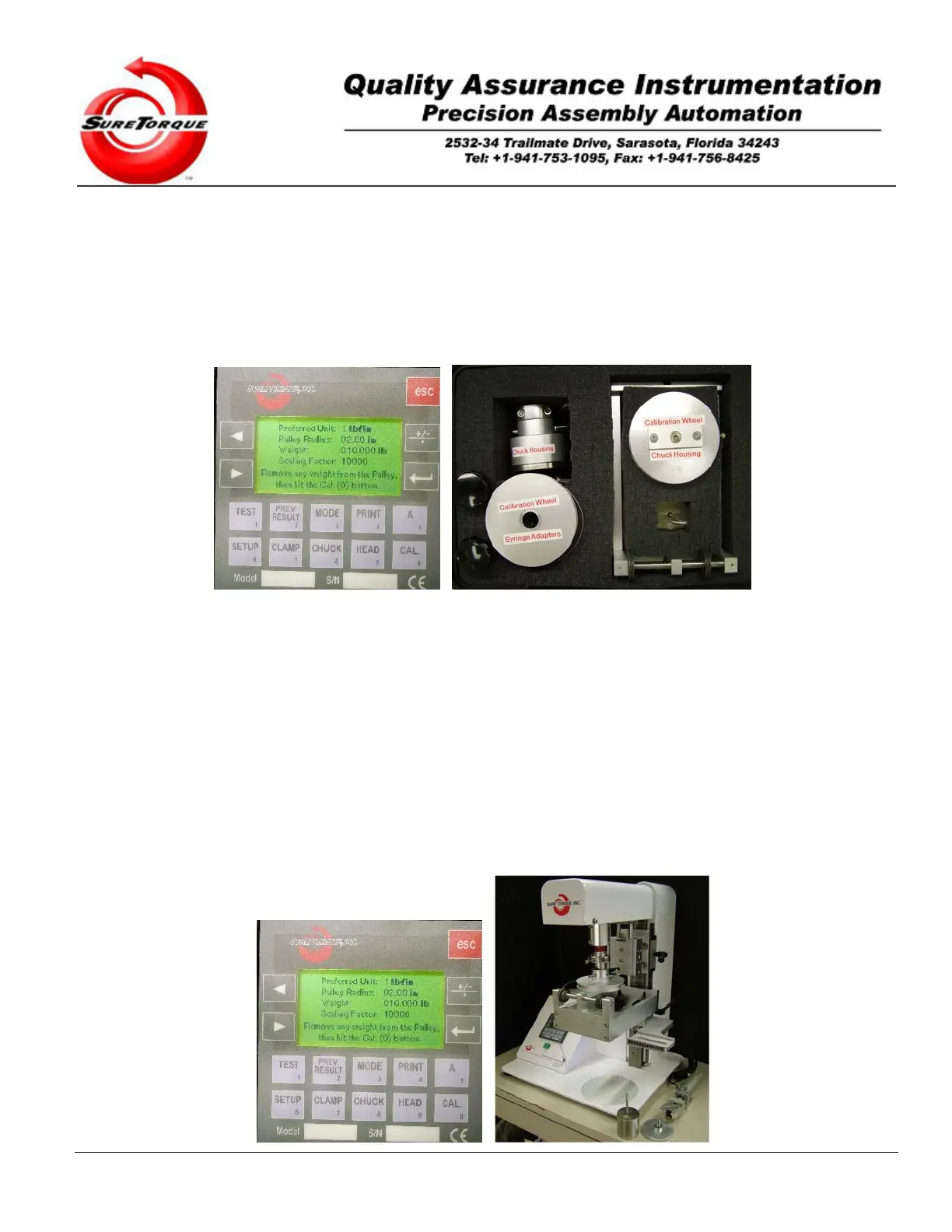
If you need to recalibrate your machine, press the “ENTER” button to enter the recalibration mode. You will get the
following display:
Calibration specific settings may be configured on this screen. The unit system of the torque tester is selectable,
on customer request we also provide other settings than the one has been already implemented. The list of
measurement units:
0: ozfin
1: lbfin
2: lbfft
3: kgfcm
4: kgfm
5: Ncm
6: dNm
7: Nm
The units best fit for most of the applications are the lbfin in imperial/US unit system, and dNm in SI unit system.
Change or keep the configuration of the pulley radius and the weight by the numeric keypad, change or leave your
preferred unit system and the “ENTER” key. When the cursor is not blinking anymore (you entered all the necessary
variables. You may start the calibration procedure.


 To Next Page