28 A-96.250.761 / 161017
AMI INSPECTOR pH
Operation
5.4. Changing Parameters and values
Changing
parameters
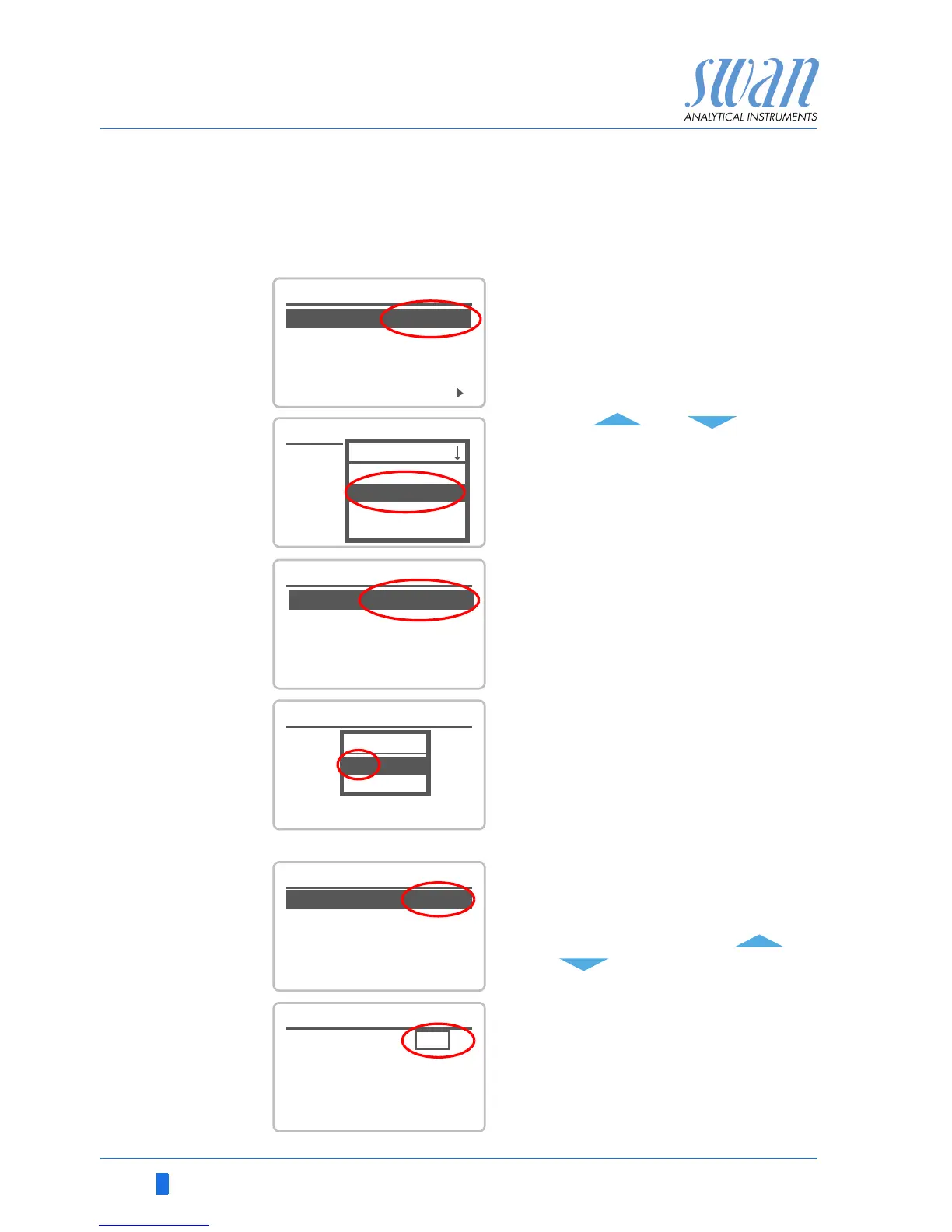
The following example shows how to change the logger interval:
Changing
values
1 Select the parameter you want to
change.
2 Press <Enter>
3 Press < > or< > to high-
light the required parameter.
4 Press <Enter> to confirm the se-
lection or <Exit> to keep the previ-
ous parameter).
The selected parameter is
highlighted (but not saved yet).
5 Press <Exit>.
Yes is highlighted.
6 Press <Enter> to save the new pa-
rameter.
The system reboots, the new
parameter is set.
1 Select the value you want to
change.
2 Press <Enter>.
3 Set required value with < >
or< >.
4 Press <Enter> to confirm the new
value.
5 Press <Exit>.
Yes is highlighted.
6 Press <Enter> to save the new val-
ue.



 To Next Page