46 A-96.250.341 / 061015
AMI Powercon
Maintenance
7 Open and adjust the sample flow.
8 Pre-rinse the new cation exchanger resin until the display
shows stable measuring values.
with pre-rinse
option
Step 1 to 3 same procedure as on “without pre.rinse option”:
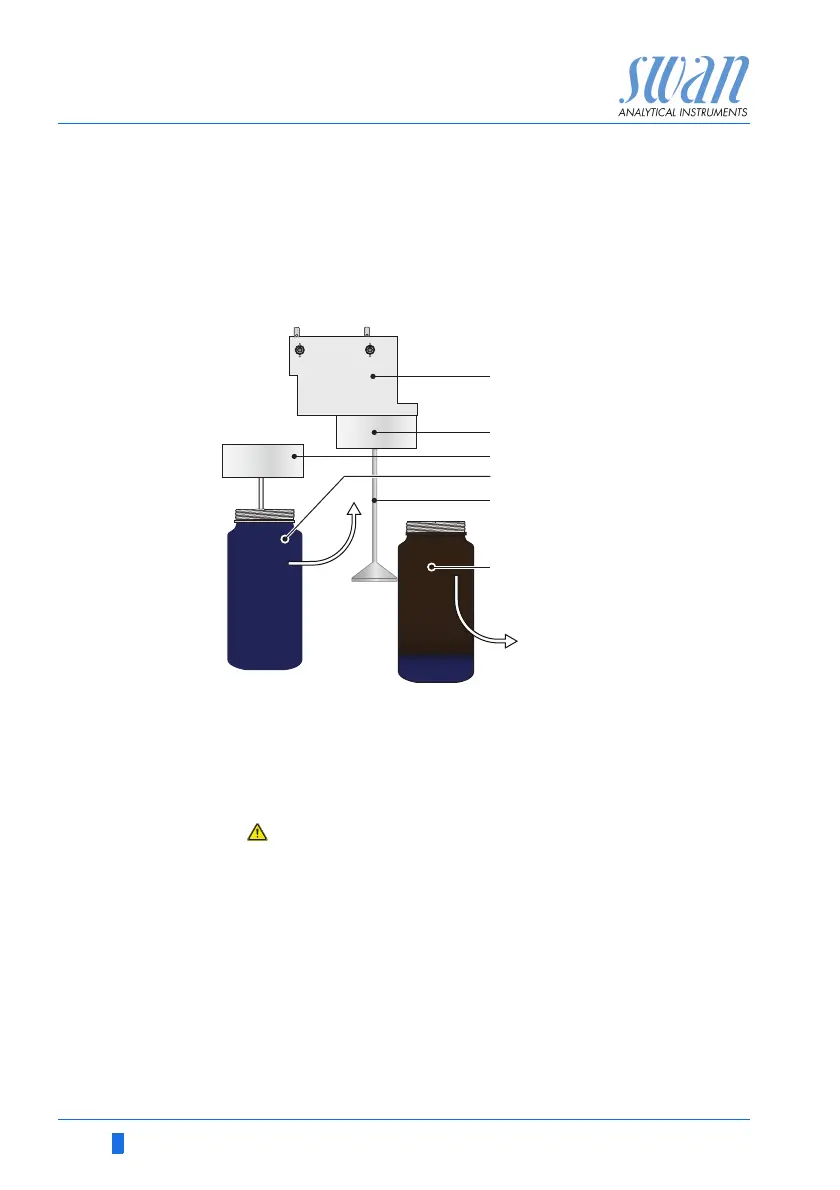
1 Unscrew and carefully remove the pre-rinsed cation exchanger
bottle [D] from the pre-rinse holder [C].
2 Carefully, without spilling water, push the cation exchanger bot-
tle [D] over the inlet filter holder [E] into the bottle holder [B].
3 Screw the cation exchanger bottle into the bottle holder.
Do not tighten the bottle too firmly, this could damage the
gasket.
4 Install a new bottle with fresh, unused resin into the pre-rinse
bottle holder [C].
The new cation exchanger resin will be pre-rinsed and ready
for use if the next exchange is necessary.
A
B
C
D
E
F
Flow cell
Bottle holder
Pre-rinse bottle holder
Pre-rinsed cation
exchanger bottle
Inlet filter holder
Exhausted cation
exchanger bottle



 To Next Page