EN-26
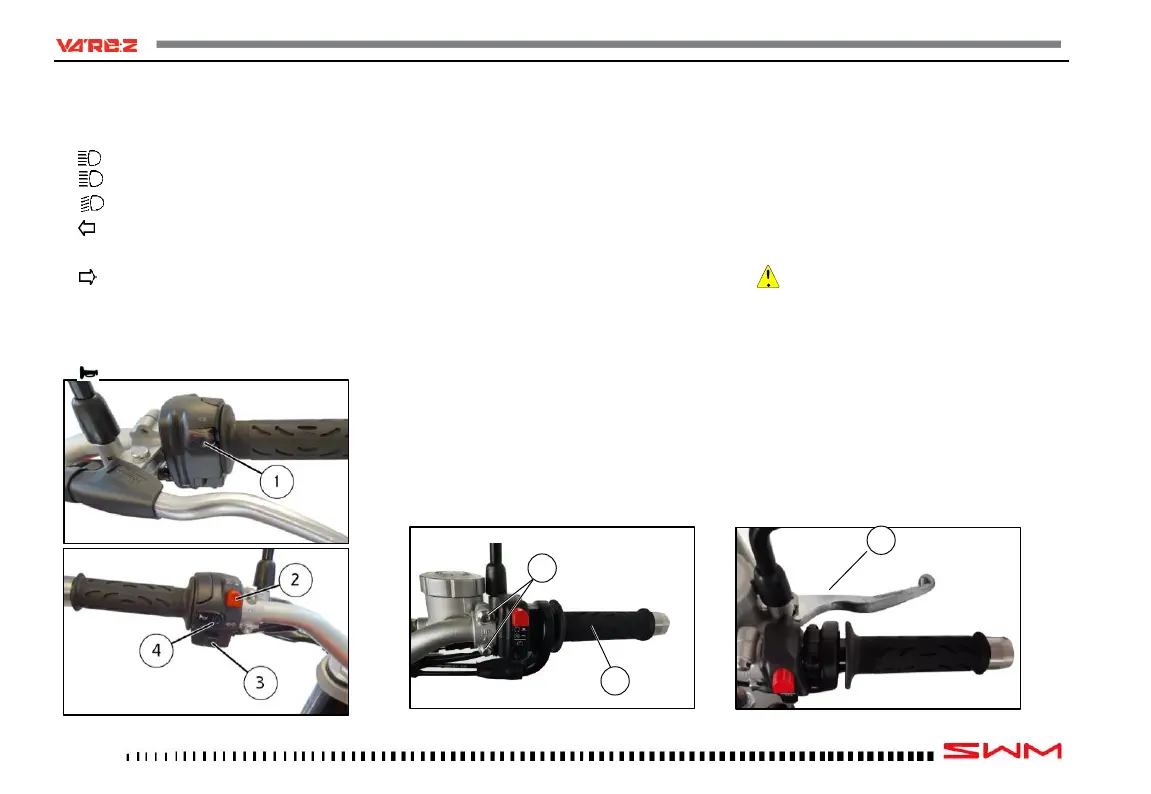
LH HANDLEBAR SWITCH
The left-hand switch features the following con-
trols:
1) High beam flasher (self-cancelling).
2) High beam.
Low beam.
3) Left-hand turning indicators (self-cancel-
ling).
Right-hand turning indicators (self-can-
celling).
To deactivate the turning indicators, press the
control lever after it is returned to the center.
4) Warning horn.
THROTTLE CONTROL
The throttle twistgrip (1) is located on the right-
hand side of the handlebar.
FRONT BRAKE CONTROL
The brake control lever (2) is located on the right-
hand side of the handlebar. A stop switch, during
the braking action, causes the stop light on the tail
light to come on. The control position can be ad-
justed by loosening the two retaining screws (3).
CAUTION
Do not forget to tighten the screws (3) after the
adjustment


 To Next Page