19
6. OPC/UA SERVER
OPC UA is a communication protocol for the automation industry using an Ethernet port. It is the most flexible
automation solution supported by the Scan (e.g. access to the details of a measurement result).
Note that the Scan only supports the binary protocol opc.tcp.
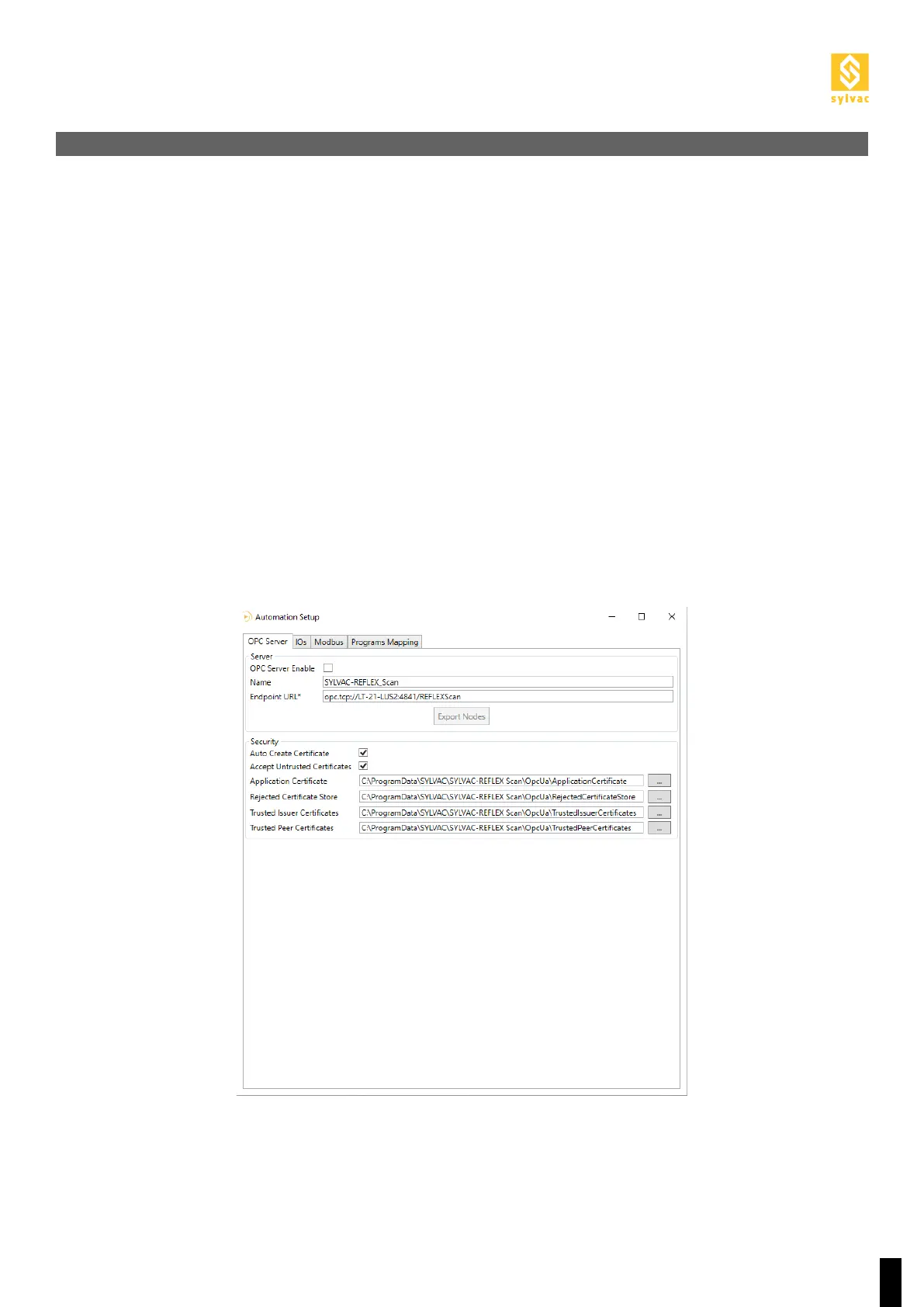
The first time you use it, you must activate the OPC Server to be able to use the protocol.
Go to the Setup of the “Automation” plugin using the “Service->Plugin->Automation->Setup” menu and check
OPC Server Enable in the OPC Server tab.
If you are not using OPC/UA, OPC Server Enable must be unchecked.
To check the status of the OPC Server, go to Diagnostics of the “Automation” plugin using the “Service->Plu-
gin->Automation->Diagnostic” menu and check the status of the OPC Server in the drop-down window at the
bottom of the OPC Server tab.
To change the URL of the OPC Server, go to the Setup of the “Automation” plugin using the “Service->Plu-
gin->Automation->Setup” menu and to Endpoint URL in the OPC Server tab.
Note that the address of the Automation Ethernet port on the PC where ReflexScan is installed must be the same.
6.1 Configuration



 To Next Page