Deployment Solution 489
Pocket PC
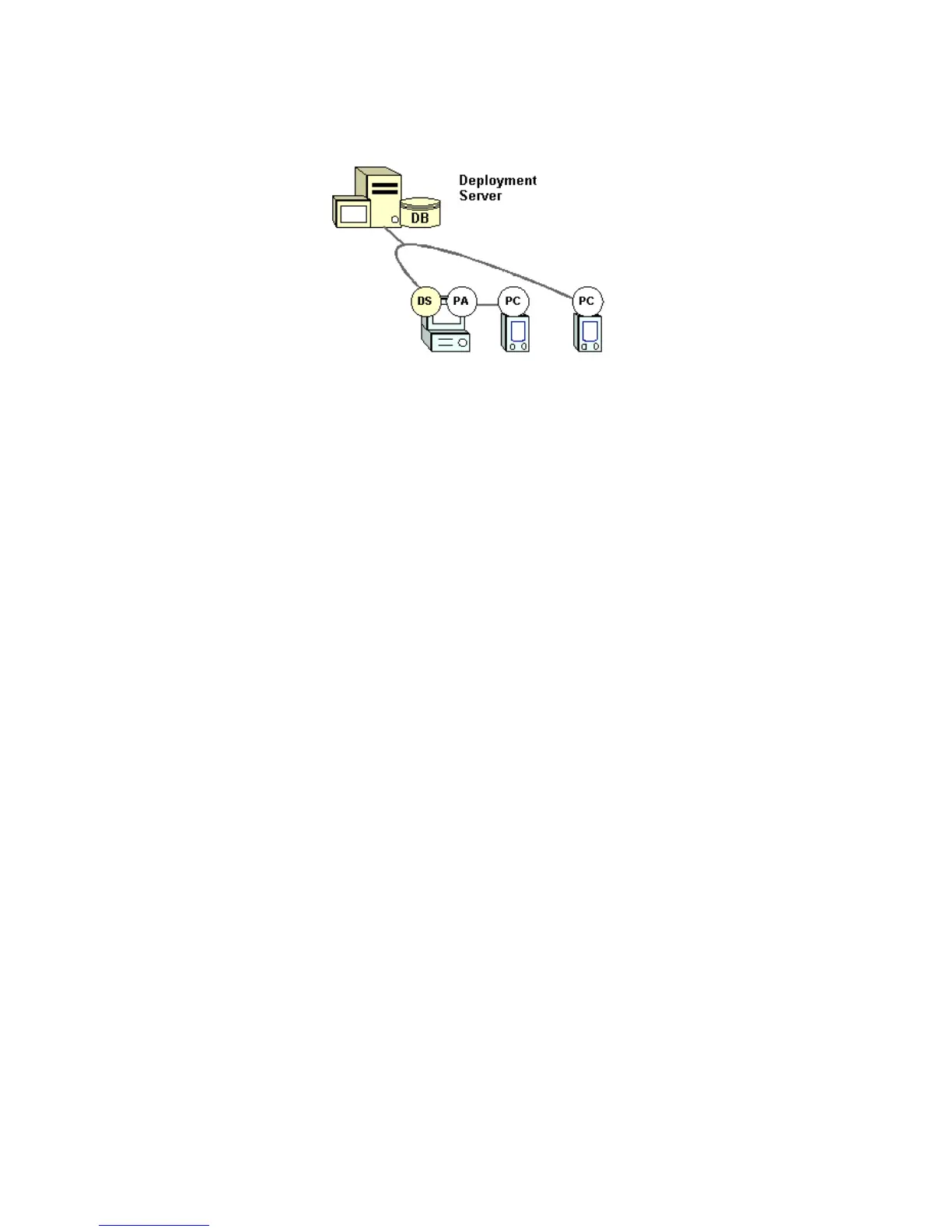
The Deployment Agent for Pocket PC (PA) runs on the host computer, which itself is a managed computer
running the Deployment Agent (DS). The Deployment Agent for Pocket PC automatically installs the
Deployment Client for Pocket PC (PC). You can also install the Deployment Client for Pocket PC directly
to the handheld by installing the required CAB files.
Install a Pocket PC Agent from the Deployment Console
When installing a handheld running the Pocket PC operating system, you can attach to a host computer and
run Microsoft ActiveSync software to synchronize data between the host computer and the handheld.
Deployment Solution lets you install Deployment Agents on both the host computer and the handheld to
communicate with Deployment Server as a managed computer.
The Altiris
Pocket PC Agent is software that runs on the host computer. This agent communicates through
the handheld’s cradle to the
Pocket PC Client running on the handheld. The Pocket PC Agent also
automatically installs Pocket PC Client on the handheld. The Pocket PC Agent provides communication
between the Pocket PC Client on the handheld and the Deployment Server. ActiveSync is required for the
Pocket PC Agent because it provides the IP stack the Pocket PC Agent uses to communicate with the
handheld.
The Pocket PC Agent monitors the connect and disconnect jobs sent to the handheld. If the Pocket PC Client
on the handheld is present but not started, then the agent will start it. The Pocket PC Agent also acts as a
relay agent to transfer data from the Pocket PC Client on the handheld to the Deployment Server.
From a Deployment console, you can schedule and run a Sample job to install the Pocket PC Agent on a
host computer. Ensure that the handheld is connected to the host computer and seated in the cradle. You
must also download Microsoft ActiveSync™ and install it (this is free software available on the Microsoft
web site) on the host computer. Then synchronize the host computer with the handheld.
To install from a Deployment console
Use Deployment Solution to find computers with ActiveSync and run deployment jobs to automatically
copy the necessary files and install the Deployment PPC Agent and PPC Client.
1 From a Deployment console, in the
Jobs pane open the Samples > Pocket PC folder.
2 Click the
Install Altiris Pocket PC job and then select the Active Sync computer condition in the Condition
box in the
Details pane.
3Drag the
Install Altiris Pocket PC job to the host computer. If you are using a Web console, then assign
using web features.
4 Schedule the job.
After the Pocket PC Agent has installed, the Altiris Pocket PC Agent icon will appear in the system tray
of the host computer.
When the Deployment Agent is initialized, it will connect to the handheld. The agent will check if the
Altiris Pocket PC Client is installed on the handheld. If not, the agent will automatically install it.




 To Next Page