5 Priming / Initialization
5.1 Priming / Initialization process
There is a PRIME mode available as a Start Up process for the device. This process
includes cleaning and filling tubes with Sheath Fluid. If a new original CFG-file will be
loaded the PRIME mode is always selected. User defined configuration files can start in
PRIME or WORK mode, depend on the status during saving.
In the following cases the PRIME mode should be performed:
• Starting the instrument for the first time → Daily initialization
• After the Sheath Fluid bottle was filled
• As trouble shooting procedure (no/bad signals, blocking, etc.)
To start the priming process, please follow the instructions below:
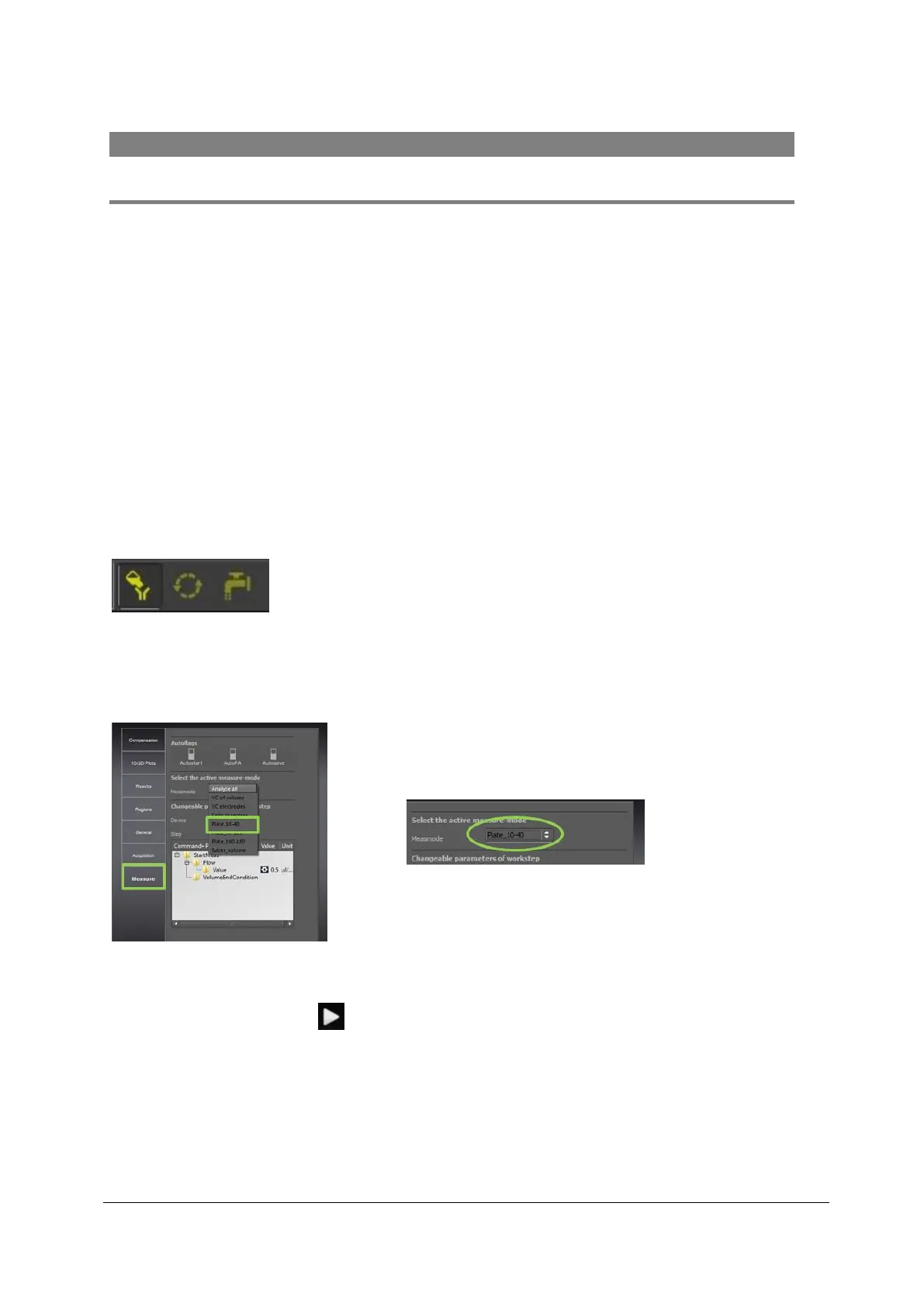
1. Open a configuration file and select the initialization modus by clicking on the
Initialization button. Please notice that in all Partec Master Cfg-file the Prime mode
is preset.
Figure 3: “PRIME” button (bright highlighted), “WORK” button and “CLEAN” button
2. Choose an Automate Measure mode to include the Automate in the Initialization
process.
Figure 4: Go to “Measure” tab and choose the measure mode “Plate_10-40” (Example)
3. After pressing Start the system will start the priming process automatically and
guide through the program.



 To Next Page