6 Measurement with the Autoloading Station
CyFlow
™
Robby 6 Autoloading Station | Operating Manual | September 2020 | Revision 002
Figure 9. Please insert a tray
Figure 10. Please change tray or tray
layout
Figure 11. Select applicable tray
layout
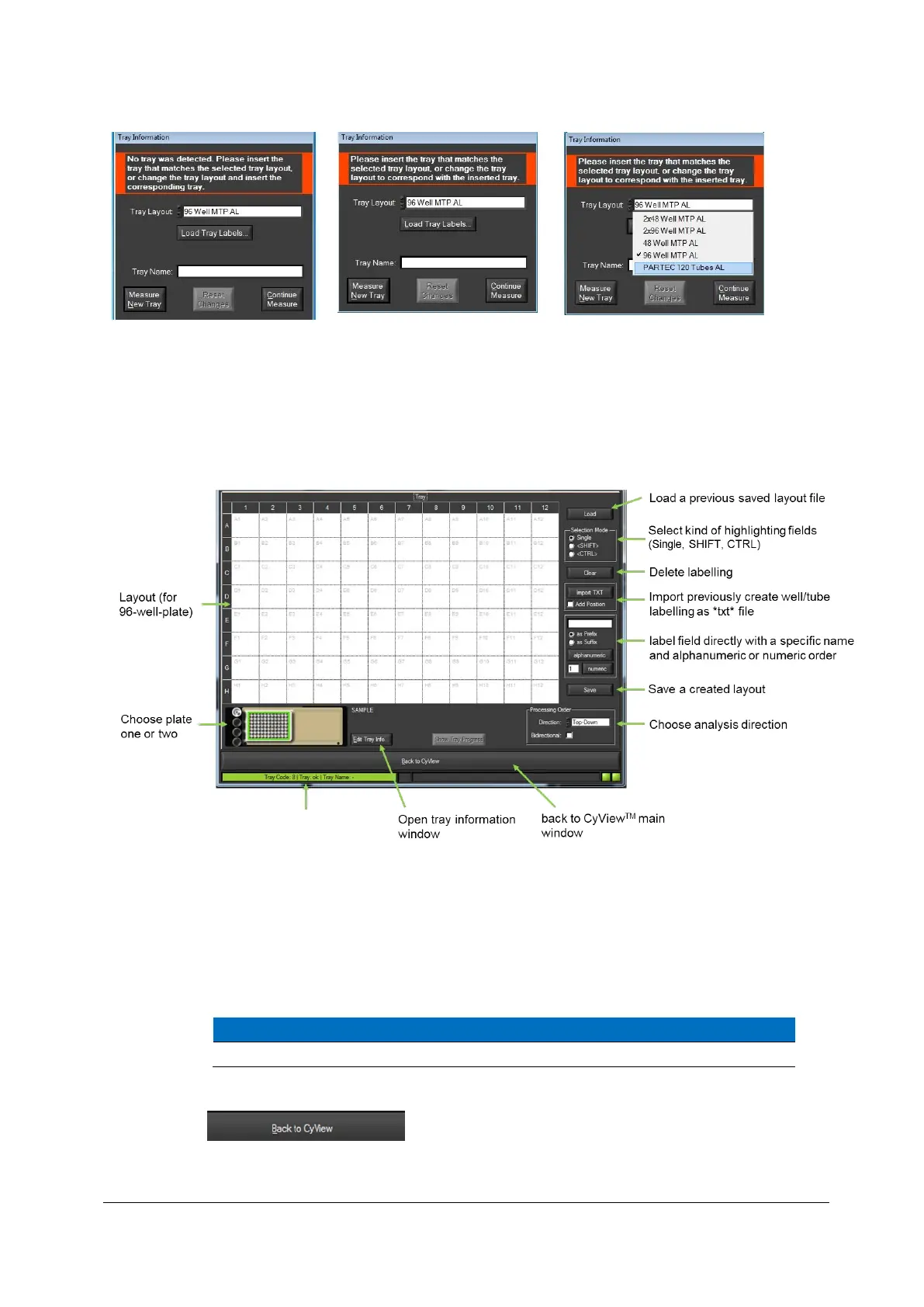
13. The layout editor will open (layout format depends on selected tray format: 96-well or
tubes (see below)), to define the position of samples and the names the individual
samples in a 96-well plate or the tube rack.
Figure 12: Layout Editor overview
14. In order to highlight a certain well (or tube) and label it for analysis simply double-click
into the respective well and type in a desired sample name followed by “Enter”. In this
way, all tray positions containing an actual sample should be labelled.
All tray positions without a given name will not be analysed!
15. After selecting the tray position and the labelling procedure, please click “Back to
CyView” .
Information whether inserted tray
matches selected layout
(Green = correct, Red = not correct)



 To Next Page