6.2 General Procedure
1. Open a configuration file .
2. Select a measure mode for the manual operation (for example “Analyze all” → go to
registry page “MEASURE” and selected the mode)
3. Connect a Sample Tube filled with 1 ml of sample to the manual sample port.
A distinct sound will occur, if the Sample Tube is inserted correctly.
4. Press “Start” → After the pre-run phase acquisition data will be displayed.
5. Optimize gain and threshold values and define regions if required.
6. When all instrument settings are optimized for your measurement press “Stop”.
7. Clean the sample port.
a) Connect a Sample Tube filled with 1.5 ml Cleaning Solution and press “CLEAN”
.
b) Repeat the procedure with 1.5 ml Sheath Fluid
8. Select the main registry page “Measure”. Within this window choose a measure mode
for the Autoloading Station.
9. Place the “Device” selection to “AL1” --> The different conditions of the measure-
modes are visible and speed and/or analysis volume are changeable.
10. Start the automate mode by pressing “Start” .
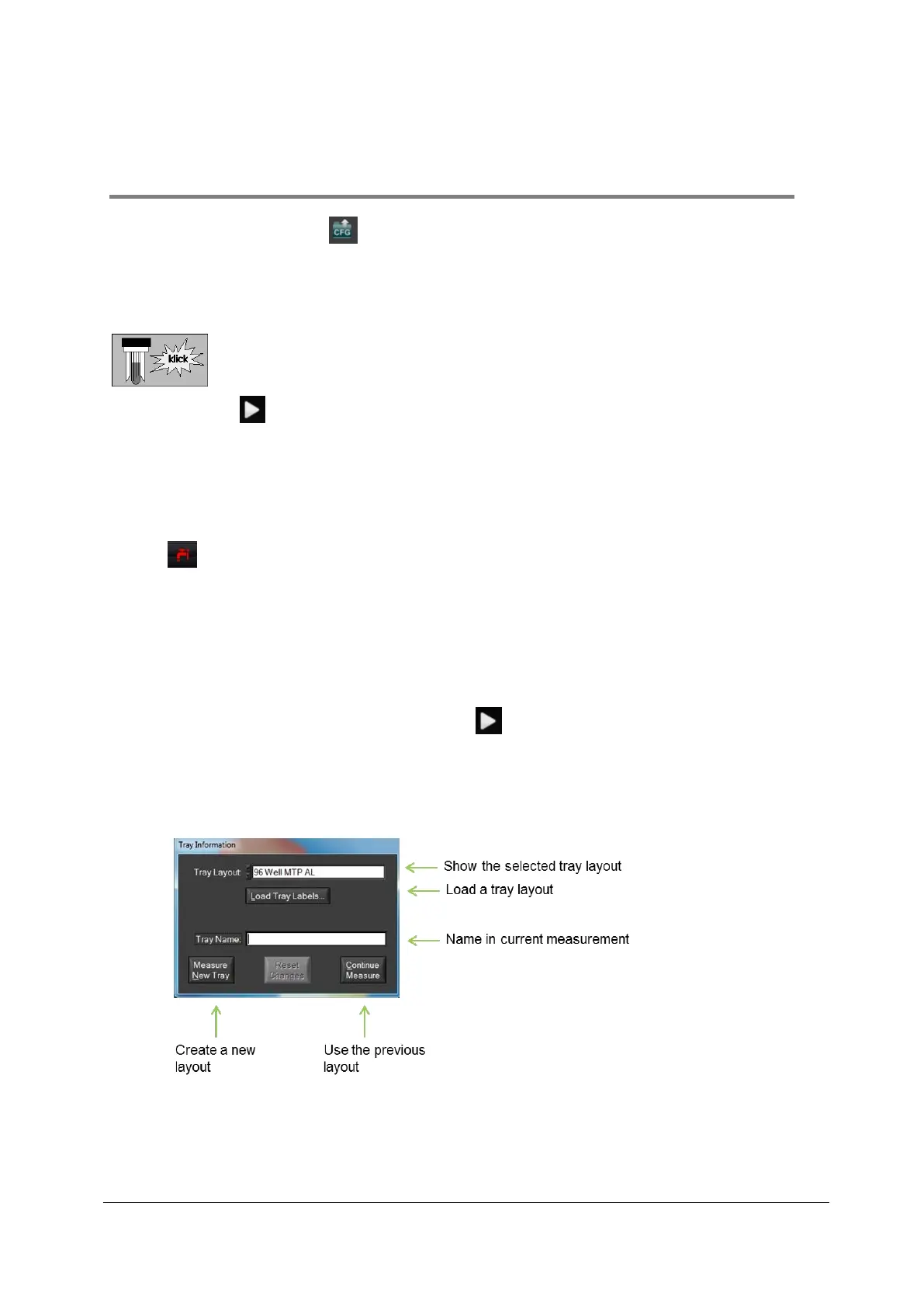
11. After the “Tray Information” window opens, type in a name for the tray to be analysed
and press “Measure New Tray”. If the window opens not directly, please check the
window bar.
12. The system recognizes if there is no tray or if the tray is not compatible to the selected
tray layout.



 To Next Page