1
PANEL DESCRIPTION
1.
A
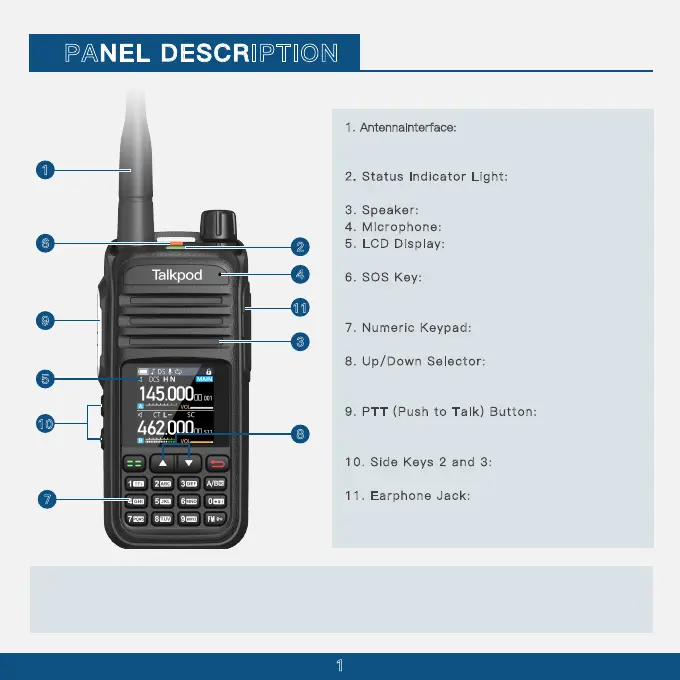
ntennaInterface: SMA antenna interface, used
for installing the provided antenna or other brand
antennas compatible with the SMA interface.
2. St atu s I ndic ato r L ight: Illuminates red during
transmission and green when a signal is received.
3. Sp eak er: Outputs sound.
4. Micro pho ne: Inputs sound.
5. LC D D isplay: Displays the operational status of
the walkie-talkie.
6. SO S K ey: Press and hold to initiate an SOS
emergency alert; a short press can be customized
for other functions.
7
. N ume ric Keyp ad: Used for entering frequencies
and functions.
8
. U p/D own Sele cto r: Adjusts the displayed
frequency, menu numbers, or menu content upward
or downward.
9
. P TT (P ush to Ta lk) But ton: Press the PTT
button to transmit; release it to return to receive
mode
10. Side Keys 2 and 3: Functions of these side
keys can be customized through the menu.
11. Earphon e J ack : Used for connecting an
external earphone; or to connect a programming
cable for programming and software updates via PC.
1
2
3
4
5
6
7
8
9
10
11
CAUTION:DONOT use the transceiver without the jack cover or the optional equipment attached.
The transceiver meets IP
5
6 requirements for dust-tight and waterproof protection only when the
jack cover or the specifed optional speaker microphone is attached.



 To Next Page