EDIT YOUR CHANNEL NAME
With the new built-in input method, you can now edit the name of your walkie-talkie as well as the
33
names of individual channels!
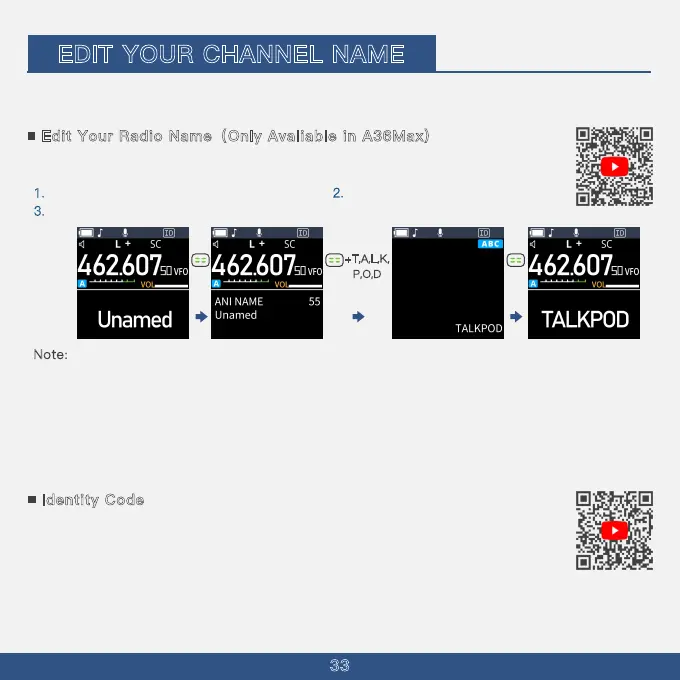
Example: Setting your walkie-talkie name to Talkpod
Edit Your Radio Name(
1. Press the Menu key and select menu 55
3
2. Press the Menu key and enter T, A,
L, K, P, O, D.
. Press the Menu key to save.
Only Avaliable in A36Max)
Note:
1 . When editing channel names, device names, etc., you can directly input information in both Chinese and
English.
2. Press the FM key to switch languages, cycling through Pinyin, lowercase English, uppercase English, and
numbers.
3. Using the numeric keypad, enter the letters of the Pinyin one by one. Use the up/down keys to select from
the suggested characters, press the [Menu] key to select, then use the up/down keys to choose the
corresponding character, and press the [Menu] key to confirm the input.
+T,A,L,K,
P,O,D
Identity Code
1. Set the device name through menu option 56. (Supports both Chinese and English)
2. Enable the Identity Code function through menu option 28. (An ID icon will appear at the top of
the screen)
3. Choose the on/off line code through menu option 29. (Select when to transmit the identity code)
- If the on/off line code function in menu option 29 is set to off, the Identity Code function will be disabled.
- When transmitting, the device name will be sent via signaling. Devices with the same protocol will receive
the name information, supporting both Chinese and English.



 To Next Page