FM Scan Function
1
2
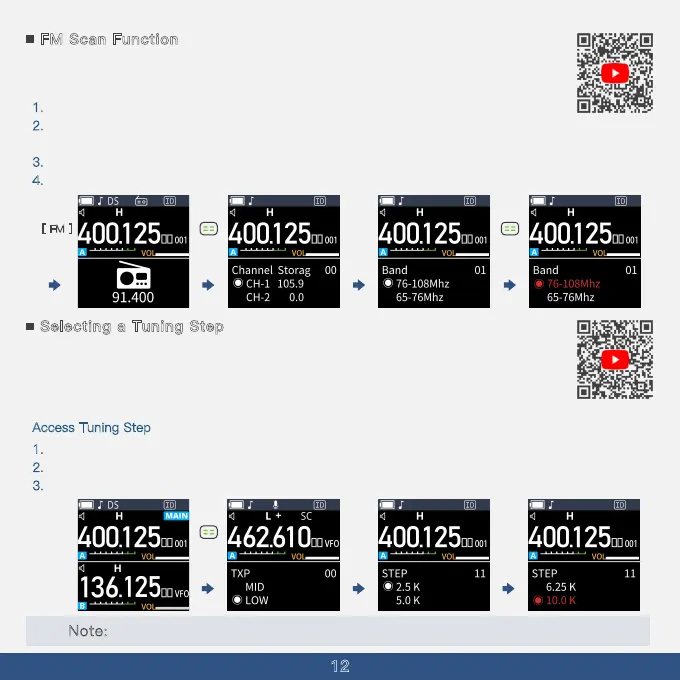
The A36Plus supports changing the FM frequency range for scanning, helping you find the
range you want.
1
. In standby mode, press the [FM Key] to enter Radio Mode.
2
. Press the [Menu] Key to Enter the FM Menu, which supports FM Scan Function and FM Channel
Save Function.
3
. Press the [UP] Key to the menu option to choose the Frequency Range.
4
. Press the Menu Button to choose The frequency Range.
[ FM ]
Selecting a Tuning Step
In VFO (Variable Frequency Oscillator) mode, selecting the appropriate tuning step is
crucial for precise frequency adjustments and effective scanning. The A36Plus provides a
variety of tuning steps to suit diverse communication needs, ensuring both flexibility and
precision.
A
ccess Tuni
ng Step
1. In VFO Mode, press the MENU button to access the MENU Page.
2
. Use the Up/Down Key to navigate to Menu Option 11.
3
. Use the MENU Key and UP/DOWN Key to select the tuning step you need.
Note: The selected tuning step will be applied to the VFO scan function.
Short
press
Short
press
Short
press



 To Next Page