SCANNING FUNCTION
Scanning is a versatile function that can automatically search for signals. A scan makes it easier to
locate stations to contact or listen to, or to skip unwanted channels or frequencies.
28
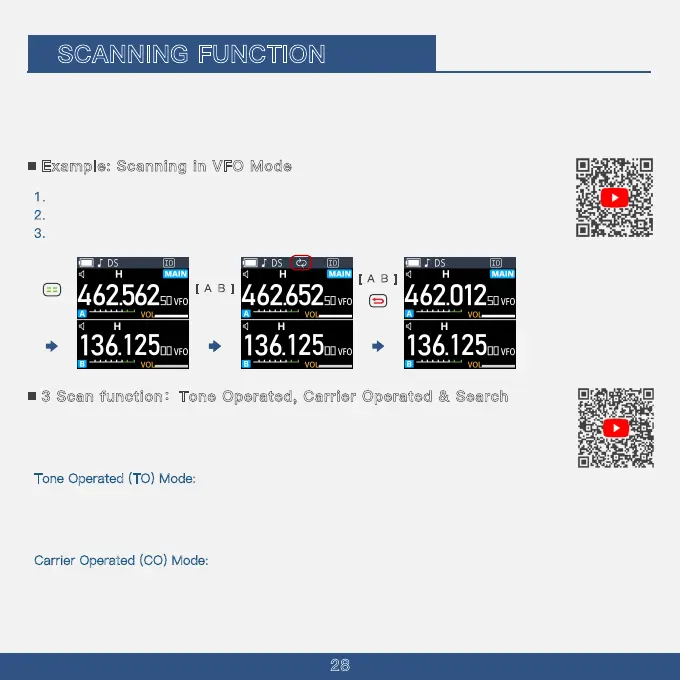
This section describes the basic scan operation. See the Advanced manual for details.
1
. Hold on MENU Key to select the VFO mode.
2
. Hold on the A/B button until you hear scanning begin to launch scanning.
3
. Hold on the A/B Button or press BACK Key to stop scanning.
Example: Scanning in VFO Mode
3 Scan function:Tone Operated, Carrier Operated & Search
Before using the scan function, you must first determine how the radio should continue
scanning after detecting a signal. You can choose one of the following modes:
T
one Operated (TO) Mode:
The radio stops scanning and remains on the same frequency when it detects a signal. After staying in
the stopped state for approximately 5 seconds, even if the signal is still present, the radio will
continue scanning.
Carrier Operated (CO) Mode:
The radio stops scanning and stays on the same frequency when it detects a signal. It will continue
scanning once the signal disappears. There is a 2-second delay between the signal disappearance
and the resumption of scanning to allow time for response transmission.
Long Press Long Press
[ A
B
]
[ A
B
]



 To Next Page