Introduction to S-Meter Display
The S-Meter display function indicates the strength and readability of the received signal.
By enabling this feature, users can get a more intuitive understanding of signal quality,
17
allowing for effective communication adjustments.
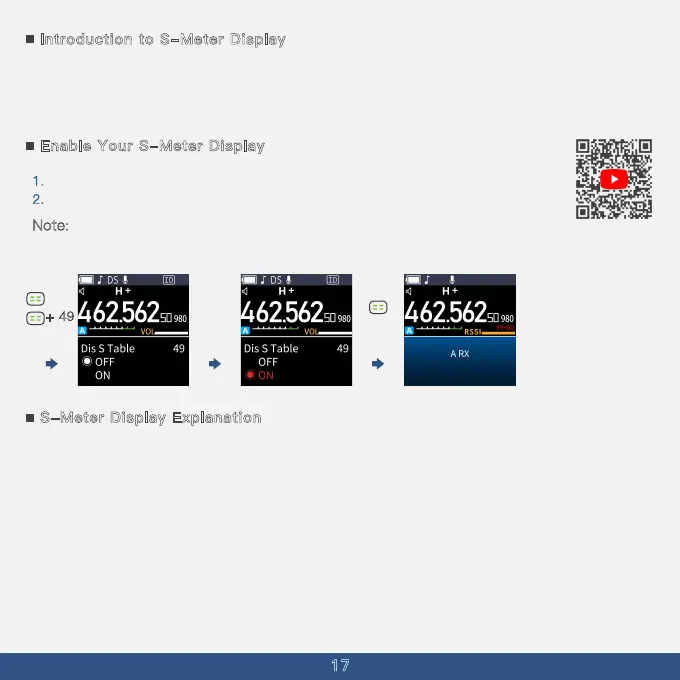
Enable Your S-Meter Display
1. Press the menu button and choose the menu option 49.
2
. Choose the ''ON'' to open the S-Meter Display
Note: When receiving a signal, if the signal report is greater than 59, ''S9+'' will be
displayed along with the specific dB value.
S-Meter Display Explanation
The S-Meter indicates the signal report of voice clarity and signal strength, with S9
representing very clear voice and very strong signal.
S9+20 or S9+60 indicates that the signal strength has reached S9 and exceeded by 20dB
or 60dB.
When relaying through a repeater, the received signal is generally constant, so the signal
report remains stable.
This signal report is for reference only.
By using the S-Meter display function, users can better assess the quality of
communication signals and make effective operational adjustments.
+ 49



 To Next Page