32
Super Mode
Under the state of power off, press and hold PTT and numeric button 9 at the same time,
turn on the power, and restart automatically after displaying SUPER MODE, then you can
enter the developer mode.
T
ips:
1
. Please observe the relevant laws and regulations, and you must replace the corresponding shortwave
antenna when using 18-30MHz.
2
. This mode only work in Talkpod A36Plus MAX
RESETTING
If the transceiver has a malfunction caused by an external factor such as static electricity, reset it using
the Partial Reset or All Reset function.
B
E CAREFUL! An All Reset clears all programming and returns all settings to the factory
defaults.
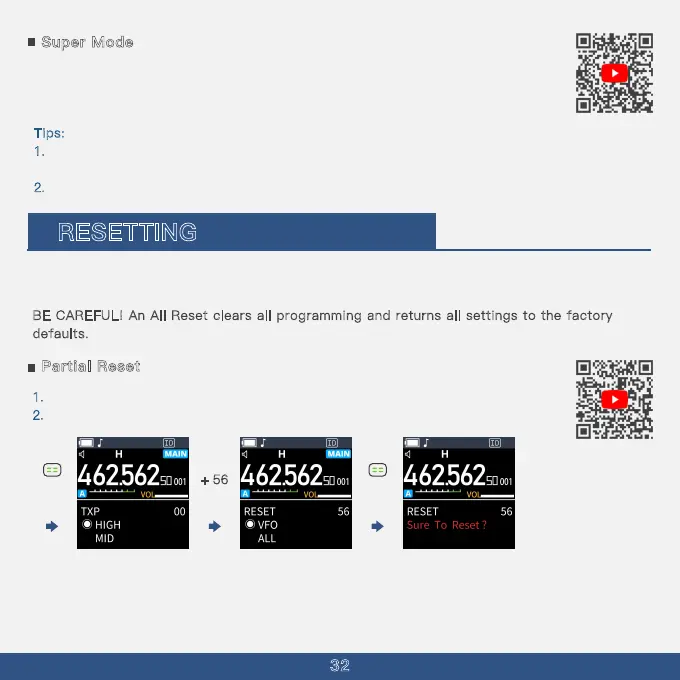
Partial Reset
1. Press The Menu Button
2
. Press The ''Up'' Key multiple times to select Menu Option 56
+ 56
Our Reset Function gives you VFO reset and All setting reset.
TIP: A Partial Reset resets the operating settings to their defaults without clearing the following:
·
Memory Channel contents
·
·
Call Channel contents
DTMF memory contents
·Scan Edge contents
·Home Channel settings
Short press



 To Next Page