Tally Dascom 1140
17
4 Control Panel Operation
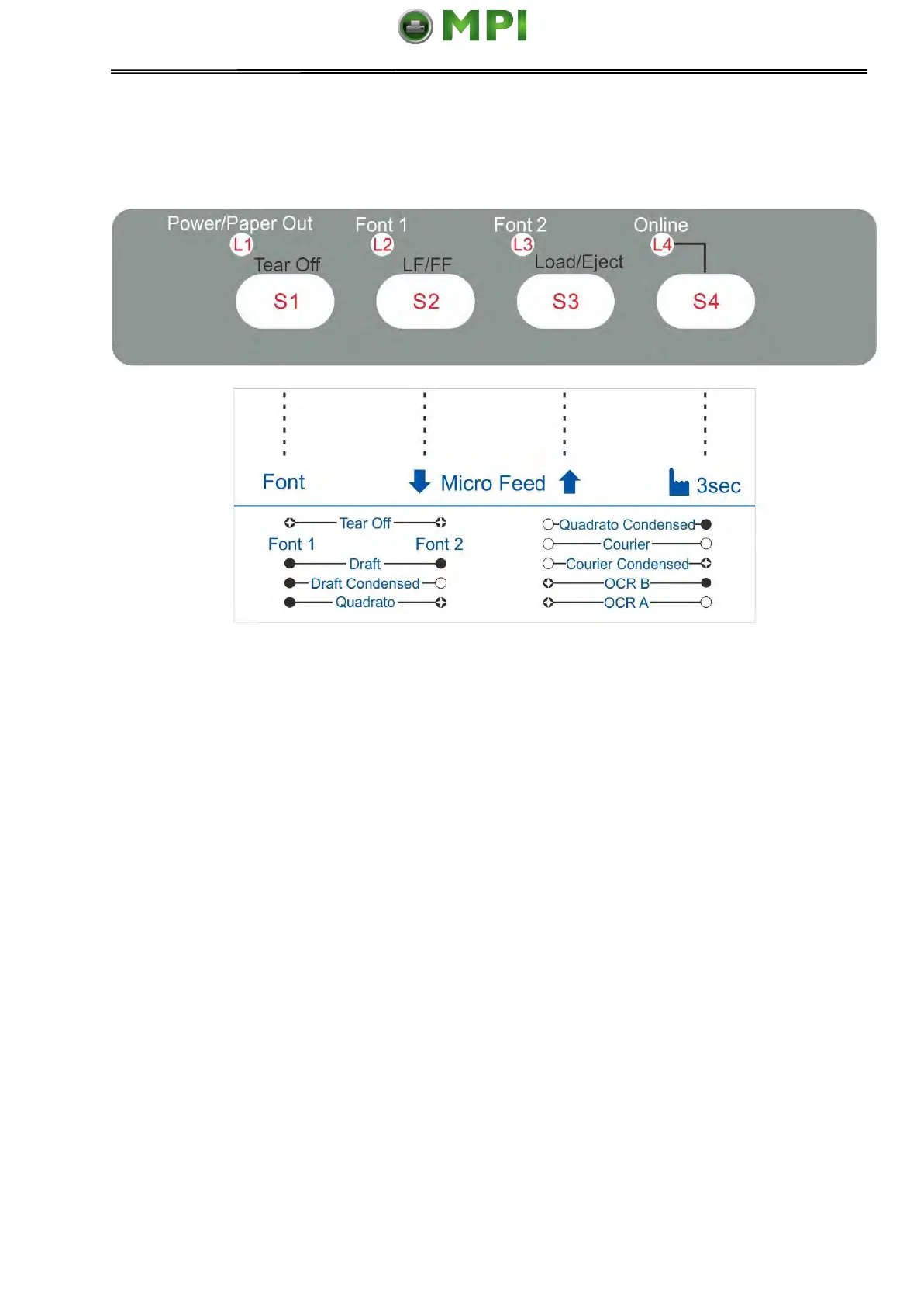
Note: A black filled circle means LED off; A white circle means LED on.
There are 4 switches S1~S4 and 4 LEDs L1~L4. The meaning and application of each
switch and LED are described below:
4.1 LED Indicators
“Power/Paper Out” LED:
On: Power on
Flashing: Paper out
Flashing + buzzer: Paper jam
“Font 1 and Font 2” LED:
Flashing together: Indicates continuous paper is at tear-off position; otherwise it indicates the
selected font. See table 4.1.
“Online” LED:
On: The printer is in online state and ready to receive data from the computer.
Off: The printer is in offline state and cannot receive data.
Mantenimiento Periféricos Informáticos SL C/Canteras, 15 28860 Paracuellos de Jarama Tel: 00 34 917481604 WEB: https://mpi.com.es



 To Next Page