Tally Dascom 1140
20
4.4 Online State
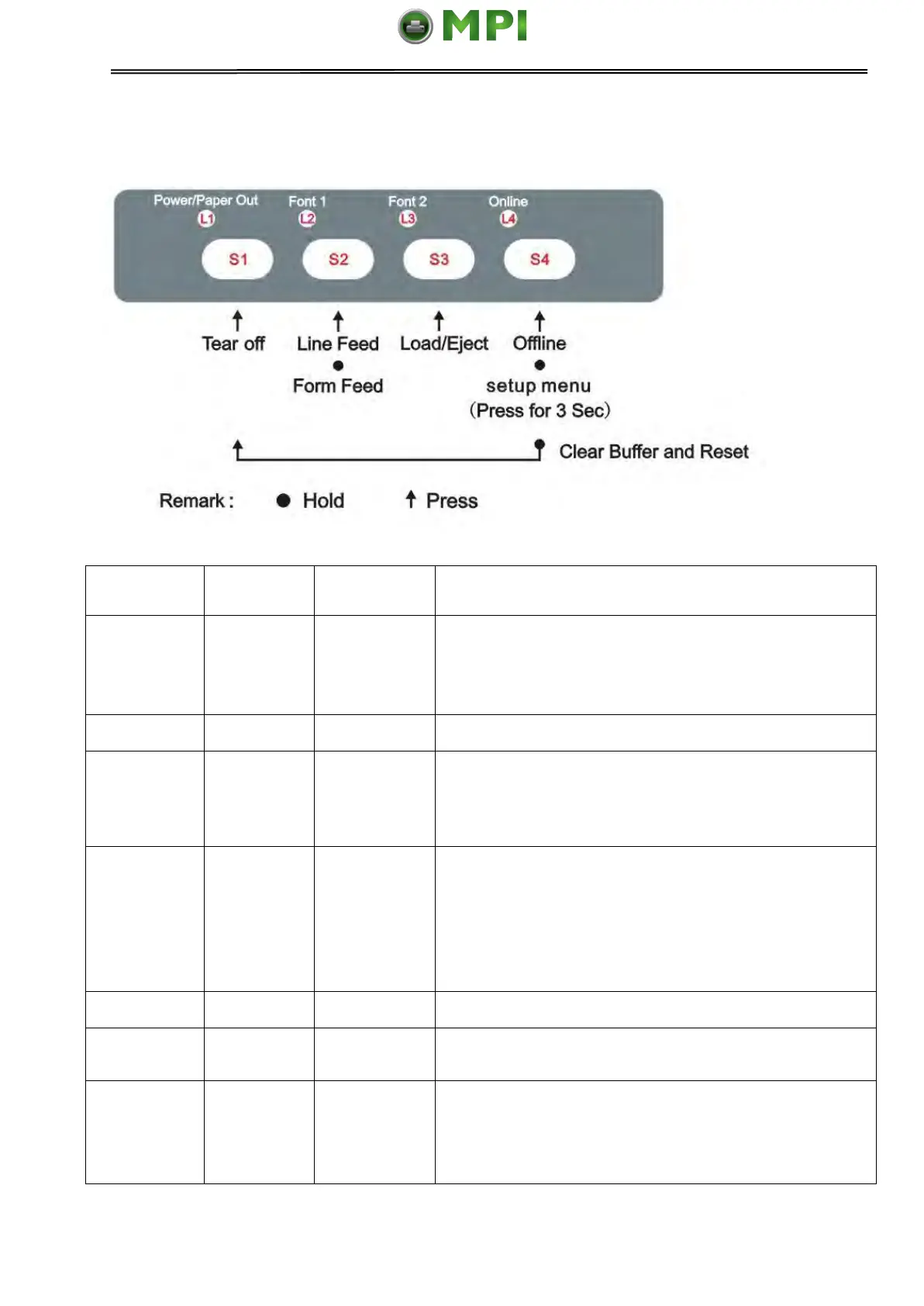
This is valid for tractor mode only. It feeds the form
to the tear-off position. After tearing off the form,
printing starts on the next TOF by pressing any key
or receiving print data from the host.
Feeds one line with every press of S2
Pressing this key will feed paper one line forward.
By holding down this key, the printer will initially feed
a few lines, then perform a form feed (continuous
paper mode) or eject the form (single sheet mode).
● Load: Automatically loads the paper (according to
path selection) when no paper is on the platen.
● Eject: For rear tractor, it retracts the form from the
platen to allow users to install cut sheets. (NOTE:
Users have to toggle the path selection lever.) For
cut sheets, it ejects the form on the platen.
Toggles between Online and Offline states.
Hold the S4 key for 3 seconds. Toggles to 3s Setup
state. Indicated by flashing L4.
● Clears the print buffer. Beeps once upon
completion.
● Pressing S1 longer initializes the printer to
default settings.Beeps 3 times upon completion.
Mantenimiento Periféricos Informáticos SL C/Canteras, 15 28860 Paracuellos de Jarama Tel: 00 34 917481604 WEB: https://mpi.com.es



 To Next Page