EasyManua.ls Logo

Tally Dascom 1140 - Setup State; Power-On State

Tally Dascom 1140
107 pages
Print Icon
To Next Page IconTo Next Page
To Previous Page IconTo Previous Page
Loading...
Tally Dascom 1140
21
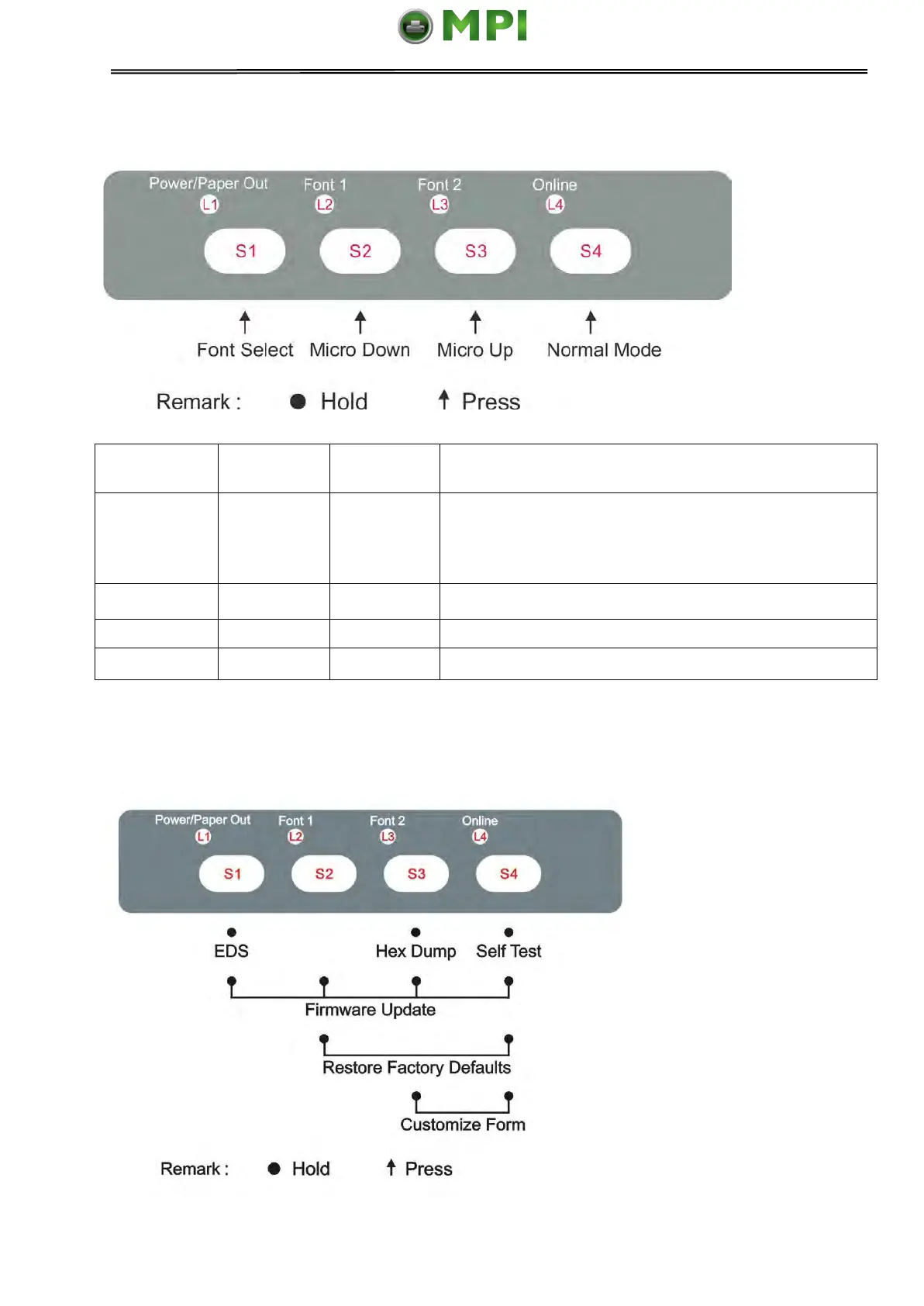
4.5 Setup State
Function
Name
Switch
Operation
LED
Function Description
Online state
{S4}
L4
Toggling to the Online state will cause the printer to
go into a ready-to-print state. Any changes made in
Setup state will be saved permanently. Lighting up
L4 indicates the Online state.
Micro UP
{S3}
--
Press S3 to micro feed paper up.
Micro Down
{S2}
--
Press S2 to micro feed paper down.
Font Select
{S1}
L2, L3
Refer to Table 4.1 for details.
4.6 Power-On State
Mantenimiento Periféricos Informáticos SL C/Canteras, 15 28860 Paracuellos de Jarama Tel: 00 34 917481604 WEB: https://mpi.com.es

Table of Contents

Other manuals for Tally Dascom 1140

Related product manuals