2.
Before you begin plugging in memory modules, take note
of
how they should be handled and installed.
0
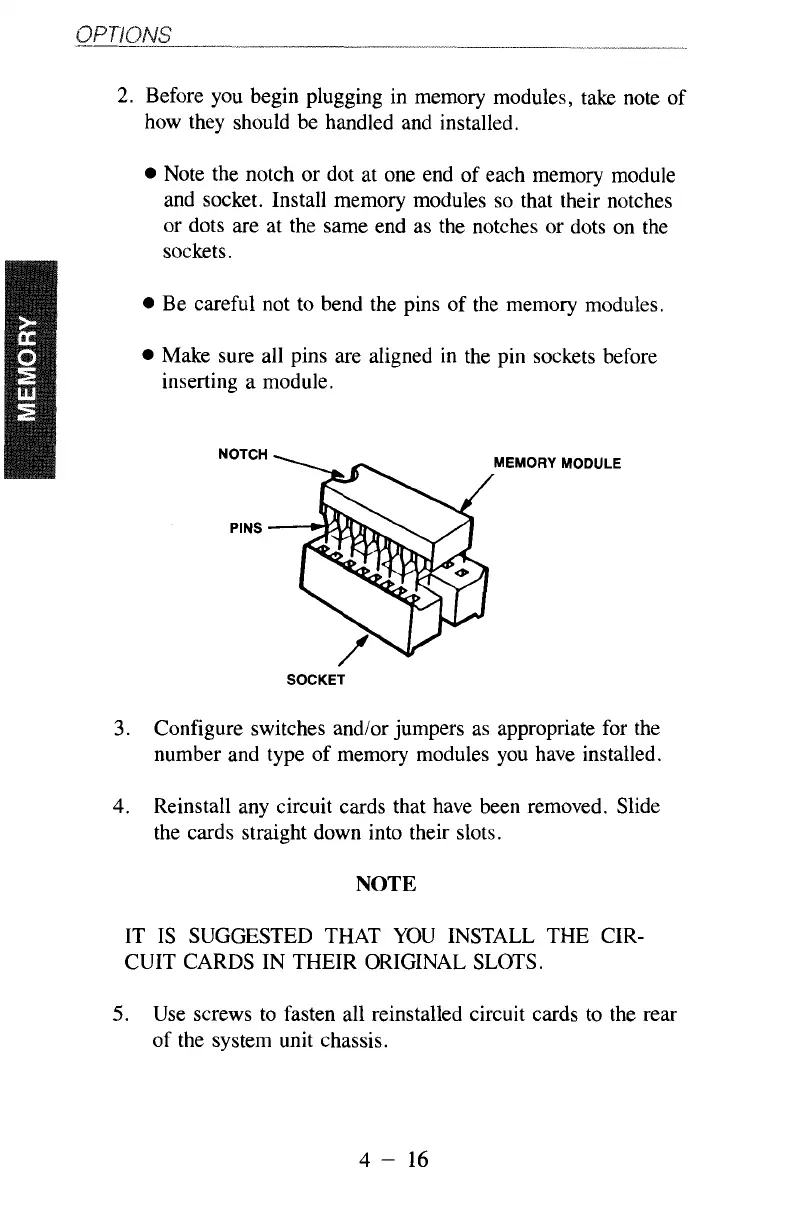
Note the notch or dot at one end of each memory module
and socket. Install memory modules
so
that their notches
or dots are at the same end as the notches or dots on the
sockets.
0
Be careful not to bend the pins of the memory modules.
0
Make sure all pins are aligned in the pin sockets before
inserting a module.
SOCKET
3.
Configure switches and/or jumpers as appropriate for the
number and type
of
memory modules you have installed.
4.
Reinstall any circuit cards that have been removed. Slide
the cards straight down into their slots.
NOTE
IT IS SUGGESTED THAT YOU INSTALL THE CIR-
CUIT CARDS IN THEIR ORIGINAL SLOTS.
5.
Use screws to fasten all reinstalled circuit cards to the rear
of the system unit chassis.
4
-
16



 To Next Page