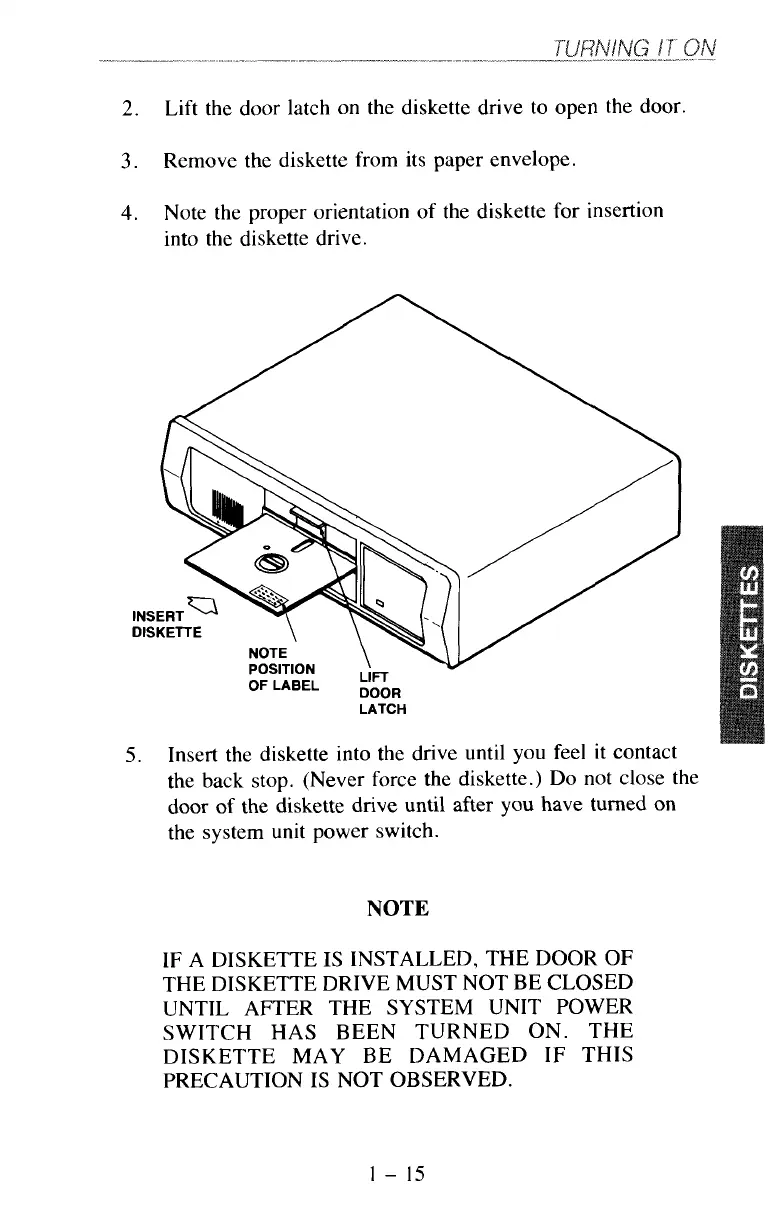
2.
Lift the door latch on the diskette drive to open the
door.
3.
Remove the diskette from its paper envelope.
4.
Note the proper orientation of the diskette for insertion
into the diskette drive.
DISKETTE
POSITION
OFLABEL
izR
LATCH
5.
Insert the diskette into the drive until you feel it contact
the back stop. (Never force the diskette.) Do not close the
door
of
the diskette drive until after
you
have turned on
the system unit power switch.
NOTE
IF
A DISKETTE IS INSTALLED, THE DOOR
OF
THE DISKETTE DRIVE MUST NOT BE CLOSED
UNTIL AFTER THE SYSTEM UNIT POWER
SWITCH HAS BEEN TURNED ON. THE
DISKETTE MAY BE DAMAGED
IF
THIS
PRECAUTION IS NOT OBSERVED.
1
-
15



 To Next Page