ATP Operator Instructions
|Part Names and Functions
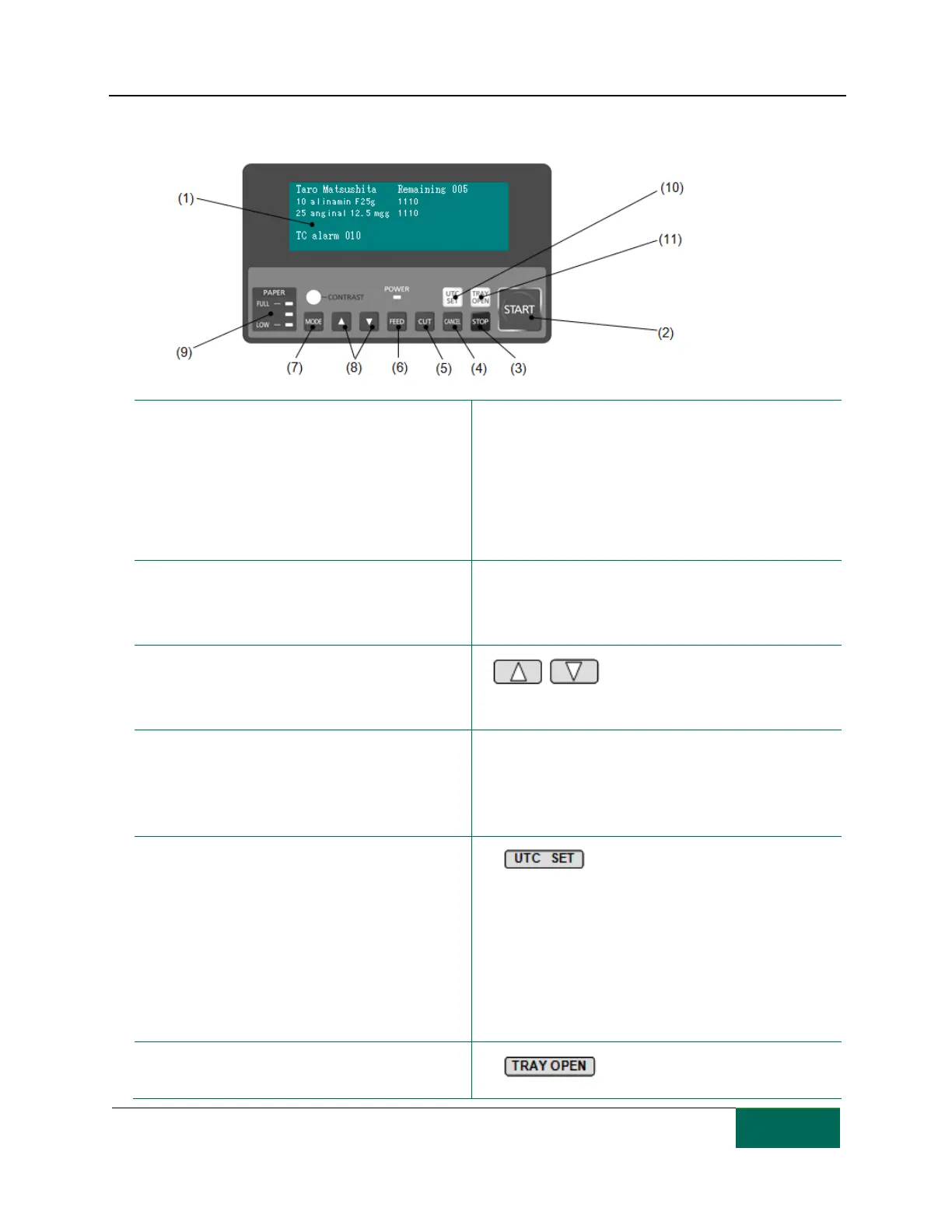
Control Panel
1. LCD display: Displays currently dispensing
medications. At the bottom of the screen there is
an area for displaying alarm status.
LCD display is normally brightly lit by a backlight,
which goes off after a preset time period. Press a
function key to turn on the backlight.
6. Feed: Creates one empty package. Use this to
perform a packaging test after paper replacement.
2. Start: When the unit stops due to an alarm,
process the alarm and press this button to restart
dispensing. Clears the alarm display field
.
7. Mode: Press to set or change operating modes.
3. Stop: Press this button during dispensing will
turn off the unit and "System stopped" will
appear in the alarm display field.
8. Press these buttons to switch
screens on the LCD.
4. Cancel: When an alarm is displayed during
dispensing, hold down this button for 2 seconds
or more to cancel dispensing.
9. Remaining Paper Indicator: Shows 4 levels of
remaining paper. 3 LEDs go off one after the other to
indicate paper consumption. They provide a rough
guide to when paper needs to be replaced.
5. Cut: Press this button after completing a
packaging test following a package paper change
to cut the paper and transport it to the
medication exit.
10. Use the UTC tray to preset
medications. Place a medication in the UTC tray and
close the tray. Holding down this button for 1 sec or
longer will display “UTC SET " and dispensing will
continue without stopping when the “Refilling UTC"
alarm appears. In “UTC SET,” it is not possible to visually
confirm the medications in the UTC during dispensing
so extra caution is needed.
11. Press to open the UTC tray.



 To Next Page