ATP Operator Instructions
How to Replace the Packaging Paper (without Splicing)
A "Paper alarm" during packaging means
that the unit has run out of paper and must
be replenished. When the "Paper alarm"
occurs, it will package all pills in the pill path
(2 packages) before stopping.
[Step 1]
Press the [Cut] button to remove the
medication that is being packaged.
[Step 2]
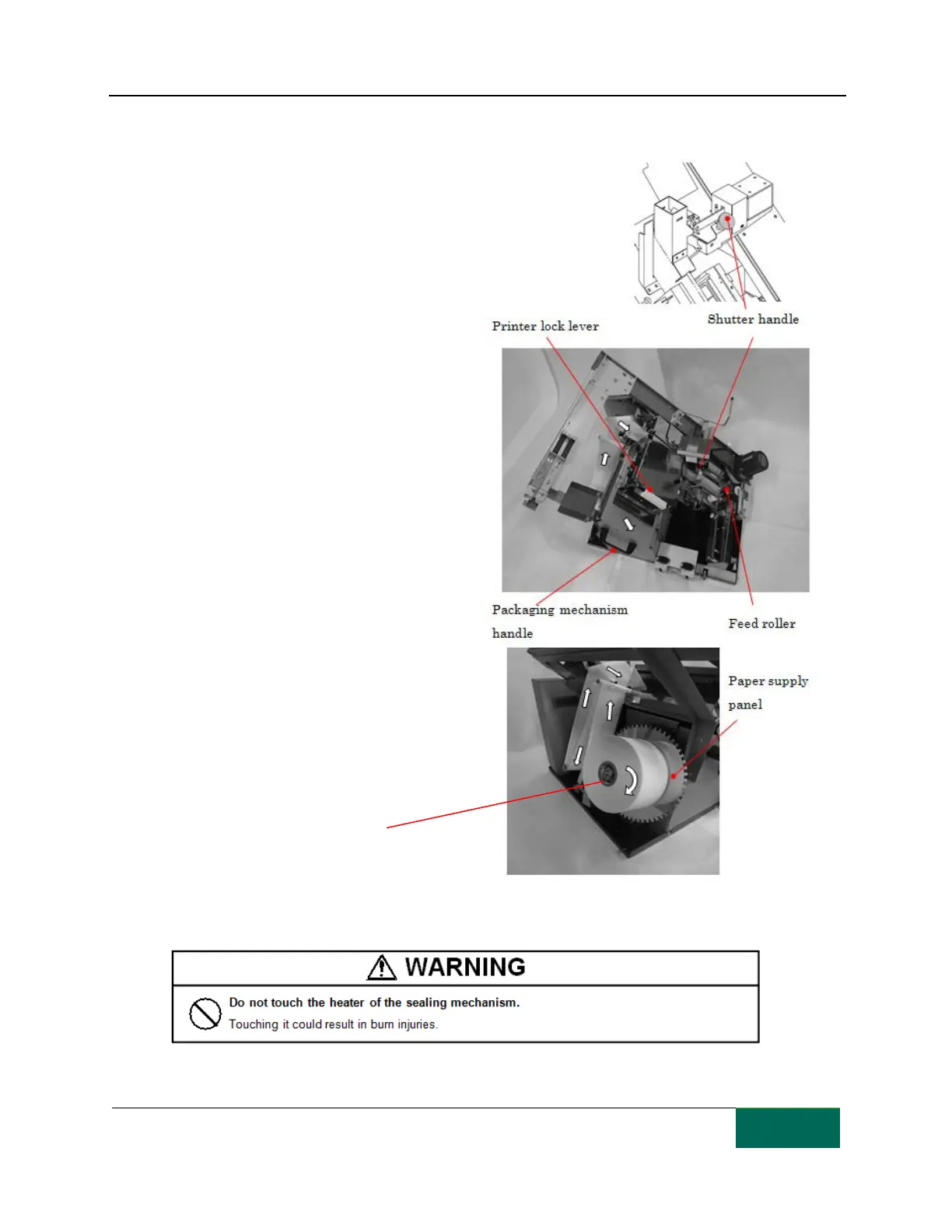
Open the front door and use the packaging
mechanism handle to pull out the packaging
mechanism (there is no need to turn off the
unit).
[Step 3]
Hold the shutter handle and raise the
shutter. Next, release the printer lock lever,
pull out the printer and free the packaging
paper path.
[Step 4]
Remove the used packaging paper from the
paper supply panel. Release the feed rollers
to remove the old paper.
[Step 5]
Place the new paper on the paper supply
panel. Attach the packaging paper so that
the open side is facing the paper supply
panel. Install the packaging paper by
threading it from the paper supply panel
following the path shown.
[Step 6]
Thread the packaging paper through the
printer, medication inlet and heater. Place it
between the feed rollers to secure it.



 To Next Page