66 Chapter 7 - Parameters Description User Manual
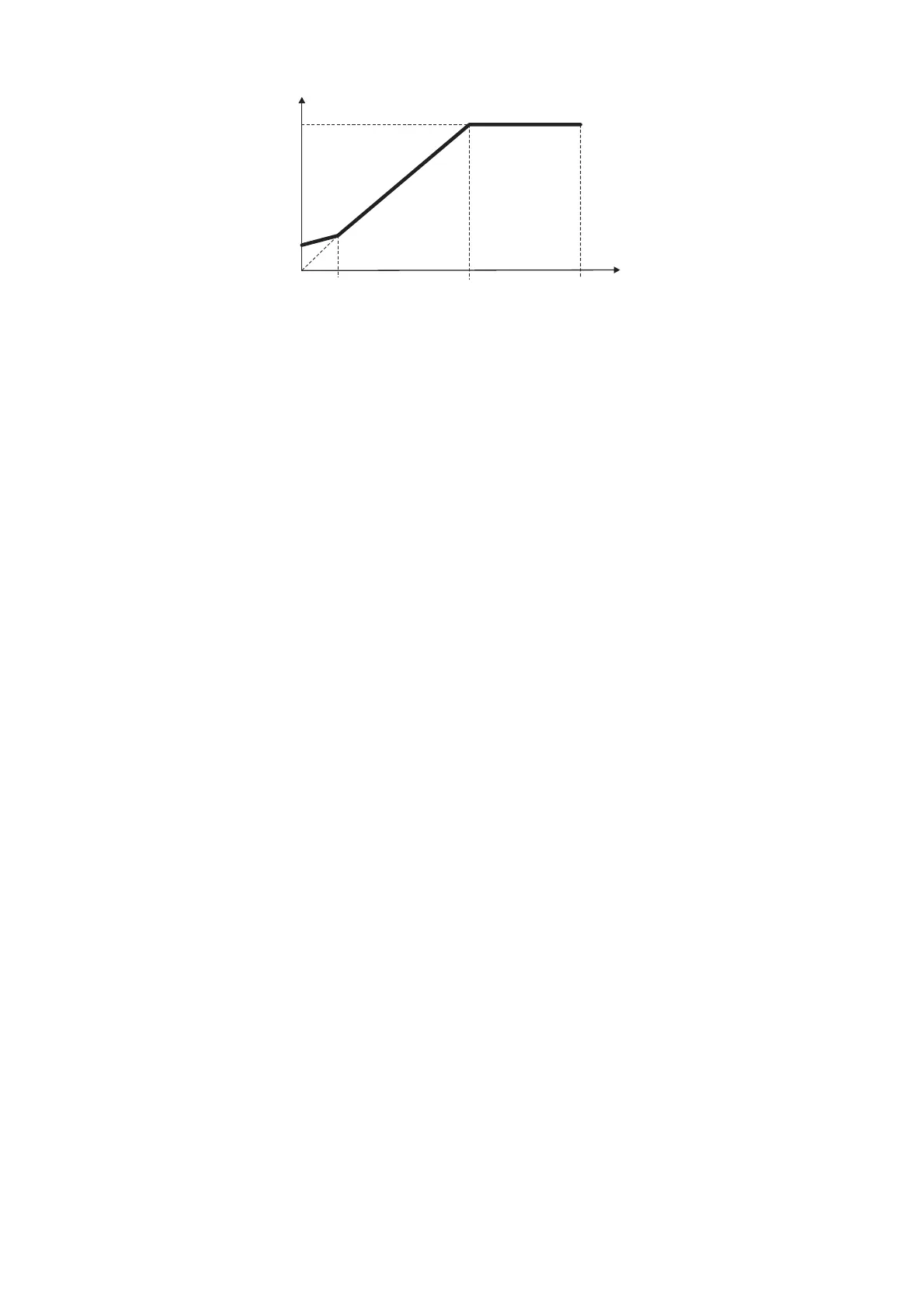
S.201
S.400
S.100
S.101
V
F
(n)
P.064
Figure 7.3.3: Manual Boost Voltage
The setting is in percentage of the Max out voltage (S.100).
NOTE!
When custom V/f shape is selected (P.060 = 0):
P. 06 4 parameter represents the return point of the output voltage, on the linear characteristic of V/f
ratio (see figure 7.3.3).
S.401 Auto boost en (Automatic boost enabling)
The boost can be automatically controlled by the enabling of this parameter. The control is continuously carried
out in the whole speed range.
The Auto boost must be disabled when a multiple motor connection is being used.
NOTE!
The automatic boost is automatically calculated during the execution of drive/motor self tuning (S.901
parameter).
It is anyway possible to obtain an "Oveboost" at low speed, increasing the value of the manual boost
(S.400 parameter).
S.450 Slip compensat (Slip compensation)
If an induction motor is being used, the mechanical speed will vary with the load due to the slip of the motor.
In order to adjust for this speed error the slip compensation can be used.
During this calibration, make sure that the drive is not in a current limit condition.
If this compensation is set too high it can cause instability.
The changing will be carried out as a percentage of the nominal slip, calculated when set the motor plate date.
The Slip compensation will act directly on the output frequency of the drive. To this purpose the parameter
Max output freq (P.080) expressing the percentage of the Max ref freq (F.020), has to be set to a value
including:
Max ref freq value + Slip compensat value.
(See also chapter PARAMETER, section Output Frequency Limit).
The Slip compensation must be disabled when a multiple motor connection is being used.
S.451 Slip comp filter (Slip compensation filter)
It is the response time (in seconds) for the reaction of the function.
Increasing this value helps damping oscillations that may arise with load steps (especially negative ones).


 To Next Page