EasyManua.ls Logo

Teac AG-V2050 - Audio Adjustments; Auto Tuning; Radio Reception

Teac AG-V2050
47 pages
Print Icon
To Next Page IconTo Next Page
To Previous Page IconTo Previous Page
Loading...
Audio
Adjustments
|
Radio
Reception
s
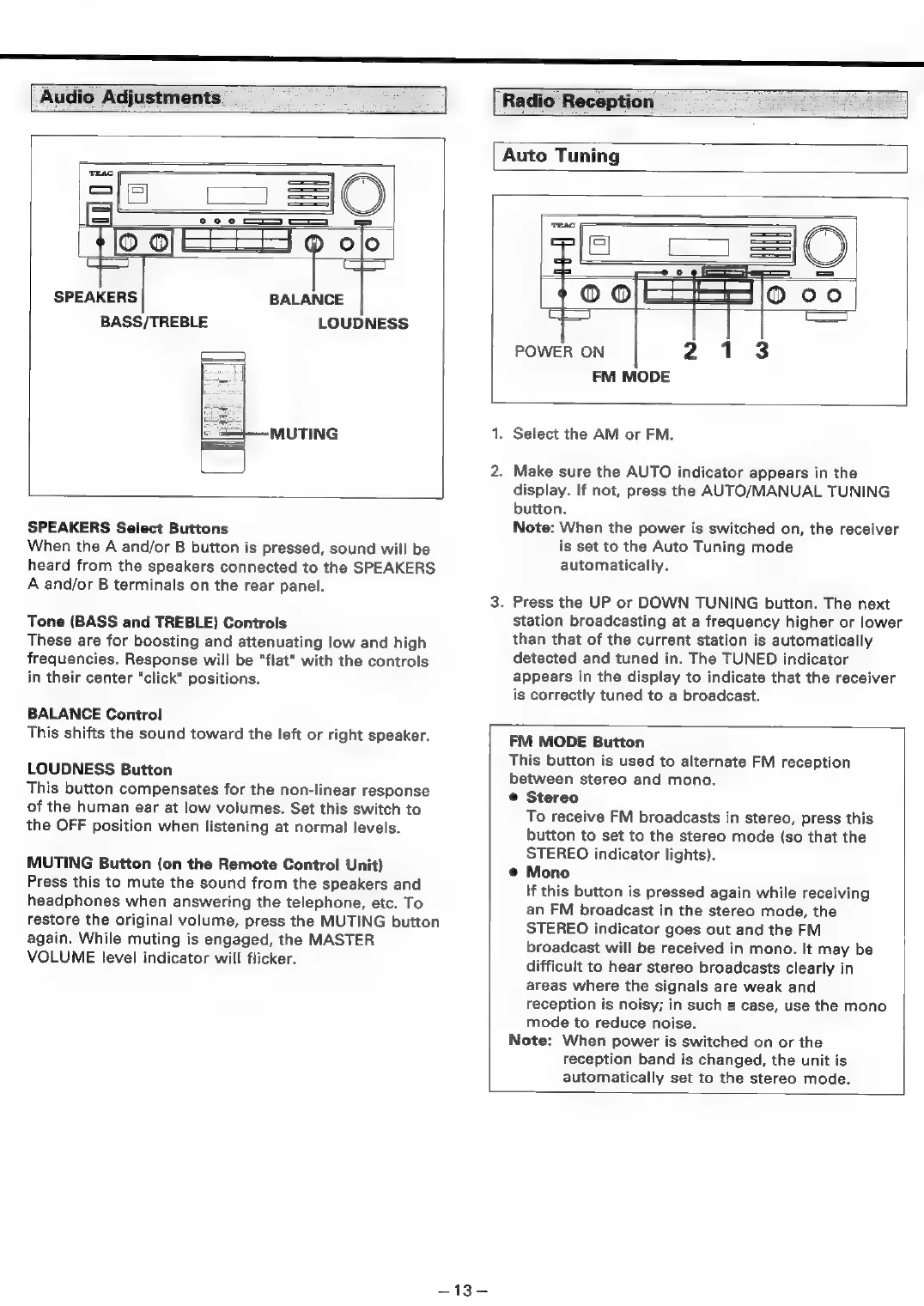
SPEAKERS
BALANCE
BASS/TREBLE
LOUDNESS
MUTING
SPEAKERS
Select
Buttons
When
the
A
and/or
B
button
is
pressed,
sound
will
be
heard
from
the
speakers
connected
to
the
SPEAKERS
A
and/or
B
terminals
on
the
rear
panel.
Tone
(BASS
and
TREBLE)
Controls
These
are
for
boosting
and
attenuating
low
and
high
frequencies.
Response
will
be
"flat"
with
the
controls
in
their
center
“click"
positions.
BALANCE
Control
This
shifts
the
sound
toward
the
left
or
right
speaker.
LOUDNESS
Button
This
button
compensates
for
the
non-linear
response
of
the
human
ear
at
low
volumes.
Set
this
switch
to
the
OFF
position
when
listening
at
normal
levels.
MUTING
Button
(on
the
Remote
Control
Unit)
Press
this
to
mute
the
sound
from
the
speakers
and
headphones
when
answering
the
telephone,
etc.
To
restore
the
original
volume,
press
the
MUTING
button
again.
While
muting
is
engaged,
the
MASTER
VOLUME
level
indicator
will
flicker.
Auto
Tuning
POWER
ON
FM
MODE
—13-—
.
Select
the
AM
or
FM.
.
Make
sure
the
AUTO
indicator
appears
in
the
display.
If
not,
press
the
AUTO/MANUAL
TUNING
button.
Note:
When
the
power
is
switched
on,
the
receiver
is
set
to
the
Auto
Tuning
mode
automatically.
.
Press
the
UP
or
DOWN
TUNING
button.
The
next
station
broadcasting
at
a
frequency
higher
or
lower
than
that
of
the
current
station
is
automatically
detected
and
tuned
in.
The
TUNED
indicator
appears
in
the
display
to
indicate
that
the
receiver
is
correctly
tuned
to
a
broadcast.
FM
MODE
Button
This
button
is
used
to
alternate
FM
reception
between
stereo
and
mono.
®
Stereo
To
receive
FM
broadcasts
in
stereo,
press
this
button
to
set
to
the
stereo
mode
(so
that
the
STEREO
indicator
lights).
Mono
If
this
button
is
pressed
again
while
receiving
an
FM
broadcast
in
the
stereo
mode,
the
STEREO
indicator
goes
out
and
the
FM
broadcast
will
be
received
in
mono.
It
may
be
difficult
to
hear
stereo
broadcasts
clearly
in
areas
where
the
signals
are
weak
and
reception
is
noisy;
in
such
a
case,
use
the
mono
mode
to
reduce
noise.
Note:
When
power
is
switched
on
or
the
reception
band
is
changed,
the
unit
is
automatically
set
to
the
stereo
mode.

Table of Contents

Related product manuals