EasyManua.ls Logo

Teac AG-V2050 - Direct Tuning; Manual Tuning

Teac AG-V2050
47 pages
Print Icon
To Next Page IconTo Next Page
To Previous Page IconTo Previous Page
Loading...
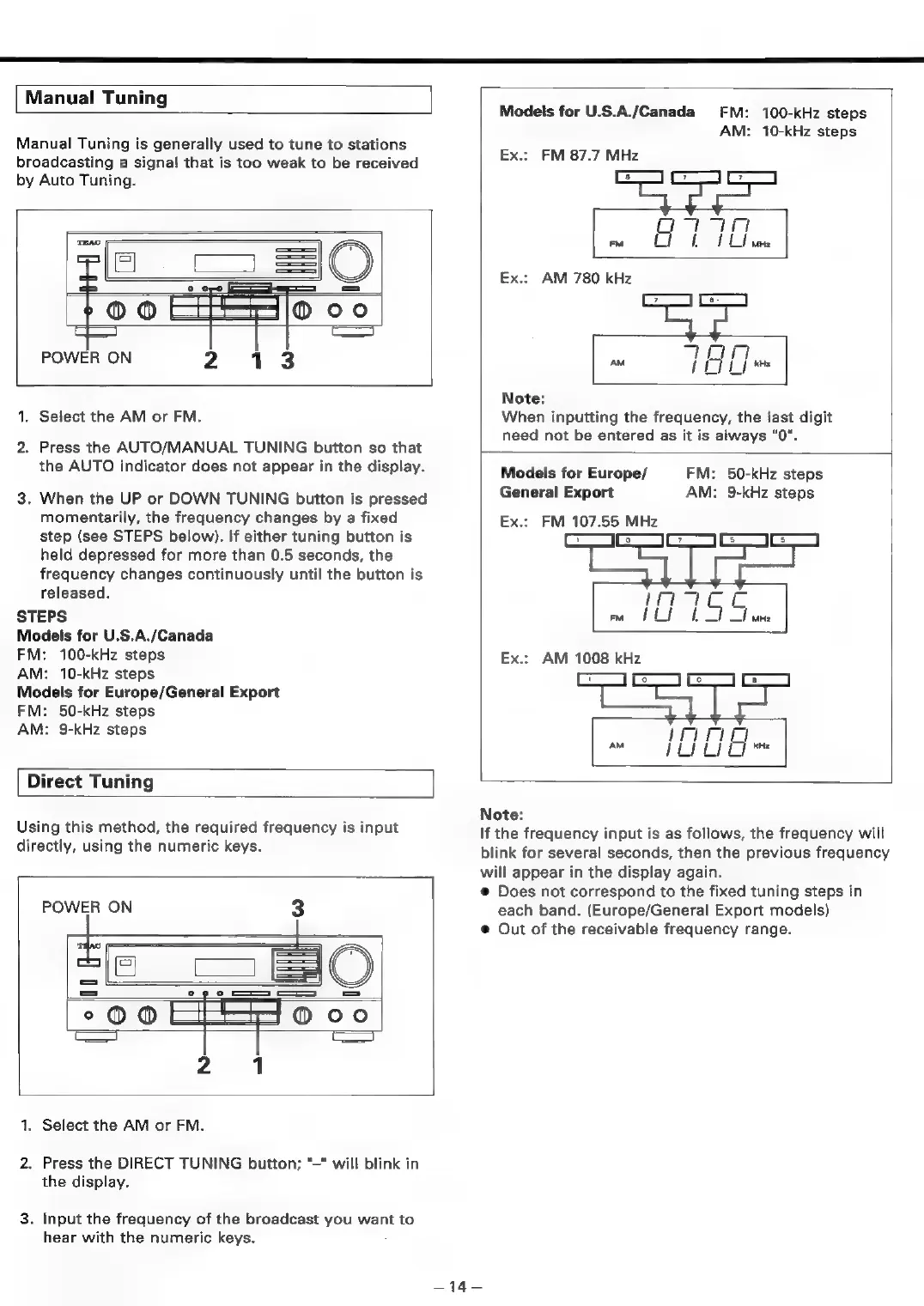
Manual
Tuning
Manual
Tuning
is
generally
used
to
tune
to
stations
broadcasting
a
signal
that
is
too
weak
to
be
received
by
Auto
Tuning.
POWER
ON
2
13
1.
Select
the
AM
or
FM.
2.
Press
the
AUTO/MANUAL
TUNING
button
so
that
the
AUTO
indicator
does
not
appear
in
the
display.
3.
When
the
UP
or
DOWN
TUNING
button
is
pressed
momentarily,
the
frequency
changes
by
a
fixed
step
(see
STEPS
below).
If
either
tuning
button
is
held
depressed
for
more
than
0.5
seconds,
the
frequency
changes
continuously
until
the
button
is
released.
STEPS
Models
for
U.S.A./Canada
FM:
100-kHz
steps
AM:
10-kHz
steps
Models
for
Europe/General
Export
FM:
50-kHz
steps
AM:
9-kHz
steps
Direct
Tuning
Using
this
method,
the
required
frequency
is
input
directly,
using
the
numeric
keys.
POWER
ON
3
5
=
oS
°OO
oC
1.
Select
the
AM
or
FM.
2.
Press
the
DIRECT
TUNING
button;
“—"
will
blink
in
the
display.
3.
Input
the
frequency
of
the
broadcast
you
want
to
hear
with
the
numeric
keys.
Models
for
U.S.A./Canada
FM:
100-kHz
steps
AM:
10-kHz
steps
Ex.:
FM
87.7
MHz
Oy
FM
H
|
ae
a
Ex.:
AM
780
kHz
TOT
AM
J
ES
Bi
CL]
Note:
When
inputting
the
frequency,
the
last
digit
need
not
be
entered
as
it
is
always
"0".
Models
for
Europe/
General
Export
Ex.:
FM
107.55
MHz
FM:
50-kHz
steps
AM:
9-kHz
steps
EXx.s
Note:
If
the
frequency
input
is
as
follows,
the
frequency
will
blink
for
several
seconds,
then
the
previous
frequency
will
appear
in
the
display
again.
@
Does
not
correspond
to
the
fixed
tuning
steps
in
each
band.
(Europe/General
Export
models)
@
Out
of
the
receivable
frequency
range.
a

Table of Contents

Related product manuals