EasyManua.ls Logo

Teac AG-V2050 - DOLBY SURROUND Effect; Editing) SYSTEM Function; S.a.V.e; Speaker Installation

Teac AG-V2050
47 pages
Print Icon
To Next Page IconTo Next Page
To Previous Page IconTo Previous Page
Loading...
a
a
SS
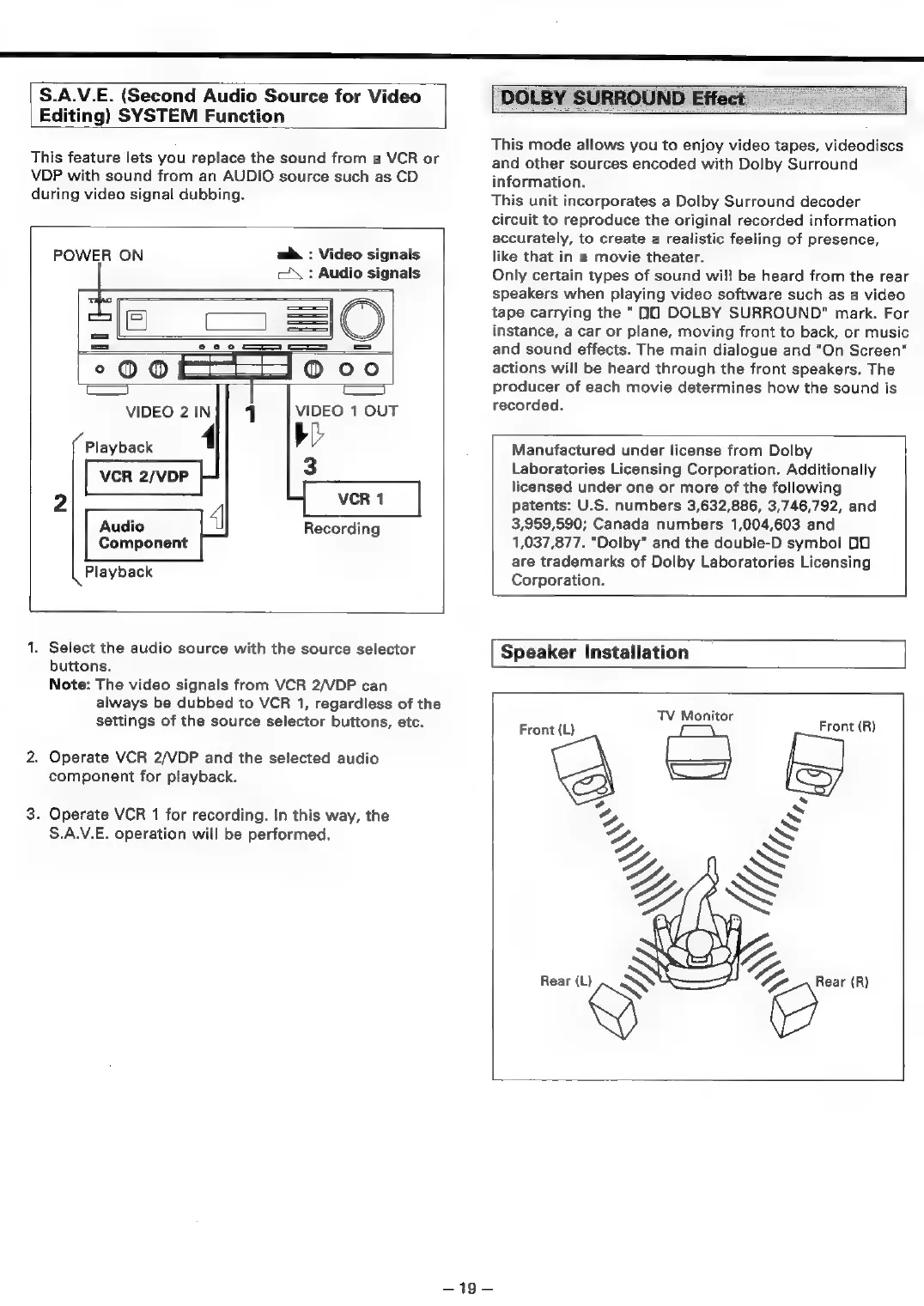
S.A.V.E.
(Second
Audio
Source
for
Video
Editing)
SYSTEM
Function
This
feature
lets
you
replace
the
sound
from
a
VCR
or
VDP
with
sound
from
an
AUDIO
source
such
as
CD
during
video
signal
dubbing.
m&
:
Video
signals
c\\
:
Audio
signals
POWER
ON
°00
@oo
Ca
Ca
VIDEO
2
IN
1
VIDEO
1
OUT
bl
3
1
Playback
Audio
Recording
Component
Playback
1.
Select
the
audio
source
with
the
source
selector
buttons.
Note:
The
video
signals
from
VCR
2/VDP
can
always
be
dubbed
to
VCR
1,
regardless
of
the
settings
of
the
source
selector
buttons,
etc.
2.
Operate
VCR
2/VDP
and
the
selected
audio
component
for
playback.
3.
Operate
VCR
1
for
recording.
In
this
way,
the
S.A.V.E.
operation
will
be
performed.
DOLBY
SURROUND
Effect
This
mode
allows
you
to
enjoy
video
tapes,
videodiscs
and
other
sources
encoded
with
Dolby
Surround
information.
This
unit
incorporates
a
Dolby
Surround
decoder
circuit
to
reproduce
the
original
recorded
information
accurately,
to
create
a
realistic
feeling
of
presence,
like
that
in
a
movie
theater.
Only
certain
types
of
sound
will
be
heard
from
the
rear
speakers
when
playing
video
software
such
as
a
video
tape
carrying
the
“O0
DOLBY
SURROUND"
mark.
For
instance,
a
car
or
plane,
moving
front
to
back,
or
music
and
sound
effects.
The
main
dialogue
and
"On
Screen"
actions
will
be
heard
through
the
front
speakers.
The
producer
of
each
movie
determines
how
the
sound
is
recorded.
Manufactured
under
license
from
Dolby
Laboratories
Licensing
Corporation.
Additionally
licensed
under
one
or
more
of
the
following
patents:
U.S.
numbers
3,632,886,
3,746,792,
and
3,959,590;
Canada
numbers
1,004,603
and
1,037,877.
“Dolby”
and
the
double-D
symbol
00
are
trademarks
of
Dolby
Laboratories
Licensing
Corporation.
Speaker
Installation
TV
Monitor
Front
(L)
Front
(R)
=O
=

Table of Contents

Related product manuals