EasyManua.ls Logo

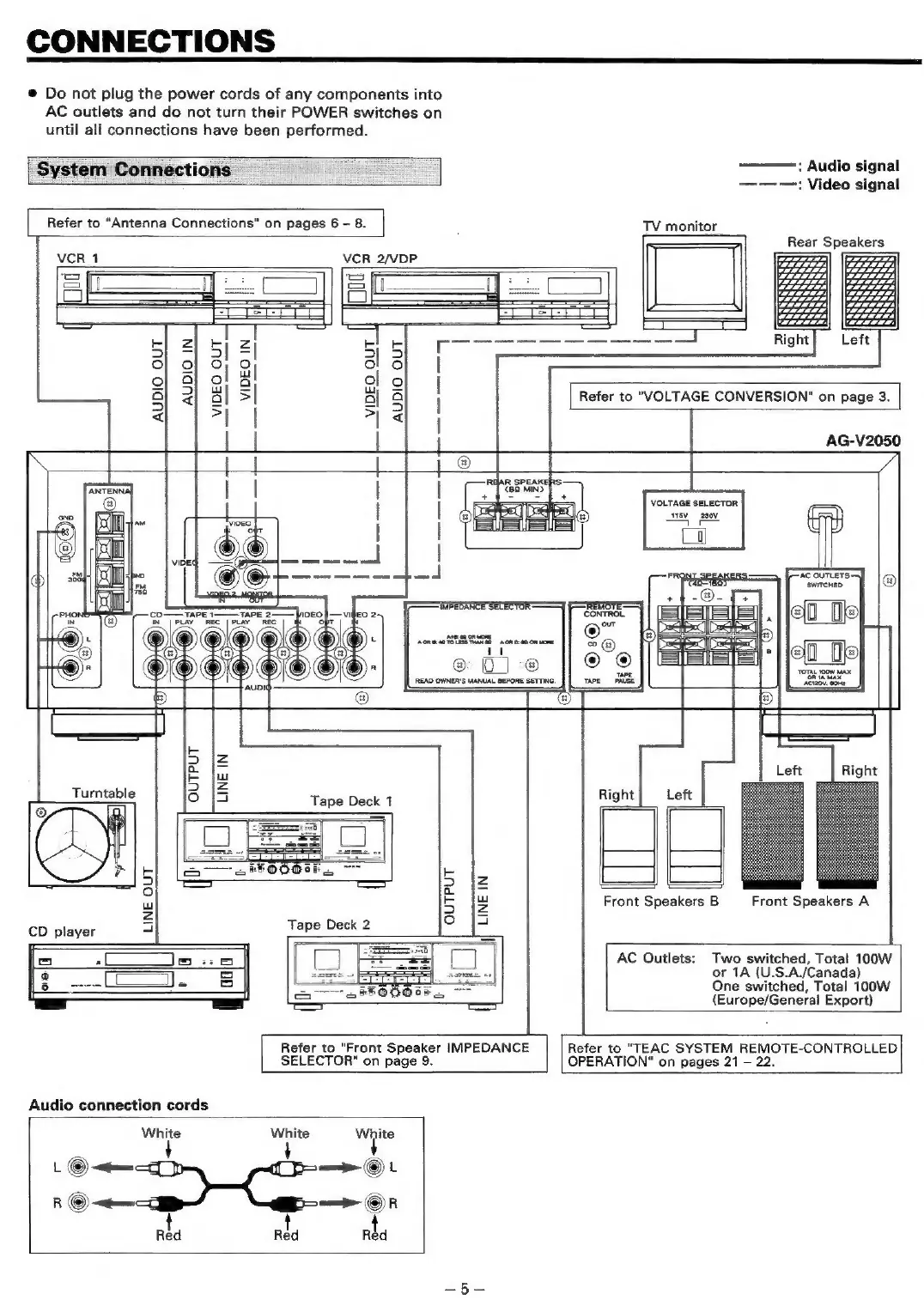
Teac AG-V2050 - Connections; System Connections

Teac AG-V2050
47 pages
Print Icon
To Next Page IconTo Next Page
To Previous Page IconTo Previous Page
Loading...
CONNECTIONS
@
Do
not
plug
the
power
cords
of
any
components
into
AC
outlets
and
do
not
turn
their
POWER
switches
on
until
all
connections
have
been
performed.
System
Connections
_
Refer
to
“Antenna
Connections"
on
pages
6
-
8.
:
Audio
signal
—-—-—:
Video
signal
TV
monitor
Rear
Speakers
ra
ar)
ZL)
VCR
2/VDP.
FE}
2
!
zi
Ek
S|
=
Sl
El
aS
oO}
of 0;
9
al
6
I
o}
al
ol
Bl
ol
ol
|}
a
2}
al
S|
al
8
|
Refer
to
"VOLTAGE
CONVERSION"
on
page
3.
<
*|
|
as}
AG-V2050
{|
|
me
REAR
SPEAKERS
aan
|
|
|
ics
®
VOLTAGE
SELECTOR
os
|
69a
1
|
|
ee
Poh
|
|
a
lal
joe.
|
2
7
ica
et
cana
ft
AC
OUTLETS
ru
Oe
Wee
‘swrrcHED
®
rete
(2
ae
ee
Pe
a
“|
|
;e_De
@):
%
@
5
Me
EIeS
caemmnce
|)
©:
@GO@OCOOO-
®
>
|
oo
||
=
*}je0_He
“AUDI
®
5 5
=
=
z
i
Left
Right
Turntable
3
iS
Tape
Deck
1
Right|
Left
®
5
5
|e
5
5
Fd
Front
Speakers
B
Front
Speakers
A
Zz
6
[5
CD
player
rar
Tape
Deck
2
os
=]
-~L_
eis
AC
Outlets:
Two
switched,
Total
100W
I
or
1A
(U.S.A./Canada)
ees
0
een
|
One
switched,
Total
100W
(Europe/General
Export)
Refer
to
"Front
Speaker
IMPEDANCE
SELECTOR"
on
page
9.
Refer
to
"TEAC
SYSTEM
REMOTE-CONTROLLED
OPERATION"
on
pages
21
-
22.
Audio
connection
cords
White White
a
.©O—
=p
©L
R
©
<emm
=p
(©)
R
rta
rta
Red

Table of Contents

Related product manuals