EasyManua.ls Logo

Teac AG-V2050 - Troubleshooting

Teac AG-V2050
47 pages
Print Icon
To Next Page IconTo Next Page
To Previous Page IconTo Previous Page
Loading...
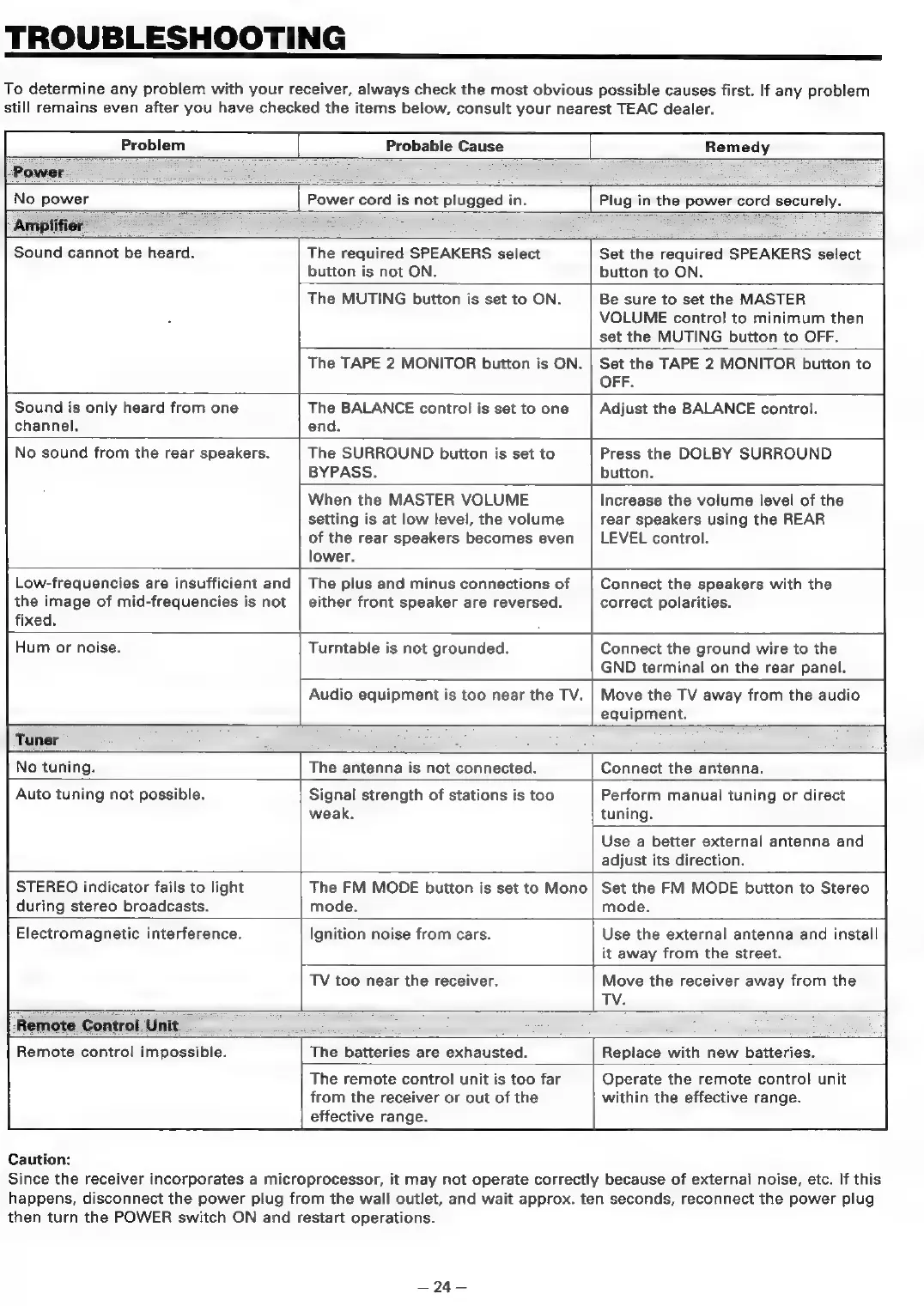
TROUBLESHOOTING
To
determine
any
problem
with
your
receiver,
always
check
the
most
obvious
possible
causes
first.
If
any
problem
still
remains
even
after
you
have
checked
the
items
below,
consult
your
nearest
TEAC
dealer.
Probable
Cause
Remedy
Power
No
power
Plug
in
the
power
cord
securely.
Amplifier
Power
cord
is
not
plugged
in.
Sound
cannot
be
heard.
The
required
SPEAKERS
select
button
is
not
ON.
Set
the
required
SPEAKERS
select
button
to
ON.
The
MUTING
button
is
set
to
ON.
Be
sure
to
set
the
MASTER
VOLUME
control
to
minimum
then
set
the
MUTING
button
to
OFF.
The
TAPE
2
MONITOR
button
is
ON.
Set
the
TAPE
2
MONITOR
button
to
OFF.
Sound
is
only
heard
from
one
channel.
The
BALANCE
control
is
set
to
one
end.
Adjust
the
BALANCE
control.
No
sound
from
the
rear
speakers.
The
SURROUND
button
is
set
to
BYPASS.
Press
the
DOLBY
SURROUND
button.
When
the
MASTER
VOLUME
setting
is
at
low
level,
the
volume
of
the
rear
speakers
becomes
even
lower.
Increase
the
volume
level
of
the
rear
speakers
using
the
REAR
LEVEL
control.
Low-frequencies
are
insufficient
and
the
image
of
mid-frequencies
is
not
fixed.
The
plus
and
minus
connections
of
either
front
speaker
are
reversed.
Connect
the
speakers
with
the
correct
polarities.
Hum
or
noise.
Turntable
is
not
grounded.
Connect
the
ground
wire
to
the
GND
terminal
on
the
rear
panel.
Audio
equipment
is
too
near
the
TV.
No
tuning.
Move
the
TV
away
from
the
audio
equipment.
The
antenna
is
not
connected.
Connect
the
antenna.
Auto
tuning
not
possible.
Signal
strength
of
stations
is
too
weak.
Perform
manual
tuning
or
direct
tuning.
Use
a
better
external
antenna
and
adjust
its
direction.
STEREO
indicator
fails
to
light
during
stereo
broadcasts.
The
FM
MODE
button
is
set
to
Mono
mode.
Set
the
FM
MODE
button
to
Stereo
mode.
Electromagnetic
interference.
Ignition
noise
from
cars.
Use
the
external
antenna
and
install
it
away
from
the
street.
TV
too
near
the
receiver.
Move
the
receiver
away
from
the
TV.
Remote
Control
Unit
Remote
control
impossible.
Caution:
The
batteries
are
exhausted.
Replace
with
new
batteries.
The
remote
control
unit
is
too
far
from
the
receiver
or
out
of
the
effective
range.
Operate
the
remote
control
unit
within
the
effective
range.
Since
the
receiver
incorporates
a
microprocessor,
it
may
not
operate
correctly
because
of
external
noise,
etc.
If
this
happens,
disconnect
the
power
plug
from
the
wall
outlet,
and
wait
approx.
ten
seconds,
reconnect
the
power
plug
then
turn
the
POWER
switch
ON
and
restart
operations.
94
=

Table of Contents

Related product manuals