44
3
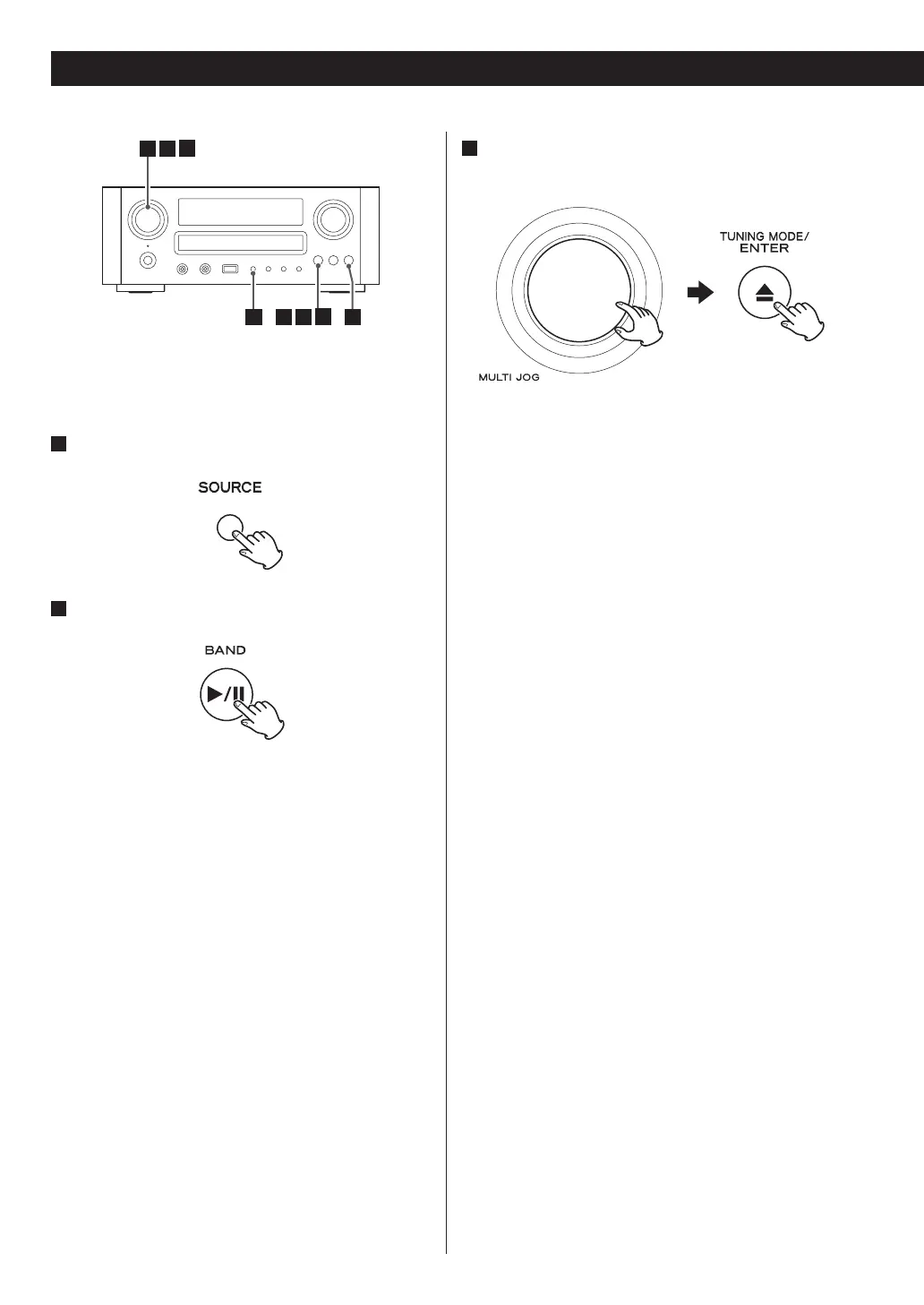
Select a search method.
Turn the MULTI JOG knob to select the item, and then
press the ENTER button.
The following search methods are available.
Favorites:
List of stations/Podcast you stored as favourite is
displayed. Select a station/Podcast you want to listen
to. Favourites are stored on the internet radio portal.
See page 46.
Added Stations:
Even though the station list contains thousands of
stations, you may want to listen to stations not listed.
You can add your own stations via the internet radio
portal. See page 46.
Location:
Search by the location of the broadcaster.
Genre:
Search by the genre of music played on the station/
Podcast.
Podcasts By Location:
Search by the Podcast’s location.
Podcasts By Genre:
Search by the Podcast’s genre.
New Stations:
Select from a list of recently added stations.
Most Popular Stations:
Select from a list of popular stations.
Recently Played:
You can select the station/Podcast from the ones
you listened to recently.
33 44 2
5
1
Listening to an internet radio
station/a podcast
1
Press the SOURCE button repeatedly to select
TUNER mode.
2
Select “Internet Radio” by pressing the BAND
button repeatedly.
Listening to Internet Radio


 To Next Page