PAGE 14
ENGLISH
CONNECTIONS
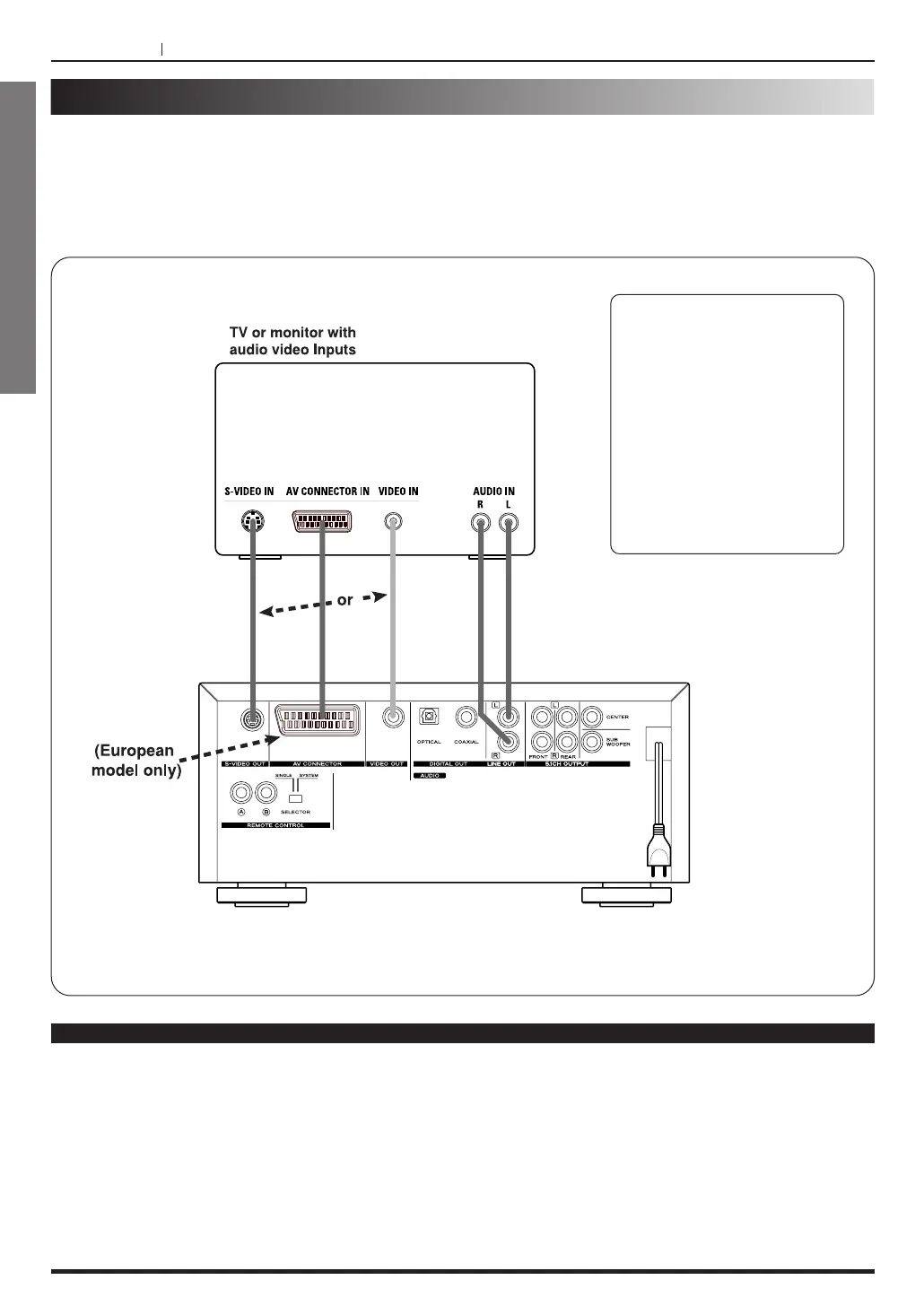
Connecting to a TV
Connect the DVD player to your TV
If the player is connected to the TV through a video cassette recorder, the picture may not be played
back normally with some DVDs. So we strongly recommended you not to connect the DVD player to
your video cassette recorder when setting up your home entertainment system.
To view pictures from the video cassette recorder, set the player to the standby mode.
Notes
< Refer to the owner’s manual of your TV as well.
< When you connect the DVD player to your TV, be sure to turn off the power and unplug both units from the wall
outlet before making any connections.
<
If your television set has one audio input, connect the DVD player to a Y cable adapter (not supplied) and then
connect to your TV.
<
Connect the DVD player to your TV directly. If you connect the DVD player to a VCR, the playback picture will
be distorted because DVD video discs are copy protected.
<
Change the setting of speaker output in Initial Setup, from Multichannel to Two channel. (Refer to page 34)
If the TV has an S-Video Input,
connect the DVD player with a
S-Video cable to get more
clear picture. It is not
necessary to connect Video
input jack (yellow).
If you connect the TV and the
DVD player with an AV
CONNECTOR cable, do not
connect other video and audio
jacks. (European Model only)



 To Next Page