Dolby Digital Surround (5.1 CH)
Dolby Digital (AC-3) is a six-channel digital surround sound technology developed by Dolby Laboratories for
theater-like surround sound reproduction. DVDs supporting Dolby Digital (AC-3) technology feature the
logo. You can enjoy realistic, theater-like surround sound from DVD movie or music disc featuring this logo. Two
front, one center and two rear speakers plus a subwoofer make up the “5.1-channel” audio system that Dolby
Digital (AC-3) uses.
Hook-ups
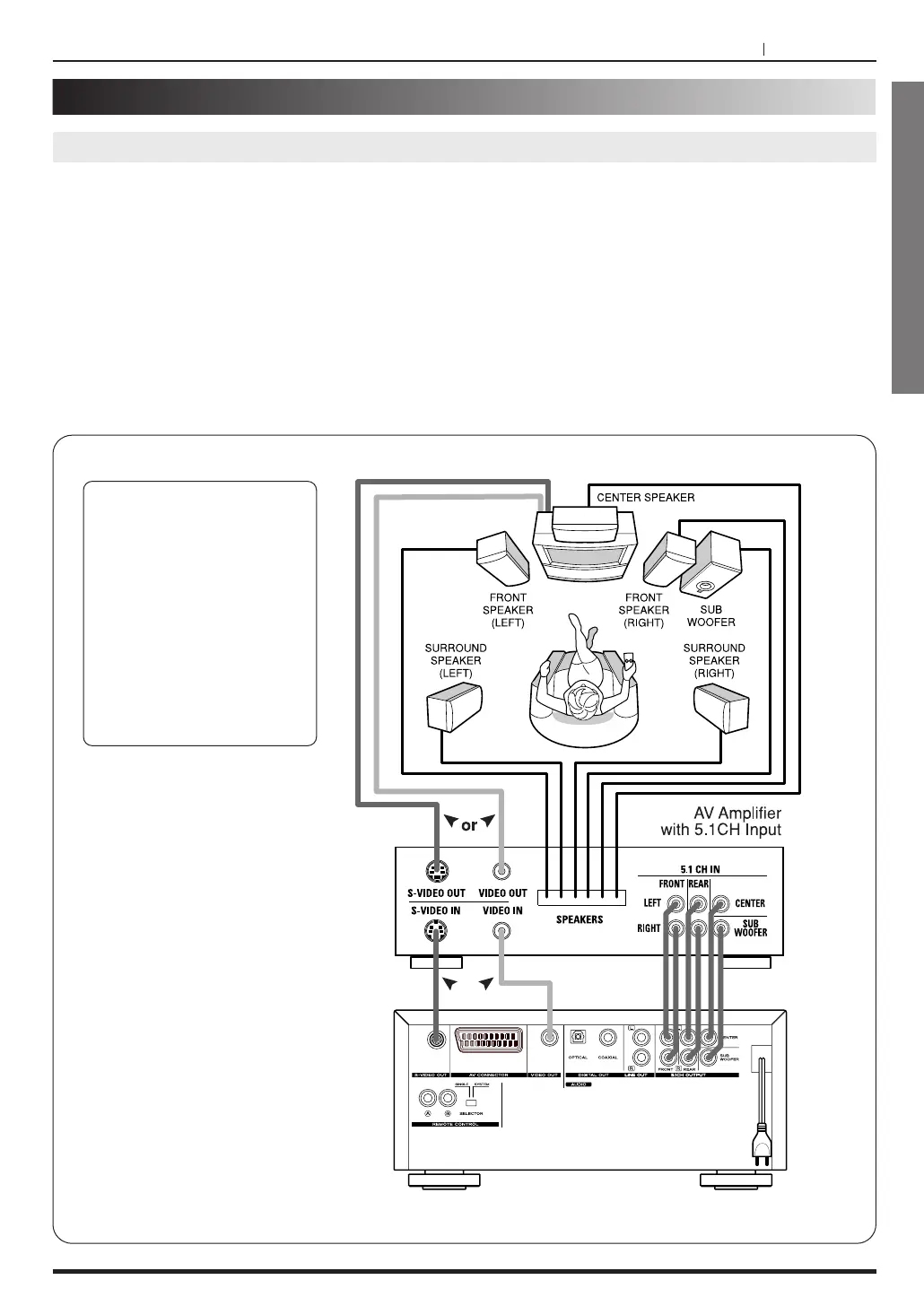
Connect an amplifier with 5.1 channel inputs to the player and to the speakers. See the figure below.
Note :
Make sure that the setting of speaker output in Initial Setup is Multichannel. (Refer to page 34)
Enjoying Dolby Digital (5.1 CH) Sound
If the TV has a S-Video Input,
and the AV Amplifer has S-
Video input/output, you can
connect them with S-Video
cables to get more clear
picture.
If you connect with S-Video
cables, it is not necessary to
connect Video input jack
(yellow).



 To Next Page