Tender the Check Chapter 3 - Guest Check Functions
3-48 FS-3600 Owner’s Manual
3.12 Tender the Check
An Amount Tendered can be entered prior to pressing a preset
{MEDIA} key.
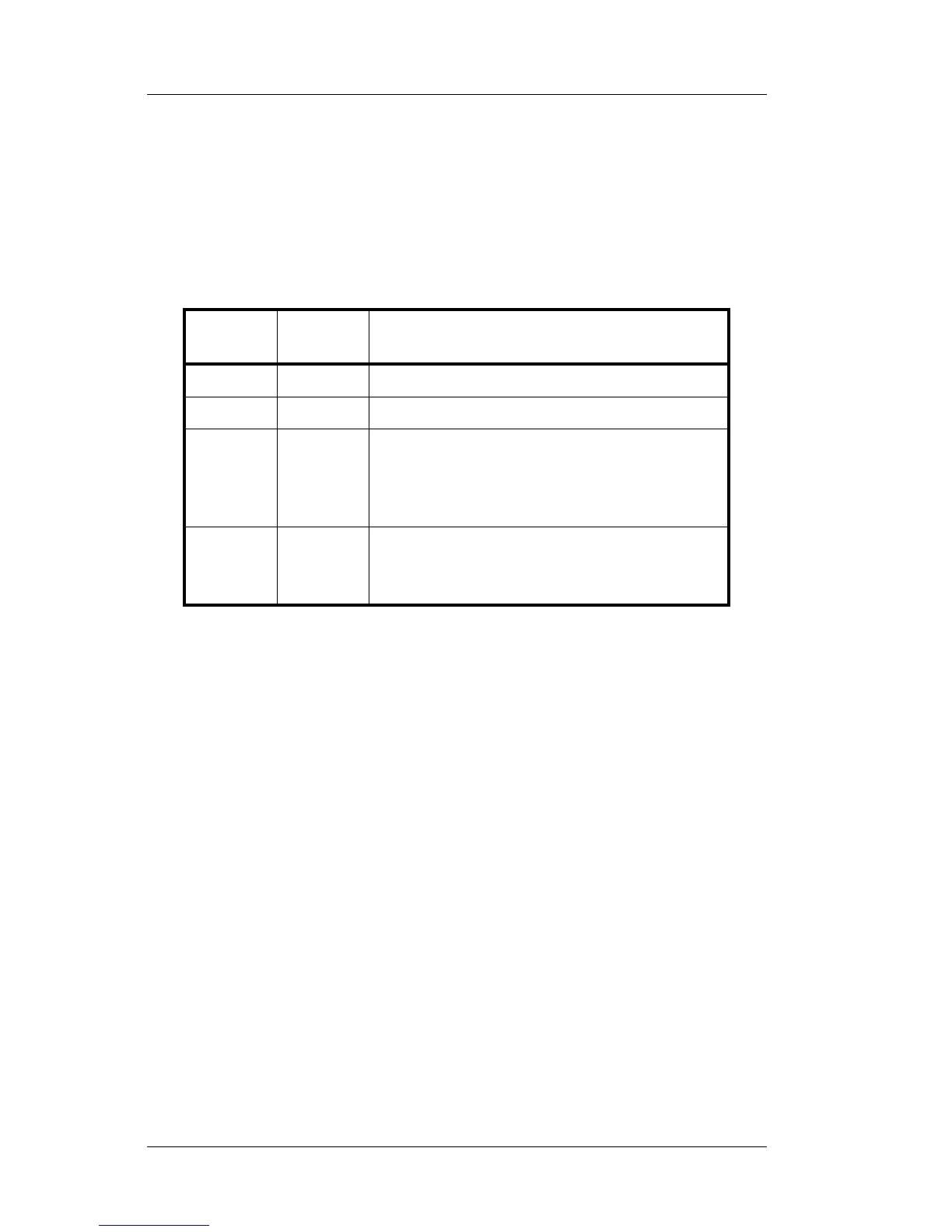
If an amount tendered is not entered prior to pressing a preset
{MEDIA} key, operations are determined by the options SPEED
TENDER and PAY IN FULL in the Media Setup table.
Speed
Tender
Pay In
Full
{MEDIA} Key Tenders for:
YES YES Amount of transaction.
YES NO The default DENOMINATION setting.
NO YES
Screen prompts: Enter Amount?
Index amount for the tender and press
{TOTAL}, or just press {TOTAL} to
tender for the transaction amount.
NO NO
Screen prompts: Enter Amount?
Index amount for the tender and press
{TOTAL}.
If Promos/Combos are being used, the {SUBTOTAL} key can be
required before a media key is pressed. This will scan the check
to see if items entered satisfy a programmed Promo.
• Promos can be programmed to:
∗ Sell a group of items at a set price.
∗ Sell a certain item at a reduced price
∗ Apply a discount to a group of items
∗ Apply a discount to a specific item



 To Next Page