(D
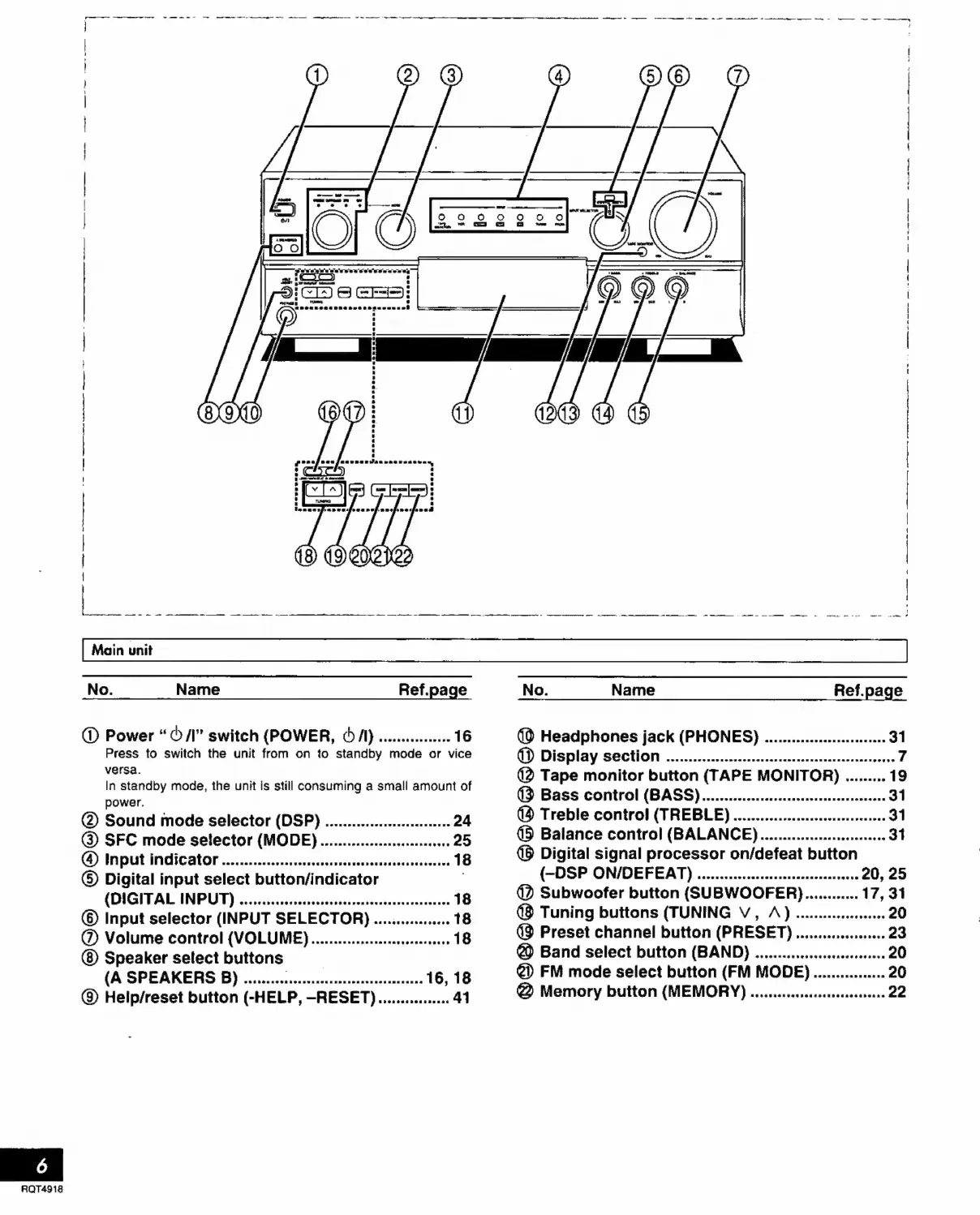
Power
“©
/I"
switch
(POWER,
€
/I)
................
16
Press
to
switch
the
unit
from
on
to
standby
mode
or
vice
versa.
In
standby
mode,
the
unit
is
still
consuming
a
small
amount
of
power.
@
Sound
mode
selector
(DSP)
............................
24
(9
SFC
mode
selector
(MODE)
............................
25
(4)
Input
indicator
..............
eee
ntn
18
©
Digital
input
select
button/indicator
(DIGITAL
INPUT)
...........
cernentes
18
©
Input
selector
(INPUT
SELECTOR,
.................
18
(
Volume
control
(VOLUME
).....................
e
18
Speaker
select
buttons
—
(A
SPEAKERS
B)
........................................
16,
18
(8
Help/reset
button
(-HELP,
-RESET)................
41
(à
Headphones
jack
(PHONES)
...........................
31
QD)
Display
section
...................eeeeeereeennnnenetnnnns
7
(2
Tape
monitor
button
(TAPE
MONITOR)
.........
19
(3
Bass
control
(BASS).............................
eese
31
(à
Treble
control
(TREBLE)
....................-
een
31
(5
Balance
control
(BALANCE)
..........................
31
(9
Digital
signal
processor
on/defeat
button
(-DSP
ON/DEFEAT)
....................................
20,
25
@
Subwoofer
button
(SUBWOOFER
)............
17,
31
@
Tuning
buttons
(TUNING
V,
A)
.................
20
(9
Preset
channel
button
(PRESET)
....................
23
@
Band
select
button
(BAND)
.........................-
20
€»
FM
mode
select
button
(FM
MODE)
................
20
@
Memory
button
(MEMORY)
................
ecce
22


 To Next Page