Technosoft 2019 5 iPOS360x VX-CAN/CAT Technical Reference
Read This First
Whilst Technosoft believes that the information and guidance given in this manual is correct, all parties must
rely upon their own skill and judgment when making use of it. Technosoft does not assume any liability to anyone for
any loss or damage caused by any error or omission in the work, whether such error or omission is the result of
negligence or any other cause. Any and all such liability is disclaimed.
All rights reserved. No part or parts of this document may be reproduced or transmitted in any form or by any
means, electrical or mechanical including photocopying, recording or by any information-retrieval system without
permission in writing from Technosoft S.A.
The information in this document is subject to change without notice.
About This Manual
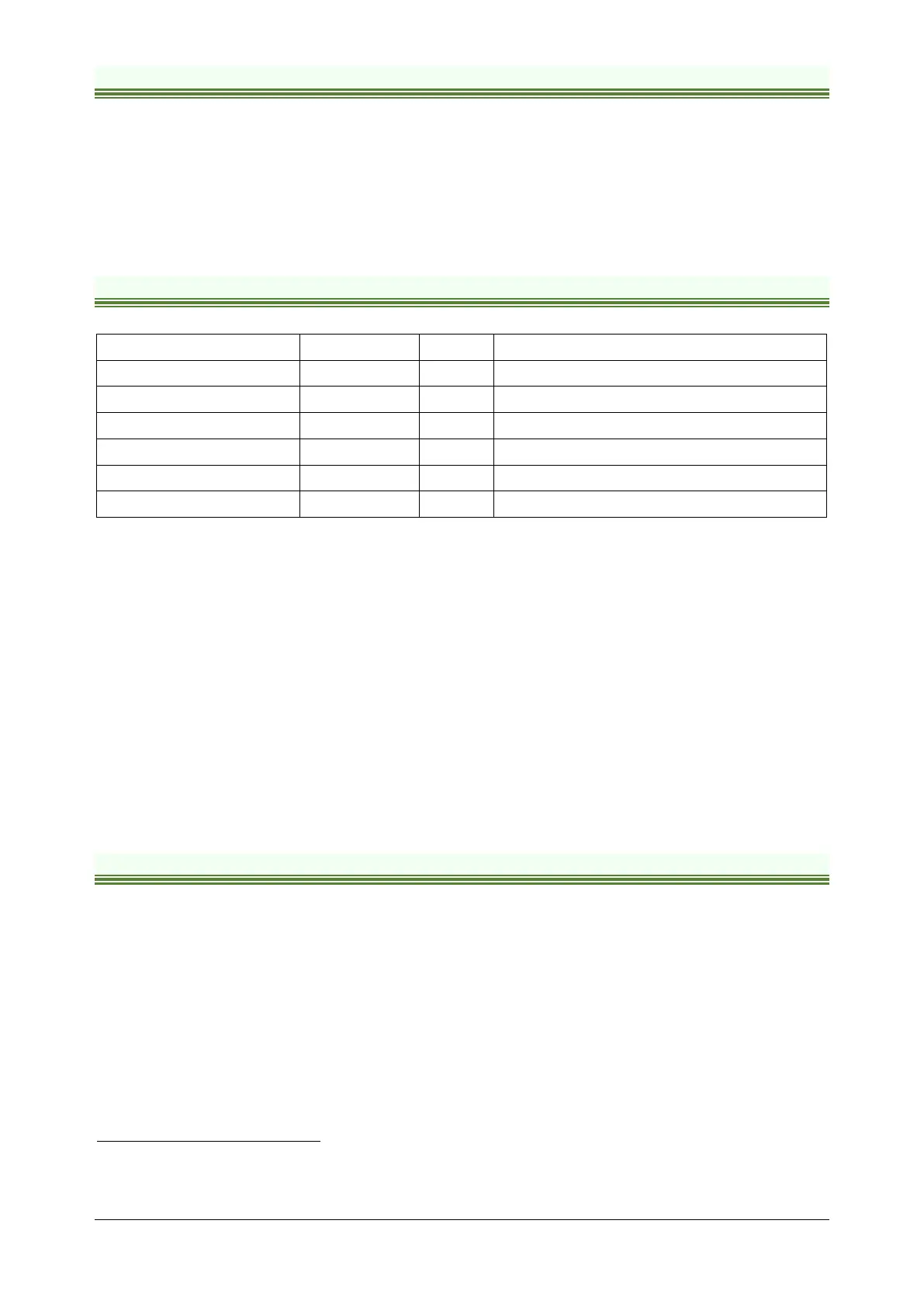
This book is a technical reference manual for:
Product Name Part Number Firmware Description
iPOS3602 VX-CAN P028.001.E001 F509x Standard version, CAN
iPOS3602 VX-CAN P028.001.E001 F524x Linear Hall version, CAN
iPOS3602 VX-CAT P028.001.E021 F511x Standard version + Linear Hall, EtherCAT
iPOS3604 VX-CAN P028.002.E001 F508x Standard version, CAN
iPOS3604 VX-CAN P028.002.E001 F524x Linear Hall version, CAN
iPOS3604 VX-CAT P028.002.E021 F510x Standard version + Linear Hall, EtherCAT
In order to operate the iPOS360X drives, you need to pass through 3 steps:
Step 1 Hardware installation
Step 2 Drive setup using Technosoft EasySetUp software for drive commissioning
Step 3 Motion programming using one of the options:
A CANopen master
1
or an EtherCAT® master
2
The drives built-in motion controller executing a Technosoft Motion Language (TML) program
developed using Technosoft EasyMotion Studio software
A TML_LIB motion library for PCs (Windows or Linux)
3
A TML_LIB motion library for PLCs
3
A distributed control approach which combines the above options, like for example a host calling motion
functions programmed on the drives in TML
This manual covers Step 1 in detail. It describes the iPOS360X hardware including the technical data, the connectors
and the wiring diagrams needed for installation.
For Step 2 and 3, please consult the document iPOS Single Loop drives Software reference
( 091.028.SL.Software.xxxx). It also includes the scaling factors between the real SI units and the drive internal units.
For detailed information regarding the next steps, refer to the related documentation.
Notational Conventions
This document uses the following conventions:
• iPOS360X– all products described in this manual
• IU units – Internal units of the drive
• SI units – International standard units (meter for length, seconds for time, etc.)
• STO – Safe Torque Off
• TML – Technosoft Motion Language
• CANopen – Standard communication protocol that uses 11-bit message identifiers over CAN-bus
• TMLCAN – Technosoft communication protocol for exchanging TML commands via CAN-bus, using
29bit message identifiers
• CoE – CAN application protocol over EtherCAT®
1
when the iPOS360x VX-CAN is set in CANopen mode
2
when using and iPOS360x VX-CAT
3
available only for CAN versions



 To Next Page