TD350 Series VFD Basic operation instructions
-45-
5.4.2 Editing a parameter list
The monitoring items displayed in the parameter list of stop state can be added by users as needed
(through the menu of the function code in state check group), and the list can also be edited by users
e.g. "Move up", "Move down" and "Delete from the list". The edit function is shown in the interface
below.
01: TD350
16:02:35
HomepageReturn
Select
Move up
Move down
Delete from the list
16:02:35
Fwd
Local Ready
HomepageReturn
Select
Stop state display parameter
Running state display parameter
01: TD350
16:02:35
EditReturn
Confirm
P17.05:Motor speed
P17.04:Outp Cur
P17.01:Outp Freq
P17.00:Set frequency
P17.11:DC bus voltage
P17.12:Digital input terminal state
01: TD350
Fwd
Local Ready
Fwd
Local Ready
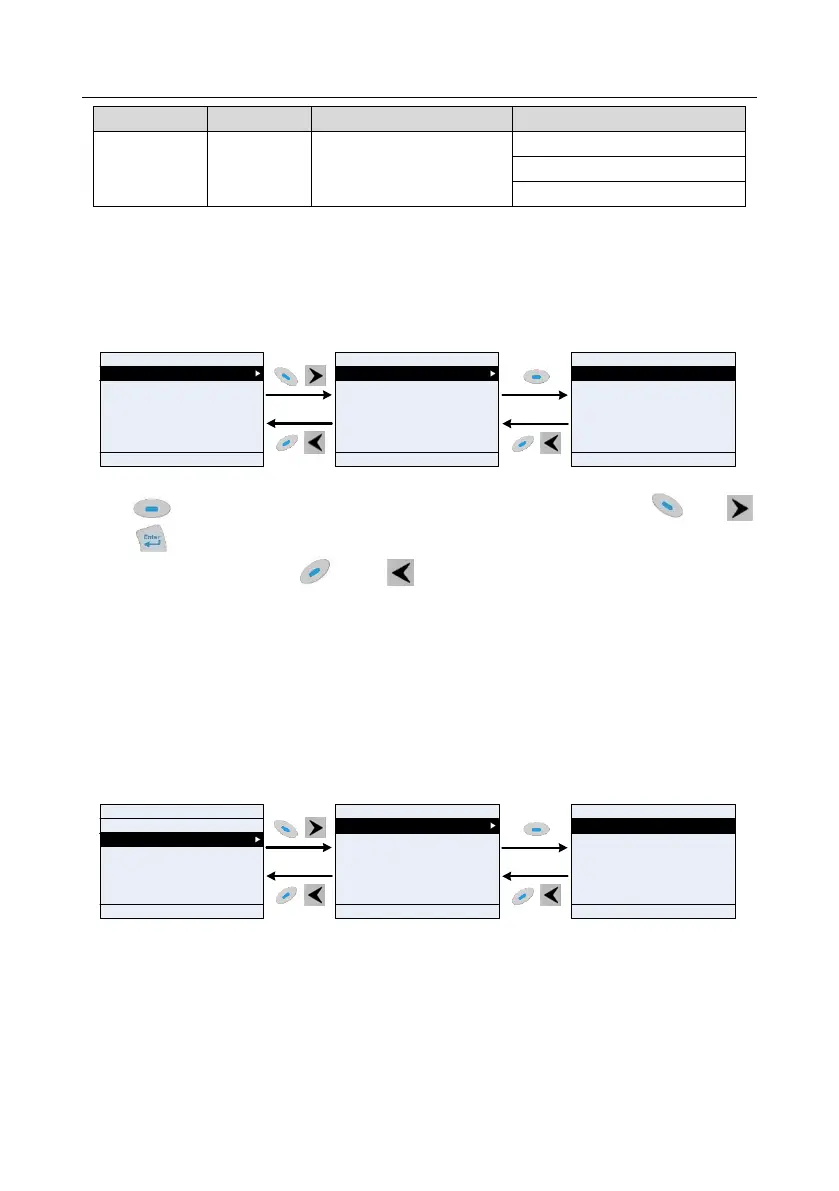
Fig 5.10 List edit diagram 1
Press key to enter edit interface, select the operation needed, and press key,
key or key to confirm the edit operation and return to the previous menu (parameter list), the
returned list is the list edited. If key or key is pressed in edit interface wihouth selecting
edit operation, it will return to the previous menu (parameter list remain unchanged).
Note: For the parameter objects in the list header, shift-up operation will be invalid, and the same
principle can be applied to the parameter objects in the list footer; after deleting a certain parameter,
the parameter objects under it will be shifted up automatically.
The monitoring items displayed in the parameter list of running state can be added by users as
needed (through the menu of the function code in state check group), and the list can also be edited
by users e.g. "Move up", "Move down" and "Delete from the list". The edit function is shown in the
interface below.
01: TD350
16:02:35
Move up
Move down
Delete from the list
16:02:35
EditReturn
Confirm
P17.05:Motor speed
P17.04:Outp Cur
P17.01:OutpFreq
P17.00:Sey Freq
P17.11:DC Bus Volt
P17.03:Outp Volt
01: TD350
01: TD350
16:02:35
Stop state display parameter
Running state display parameter
Fwd
Local Ready
Fwd
Local Ready
Fwd
Local Ready
HomepageReturn
Select
HomepageReturn
Select
Fig 5.11 List edit diagram 2
The parameter list of user defined parameter setting can be added, deleted or adjusted as needed,
including "Move up", "Move down", "Delete from the list"; the adding function can be set in a certain
function code of a function group. The edit function is shown in the figure below.



 To Next Page