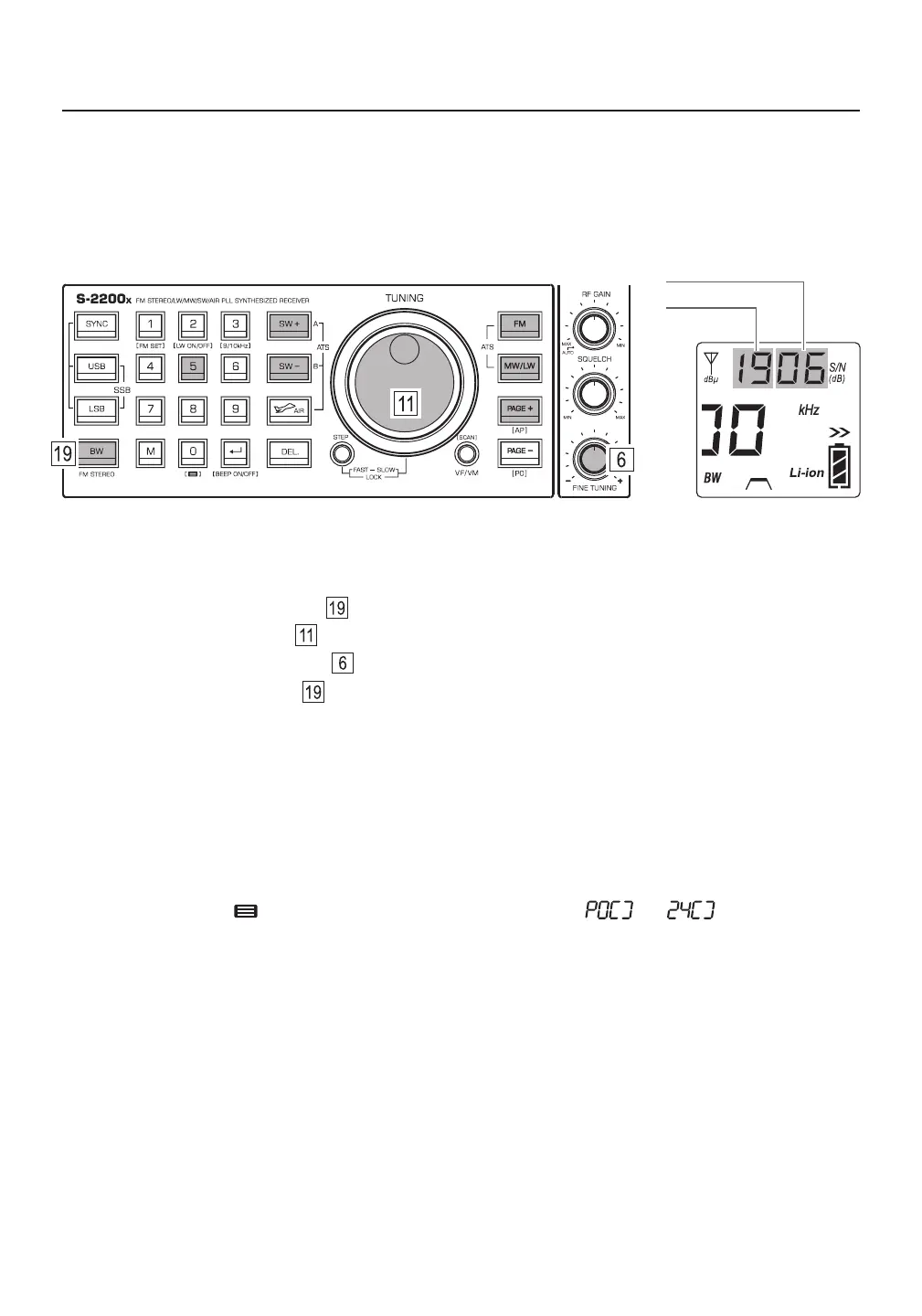
If the threshold levels for the signal strength and signal-to-noise ratio are set high, the capture sensitivity is
low, which means that broadcasts with weak signals will be missed. If the threshold levels for the signal
strength and signal-to-noise ratio are set low, the capture sensitivity is high, which will result in radio noise
mistakenly being regarded as radio signals and are stored into memory.
Signal-to-Noise ratio
Signal strength
Auto Sorting Memory
This feature can automatically organize all frequencies that have been stored into memory. Within a memory
page, duplicate frequencies are deleted and the remaining frequencies are sorted.
1) Turn the device off.
2) Press and hold the [ ] (0) button until the memory page number “ ” - “ ” on the display
starts running. It takes a few seconds for the sorting to complete.
Setting the Signal Capture Sensitivity of Auto Tuning Storage (ATS)
1) Turn on the device and select a frequency band (FM, LW, MW, or SW).
2) Press and hold the [ BW ] button until the signal strength value flashes.
3) Rotate the main tuning knob to adjust the signal strength value.
4) Rotate the [ FINE TUNING ] knob to adjust the signal-to-noise ratio value.
5) Quick press the [ BW ] button to confirm.
Note: Adjustments to the signal capture sensitivity are band specific.
18



 To Next Page