20
1) Select the frequency band (FM, LW, MW, SW, AIR) or mode (SSB).
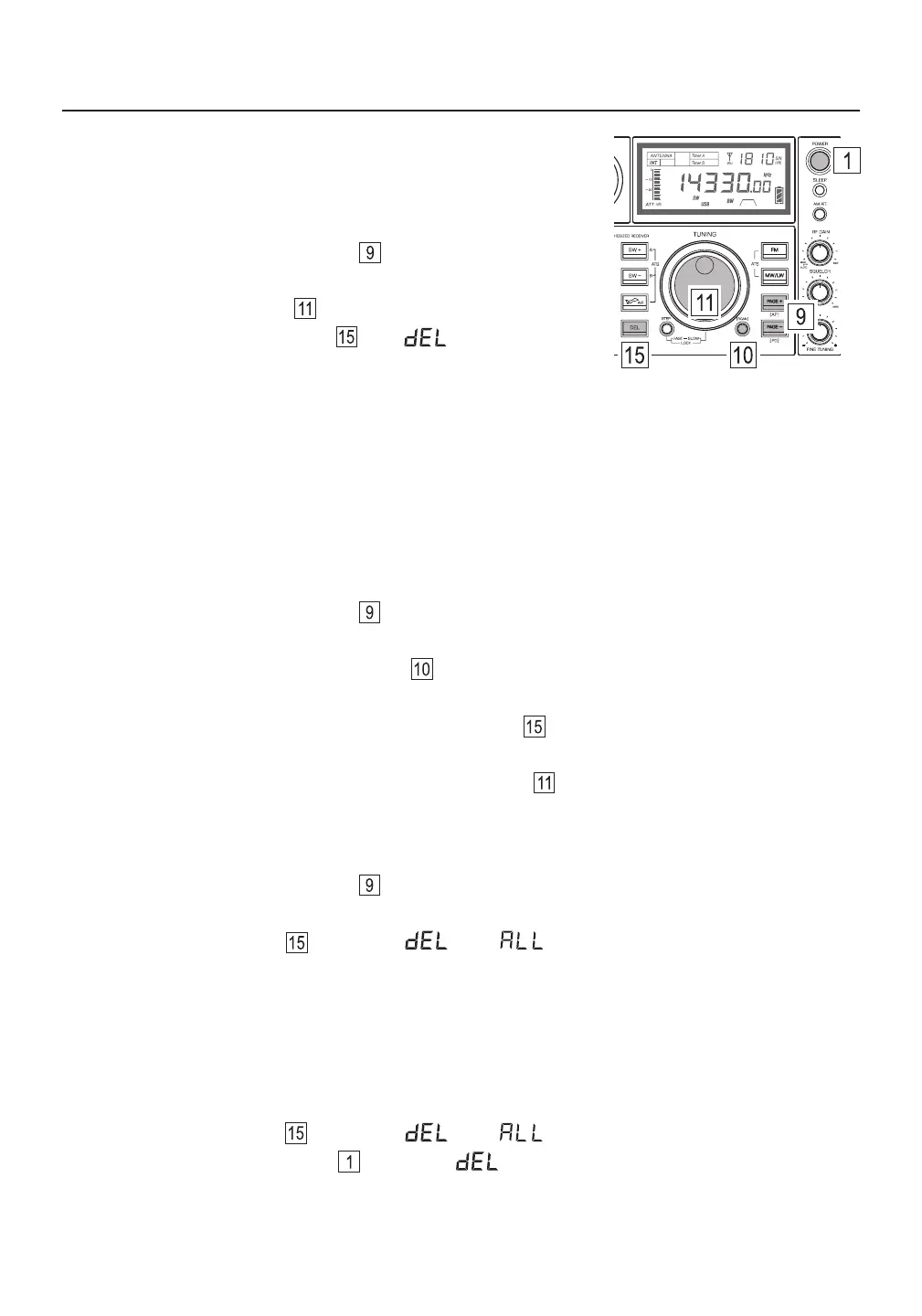
2) Quick press [ PAGE ] or [ PAGE ] to enter VM mode and select a memory page (for AIR and SSB
only page 00 is available).
3) Press and hold the [ VF/VM ] (SCAN) button until “ PRESET ” flashes in the upper right corner of the
display. The device scans all stored frequencies within the selected memory page.
4) Upon finding an unwanted station, press the [ DEL. ] button . No confirmation is required and scanning
continues immediately.
5) To stop the memory scan, gently rotate the main tuning knob .
Deleting Frequencies During Memory Page Scan
This device can auto scan all stored frequencies within a memory page, staying on each frequency for about
5 seconds, and giving you the opportunity to delete any unwanted frequencies.
Note: If the [ DEL. ] button is not pressed for confirmation within 3 seconds, the delete mode is cancelled.
Deleting All Stored Frequencies in a Memory Page
1) Select the frequency band (FM, LW, MW, SW, AIR) or mode (SSB).
2) Quick press [ PAGE ] or [ PAGE ] to enter VM mode and select a memory page (for AIR and SSB
only page 00 is available).
3) Press and hold the [ DEL. ] button until “ ” and “ ” flash on the display.
4) Quick press the [ DEL. ] button to confirm. All memories from the selected frequency band and memory
page are deleted.
Deleting All Stored Frequencies From Memory
1) Turn the device off.
2) Press and hold the [ DEL. ] button until “ ” and “ ” flash on the display.
3) Quick press the [ POWER ] button to confirm. “ ” is displayed for a few seconds while the memory
is cleared of all stored frequencies.
DELETING FREQUENCIES FROM MEMORY
Deleting a Single Frequency
1) Select the frequency band (FM, LW, MW, SW, AIR) or mode (SSB).
2) Quick press [ PAGE ] or [ PAGE ] to enter VM mode and
select a memory page (for AIR and SSB only page 00 is available).
3) Rotate the main tuning knob to select the frequency to be deleted.
4) Press and hold the [ DEL. ] button until “ ” and “ PRESET ”
flash on the display.
5) Quick press the [ DEL. ] button to delete the unwanted station.
Note: If the [ DEL. ] button is not pressed for confirmation within 3 seconds, the delete mode is cancelled.



 To Next Page