MATRIX
®
430
JOB DATA CONFIGURATION INTRODUCTIONCONSOLE
7
98-05332-EN R4
GUIDANCE
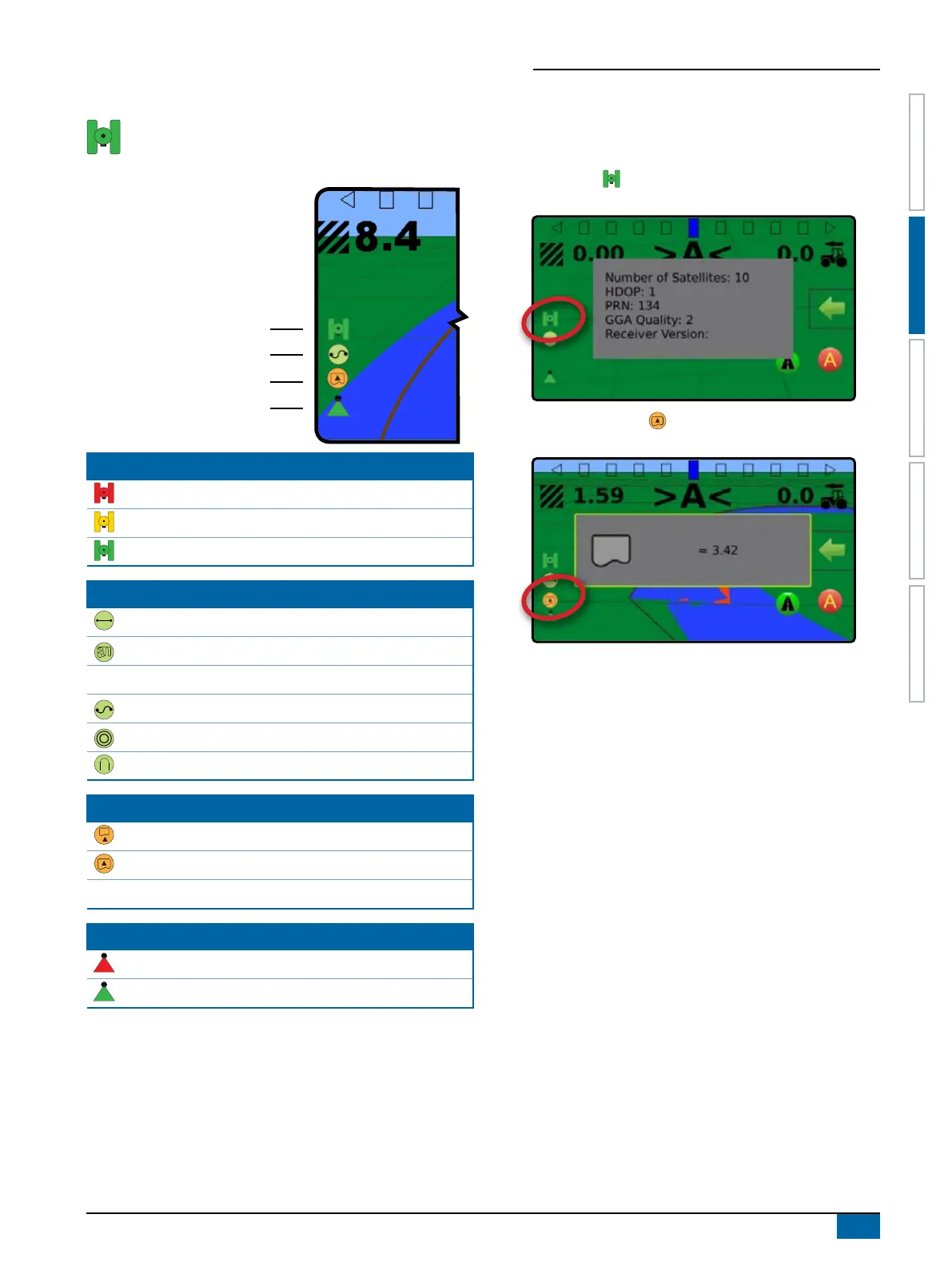
Status Bar
The status bar provides information on GNSS status,
guidance mode, boundary area, and implement control
status.
GNSS Status
Guidance Mode
Bounded Area Status
Application Mapping Status
GNSS Status
Red = no GNSS
GPS only
Green = DGPS,WAAS/RTK, GLONASS
Guidance Mode
Straight AB guidance
Last pass guidance
No icon = no guidance
Curved AB guidance
Circle pivot guidance
NextRow guidance
Bounded Area Status
Outside Boundary = currently traveling outside bounded area
Inside Boundary = currently traveling inside bounded area
No icon = no boundary established
Application Mapping Status
Red = off
Green = on
Status/Information Screens
To display information:
1. On vehicle view guidance screen, press status bar icon.
X GNSS Status – displays information regarding number of
satellites in view, satellite quality and receiver ID
X Bounded Area Status – displays information regarding the
area in the current boundary
To remove the information box, tap the information box.



 To Next Page