MATRIX
®
430
GUIDANCE CONFIGURATIONINTRODUCTION CONSOLE
20
www.teejet.com
JOB DATA
CHAPTER 4 – JOB DATA
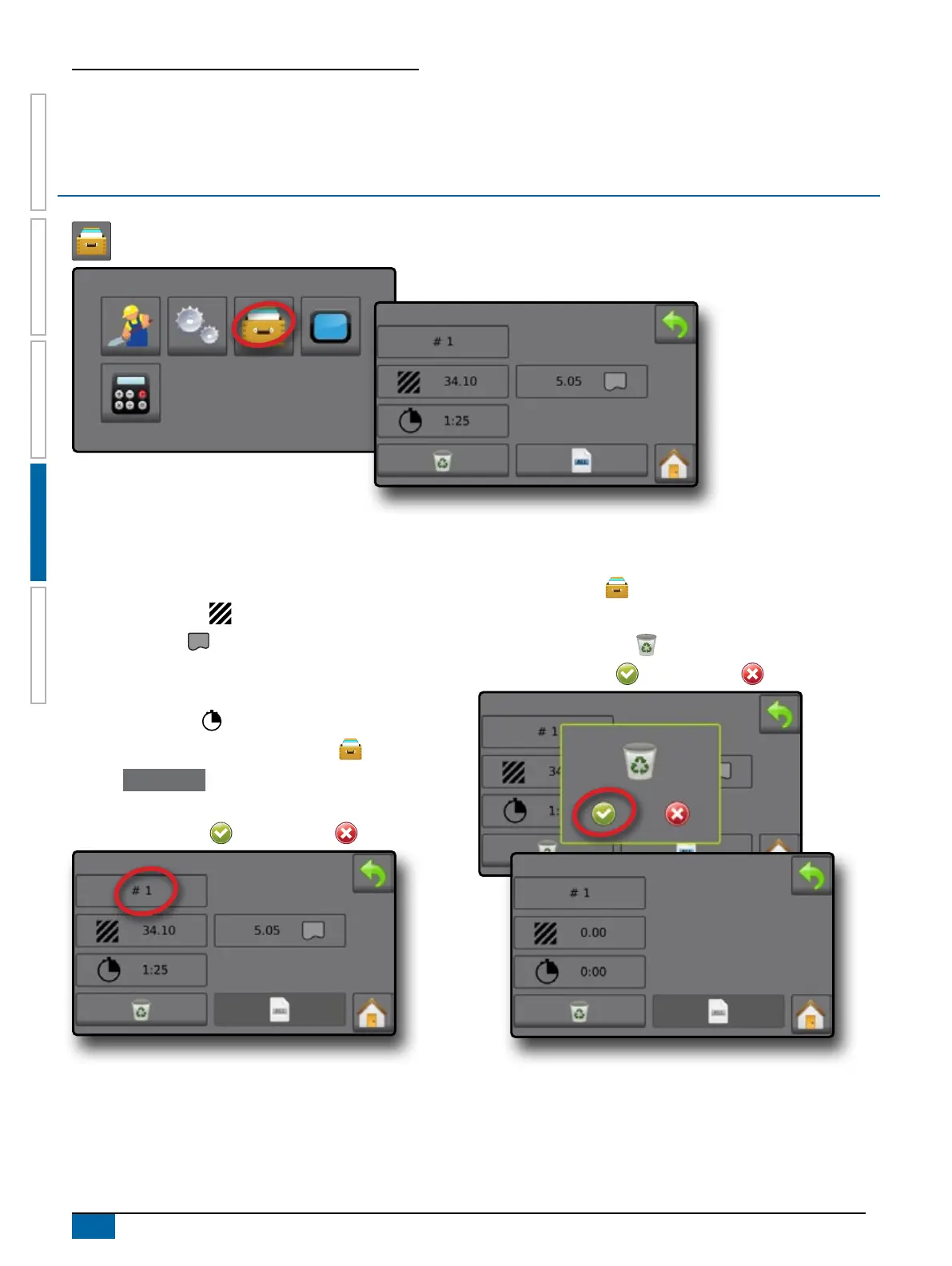
One of up to ve (5) jobs may be selected to view job information.
The current job, displayed/active on the Guidance screen, may be exported as a report.
Job Data Overview
Job information includes:
W Active Job Number
W Total Applied Area
W Bounded Area
NOTE: Bounded area is only shown when a boundary is
active.
W Application Time
1. From the Home screen, press DATA button .
2. Press Job Number to view information for a different job.
W Enter a different number (1-5) to display another job.
3. Select ACCEPT icon or CANCEL icon accordingly.
Delete Job Data
To delete job information from the current job number:
1. Press DATA button .
2. Verify the current job number is the job intended to be deleted.
3. Press RECYCLE button .
4. Select ACCEPT icon or CANCEL icon accordingly.



 To Next Page