MATRIX
®
430
Čeština Italiano PortuguêsDeutsch Magyar SvenskaDansk Lietuviškai РусскийFrançaisEspañol Polski Українська
2
www.teejet.com
C
B A
D
E
F
H
G
English
QUICK START GUIDE
SETUP THE CONSOLE
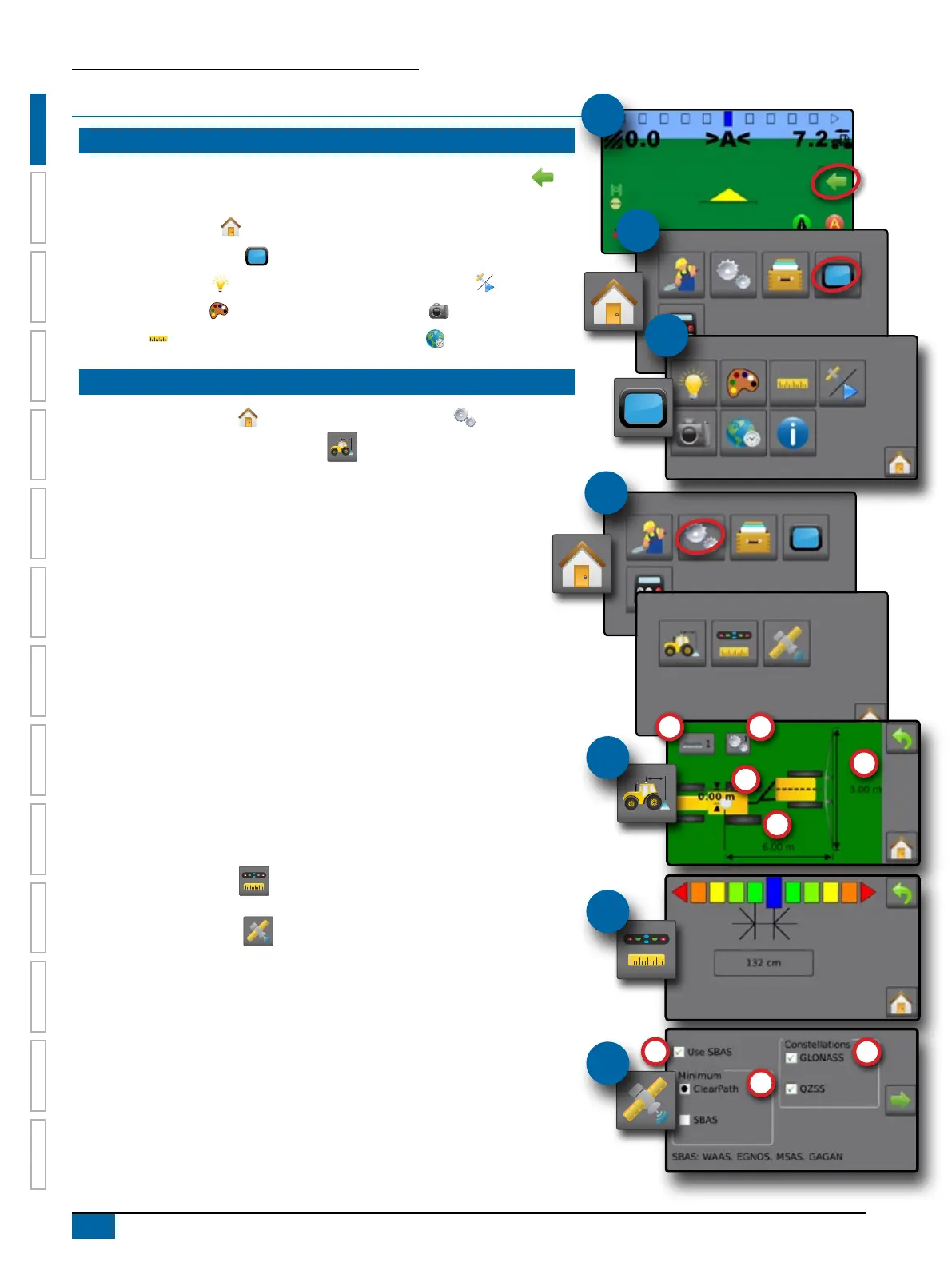
1. On guidance screen, press NAVIGATION AND GUIDANCE OPTIONS tab to
display options.
2. Press HOME button .
3. Press CONSOLE button . Adjust settings as needed.
X LCD Brightness
X Colour Scheme
X Units
X GNSS Demo Mode
X Screenshot
X Time Zone
CONFIGURE THE MACHINE
4. From the Home screen , press CONFIGURATION button .
5. Select and congure a Machine prole .
X Select Machine Prole Number A – use to select 1 of 5 machine proles. The
prole that is “active” is displayed/active on the operation screen.
X Set Number of Implement Sections B – used to select the number of
implement sections. Range is 1 to 7 sections.
X Set Section Widths C – used to enter the width of each section. Each
section can be a different width.
X Set Lateral Implement Offset Distance D – used to dene the lateral
distance from the centre line of the machine to the centre of the implement.
– Positive value will move the implement to the right of centre while facing in
the machine’s forward direction.
– Negative value will move the implement to the left of centre while facing in
the machine’s forward direction.
X Set In-Line Implement Offset Distance E – used to dene the in-line distance
from the GNSS antenna (the zero point) to the implement.
– Positive value will move the implement behind the GNSS antenna.
– Negative value will move the implement in front of the GNSS antenna.
6. Select Lighbar Spacing – used to set the distance away from the guideline
or vehicle each guidance screen lightbar box represents.
7. Set GNSS conguration . GPS uncorrected signals from the GPS system
are always available and cannot be disabled.
X Set SBAS Usage F – used to select if any satellite-based differential
correction system (SBAS) will be used.
X Select Minimum Position Quality Requirement G – used to select between
using ClearPath
®
or SBAS.
X Select Additional Constellations H – used to Indicated when the GLONASS or
QZSS uncorrected signals are available.
NOTE: When using the Matrix 430 in Europe, always include GLONASS.
Use SBAS (EGNOS) where applicable.
#1
#4
#2
#3
#5
#6
#7



 To Next Page