Matrix 908 Field Computer
29
98-01578-ENUS R3
CONSOLESTART JOB SETUPHELP MEASUREMENTSUT START JOB
Advanced Job Mode
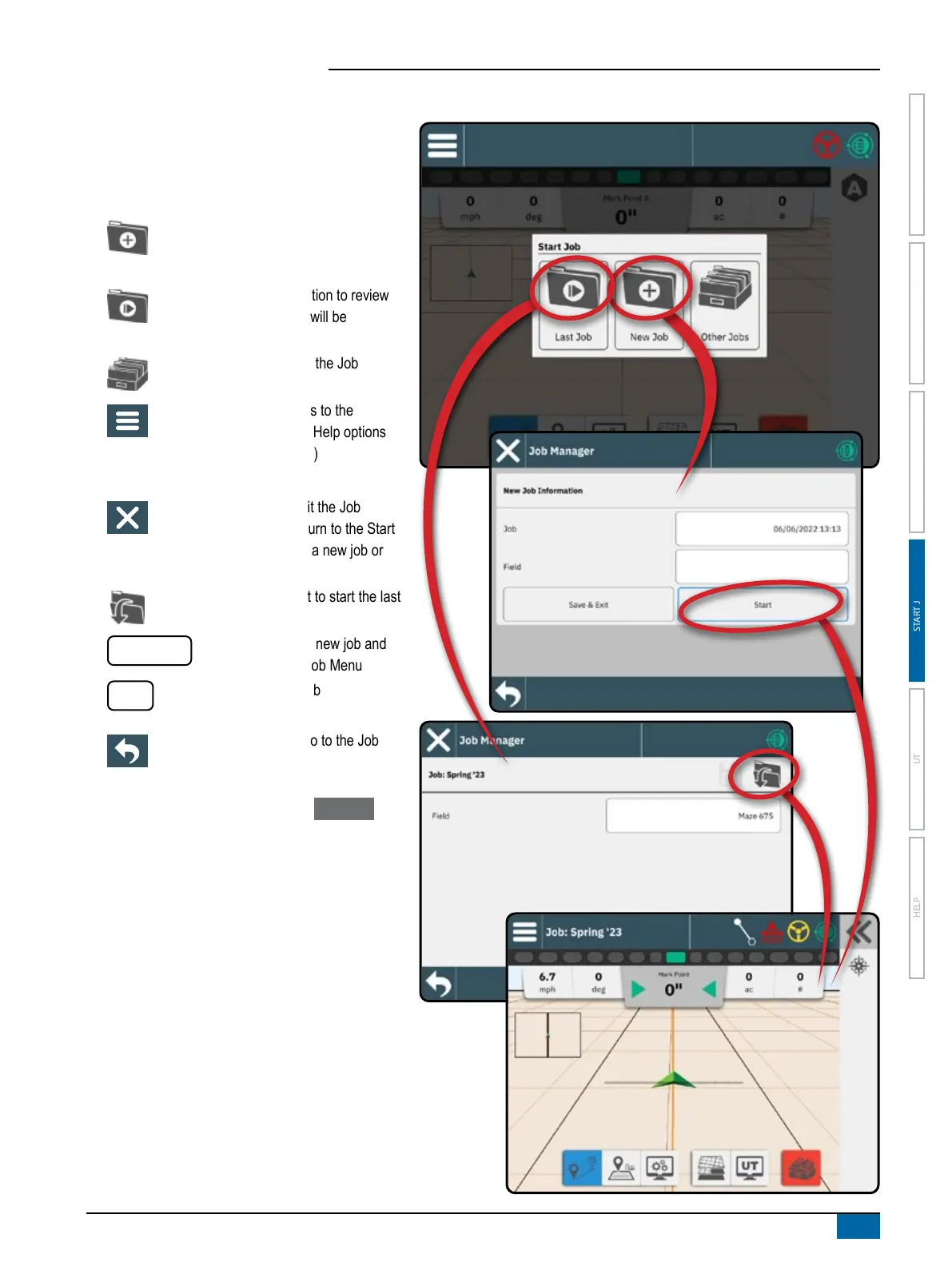
Use the Start Job menu to start a new job, continue
the last job, or open the job manager to select a
different job.
To navigate in the Start Job screen:
Start a New Job – options to change the
automatically generated name and add a
eld reference will be displayed.
Continue the Last Job – option to review
and/or edit job information will be
displayed
Open the Other Jobs using the Job
Manager
Main Menu Button – access to the
Settings including wizards, Help options
and Universal Terminal (UT)
To navigate in the Job Manager:
Close Settings – use to exit the Job
Information screen and return to the Start
Job menu without creating a new job or
starting the previous job
Start Selected Job – select to start the last
job
Save & Exit
– select to save the new job and
return to the Start Job Menu
Start
– select to start the new job
Back One Menu – use to go to the Job
Manager
If the current GNSS Position is in a UTM zone other
than the current or adjacent UTM zone Last Job will
be disabled.



 To Next Page