Matrix 908 Field Computer
40
www.teejet.com
CONSOLE START JOBSETUP HELPMEASUREMENTS UTSTART JOB
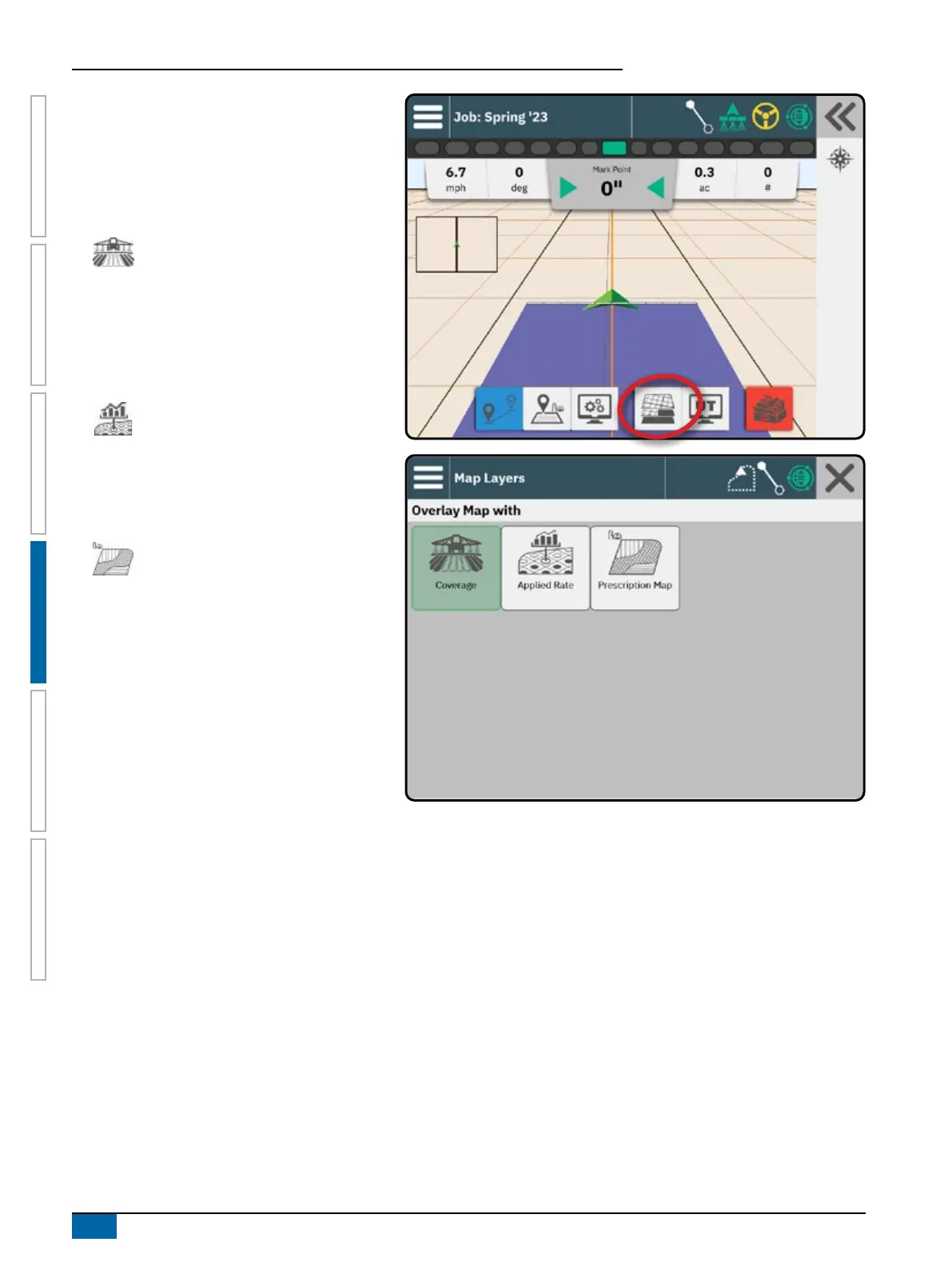
Mapping Layers
When a ISOBUS Electronic Control Unit (ECU)
sprayer or spreader control is integrated into the
implement, rate control options and mapping options
are available on the Vehicle View and Field View
guidance screens.
Coverage map – shows areas covered by
the implement with the sections active.
ISOBUS requires product to be applied.
• Coverage area – illustrates applied
area and overlap:
W Blue – one application
W Red – two or more applications
Applied Rates map – shows how much
product has been applied and where
• Coverage area – uses color to
indicate level in proportion to preset
or automatically set maximum and
minimum levels
Prescription map – shows a pre-loaded
map that provides information to the rate
controller for use in applying product.
Prescription maps contain geo-referenced
product rate information.
• Coverage area – uses color to
indicate level in proportion to preset
or automatically set maximum and
minimum levels
NOTE: Devices without rate control only create a
Coverage map of the application; therefore,
the Mapping Layers button on the Feature Bar
will not be available with only a Coverage map
available.



 To Next Page