Matrix 908 Field Computer
44
www.teejet.com
CONSOLE START JOBSETUP HELPMEASUREMENTS UTUT
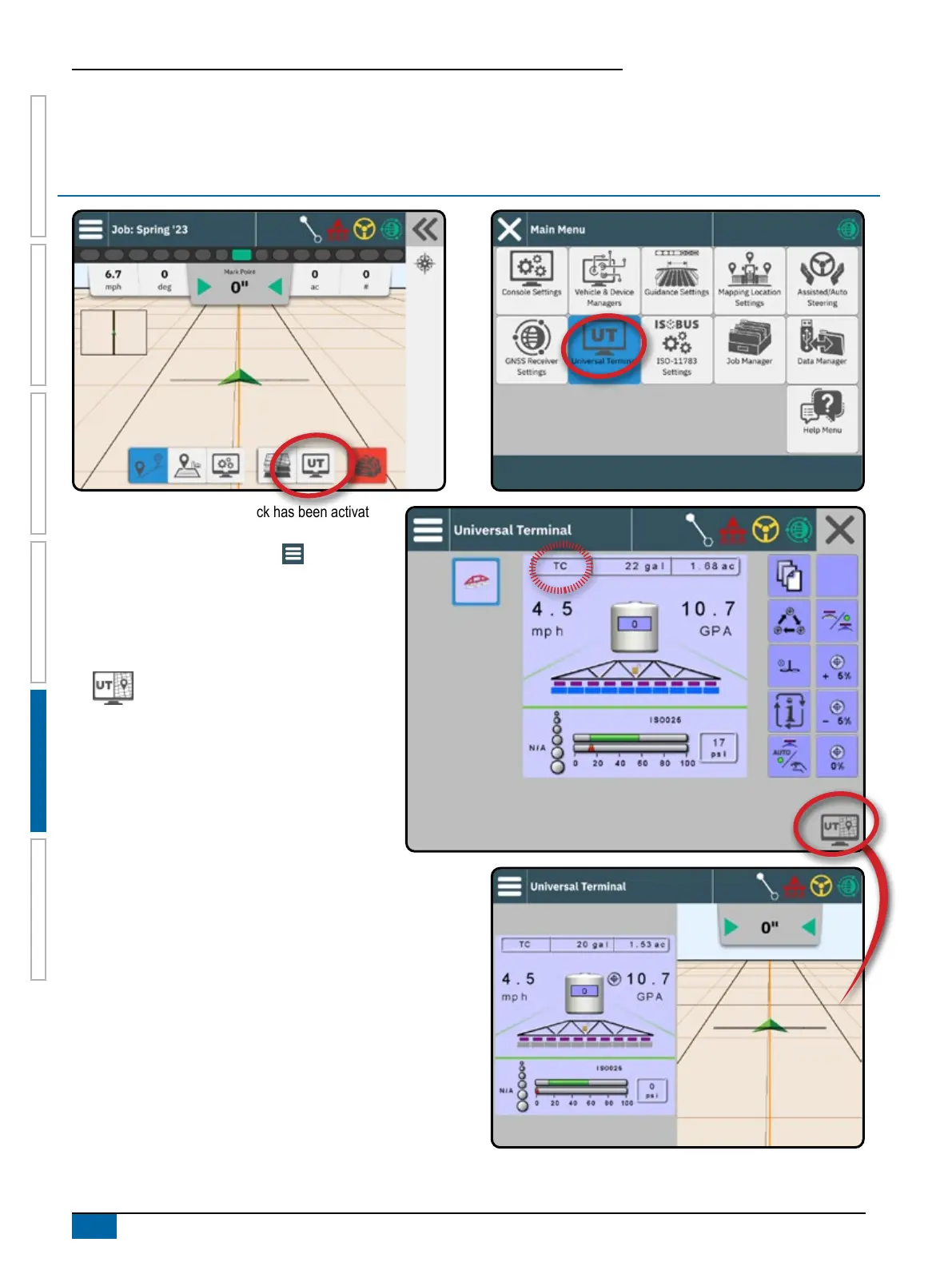
ACCESS THE UNIVERSAL TERMINAL
When a Universal Terminal unlock has been activated,
the Universal Terminal (UT) is accessible from either
the Guidance Screen or Main Menu .
NOTE: An ISOBUS device requires the Universal
Terminal which requires an unlock code. See
"No.3 Enter Available Unlocks" on page 17
for details.
TwinView – use to display both UT and
guidance information
Universal Terminal Alert Acknowledgement
To acknowledge an alert on the Universal Terminal
while in TwinView, rst select the UT side of the
screen.
Ready for Operation
Upon starting up the system, an ISOBUS product may take a few
minutes to load all required information or object pools.
Before starting a job, check to be sure the ISOBUS ECU is ready.
• Home Screen is available
• Task Control (TC) is active – Active Trip Count Number should
show “TC”
NOTE: For detailed setup instructions, refer to the specific ISOBUS
user manual for the connected ECU.



 To Next Page