16
Basic TV operation
S
electing the Media Source
If a USB device is connected you can select the Media source from the input menu.
Photo/Music/Movie/e-Book playback
Press the LEFT/RIGHT button to toggle among the Photo, Music, Movie, and e-Book browsers. Select the
U
SB disk and partition. Four different patterns are available to handle these four types of media content. The
system automatically classifies files, showing only the corresponding supported files.
Note: the USB interface supports *.mpg/*.dat/*.vob/*.avi/*.mp3/*.jpg/*.bmp/*.png/*.txt file types etc.
*Note: large image files may be slow to appear on the screen.
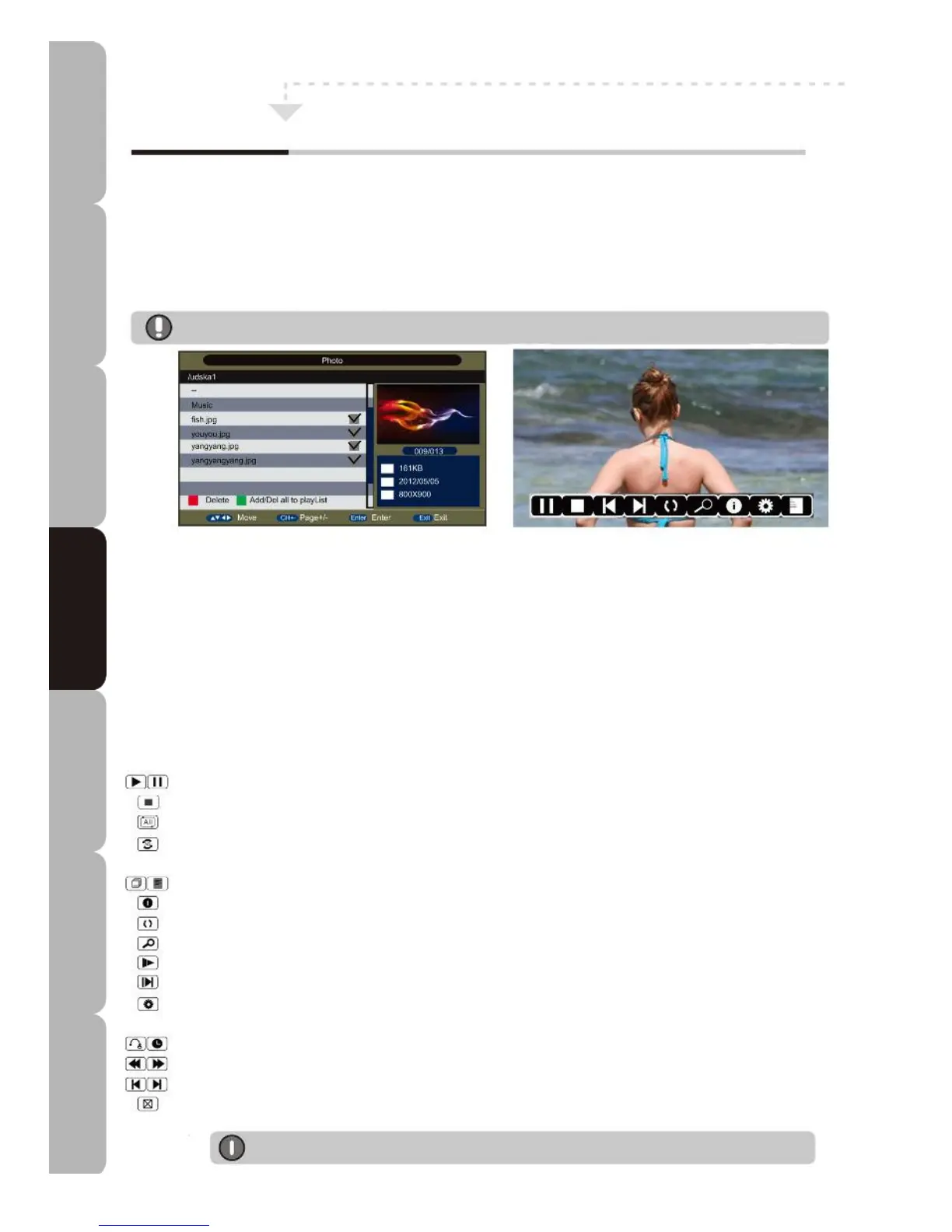
File Browser screen
Allows user to delete or add/del all files to/from a playlist via the RED or GREEN button.
Allows user to show selected file information on the right of the screen.
Allows user to press NAVIGATION and OK buttons to tick folders and files to be played back on the list.
Allows user to press the PLAY button to play back the file on the list.
Allows the user to press the EXIT button and then LEFT/RIGHT to switch between thumbnails and list mode on the Photo explorer
screen.
File Playback screen
Allows user to display a virtual keypad for various tasks that are unavailable on the remote control.
Press ENTER to pop it up and EXIT to hide it; alternatively, it will be displayed in the bottom right part of the screen in music playing
screen or none of the above when reading an e-Book.
Press the RED button to add or delete a bookmark, press the GREEN button to go to a desired page, press the YELLOW button to
pop up a Bookmark list, press BLUE to pop up Playlists and press FB or FF to page up or page down in e-Book mode.
Same as PLAY/PAUSE button on the remote control: press to resume playback or pause a multimedia file.
Same as the STOP button on the remote control: stops playback and returns you to the previous screen.
Toggles the repetition function: Repeat 1, Repeat All, Repeat Dir and Random modes.
Sets A-B repeat to play between A and B repeatedly: press once to set point A, press again to set point B, press a third time to
cancel.
Playlist: pops up the playback list in Photo/Music mode.
Info.: Same as the INFO button on the remote control: pops up a file information window in Photo/Movie/e-Book mode.
Rotate: rotates the picture in Photo mode.
Zoom in or zoom out in Photo/MOVIE mode.
Slow: playback at 1/2, 1/4, 1/8, 1/16 speed in Movie mode.
Step: frame by frame playback in Movie mode.
Press to pop up a setup menu to adjust telecast function: this includes Repeat Mode, Background Music, Music Source, Slide Time,
Effect in Photo mode and Program, Subtitle, Audio, Repeat Mode in Movie mode.
Goto Time: enter the search date/time in Music/Movie mode.
Same as the FB/FF button on the remote control: play fast backward or forward at x2/x4/x8/x16 speed.
Same as the PREV/NEXT button on the remote control: play previous or next multimedia file directly.
Same as the BLUE button on the remote control. Used to close panel in Music mode only; it can be opened by pressing any button
on the remote control.
*Note: These functions require a USB mass storage device to be connected.
Customising TV operation
Specifications Troubleshooting Using DVD Using TV Installing Introducing Safety Warnings
Features Features LED TV LED TV



 To Next Page