18
Customising TV Operation
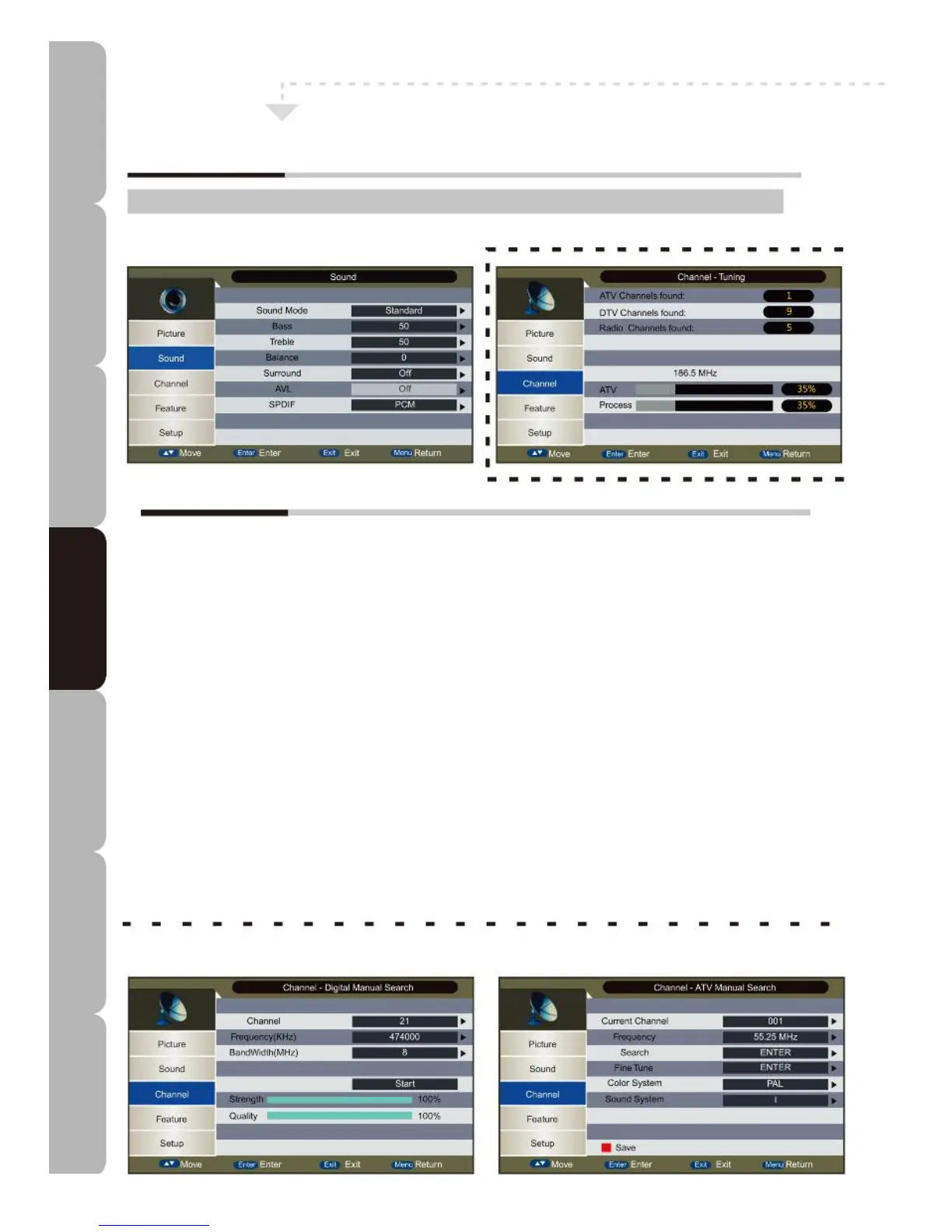
Customising the Sound Settings
Sound MENU:
Allows you to customise the sound options and effects.
The Sound Setup menu includes the following options:
Sound Mode
Allows selection of the following sound enhancement options: *User/Standard/Movie/Music/Speech
*User: allows your preferred Bass/Treble settings to be adjusted and saved.
Bass
Controls the relative intensity of lower-pitched sound in User mode.
Treble
Controls the relative intensity of higher-pitched sound in User mode.
Balance
Adjusts relative volume between left/right soundtracks. If balance is negative, the sound on the left track is
louder. If balance is positive, the sound on the right track is louder.
Surround
Allows you to generate virtual surround sound.
AVL
Auto-adjusts sound volume.
SPDIF Mode
Allows user to modify digital sound output from the COAX port. The available options are: Off/PCM/Auto.
Specifications Troubleshooting Using DVD Using TV Installing Introducing Safety Warnings
Features Features LED TV LED TV



 To Next Page